
If you’ve searched “GNDU result” and landed on three or four different-looking websites, you’re not doing anything wrong – GNDU’s online presence really is split across several portals, and most guides don’t tell you which one actually matters for what you need. This guide sorts that out first, then walks you through checking your result, understanding your marks, and handling revaluation, marksheets, and everything that comes after.
Quick Highlights
| Detail | Information |
|---|---|
| University | Guru Nanak Dev University (GNDU), Amritsar |
| Established | 1969, by Punjab State Legislature Act No. 21 |
| Type | State, affiliating and residential university |
| NAAC Grade | A++ (CGPA 3.85/4.00) |
| Main website | digital.gndu.ac.in |
| Actual result-checking portal | collegeadmissions.gndu.ac.in |
| Category | University Result |
| Courses covered | UG, PG, Diploma, Certificate, PhD across faculties |
| Credentials needed | Year, month, course type, class, semester, roll number |
| Marksheet type shown online | Provisional/unofficial result; original marksheet issued separately |
| Revaluation | Online, via student login, within 18 days of declaration |
| Result status | Declared course-by-course; verify current status on official portal |
Which GNDU Website Is the Real Result Portal?
This is the part almost every other article skips, and it’s the part that actually saves you time.
GNDU operates several distinct web properties, and they serve different purposes:
- digital.gndu.ac.in – This is GNDU’s main institutional website: admissions notices, faculty pages, circulars, and navigation to everything else. It does not host the result-checking tool directly; it links out to it under “Results & Gazette.”
- collegeadmissions.gndu.ac.in – This is where the actual work happens. The result-lookup form, the datesheet, revaluation applications, duplicate DMC requests, and student login all live here. If you’re checking your result, this is the domain you want.
- online.gndu.ac.in – Primarily used for admissions and internal/employee-facing services, not for routine result checking.
- www.gndu-online.in and result.gndu.ac.in – Some of these are legitimate GNDU-linked subdomains used for specific result formats (like annual UG results); others surface in search results without a clear, verifiable connection to the university. Treat any domain you’re unsure about with caution, and cross-check it against links published on digital.gndu.ac.in before entering your roll number anywhere.
- Lookalike domains (e.g., sites ending in .co.in that mimic “GNDU result”) – Several unofficial sites use “GNDU” in their name and republish result data or ads. These are not run by the university. Never enter personal details on a site just because it appears near the top of a Google search for “GNDU result.”
About Guru Nanak Dev University
Guru Nanak Dev University was set up in Amritsar in 1969 to mark the 500th birth anniversary of Sri Guru Nanak Dev Ji. It’s both a residential and an affiliating university, meaning it runs its own teaching departments on campus and also oversees examinations and results for a large network of affiliated colleges across the region, including regional campuses in Jalandhar and Gurdaspur.
GNDU holds an A++ NAAC grade with a CGPA of 3.85 out of 4 – the highest rating band – and has been recognised by the UGC as a “University with Potential for Excellence.” It’s also the only university with Category-I status across Punjab, Himachal Pradesh, and Chandigarh. The university offers programmes across faculties like Engineering & Technology, Life Sciences, Sciences, Languages, Laws, Economics & Business, Education, Physical Planning & Architecture, and more, serving roughly twenty thousand students across its campuses and constituent colleges.
Latest Result Update
GNDU declares results on a rolling, course-by-course basis rather than all at once. Historically, results for a given semester have followed a broad pattern:
- Odd semester (roughly August–December): exams typically held October–December, results generally out December–February
- Even semester (roughly January–June): exams typically held April–June, results generally out around July–August
These windows shift from year to year and course to course, so treat them as a rough planning guide, not a guarantee. For the specific status of your course and semester, check the “Select Link to view Result” section on collegeadmissions.gndu.ac.in directly, or the notice board on digital.gndu.ac.in.
Courses Covered Under GNDU Results
| Level | Courses |
|---|---|
| Undergraduate | BA, BSc, BCom, BCA, BBA, BArch, BTech, LLB, BEd |
| Postgraduate | MA, MSc, MCom, MBA, MCA, LLM, MEd, MTech |
| Diploma/Certificate | Diploma and Certificate courses across faculties |
| Doctoral | PhD (notifications tracked separately) |
| Distance/Online | Courses under the Directorate of Open and Distance Learning (ODL) and Directorate of Online Studies |
How to Check Your GNDU Result – Step by Step
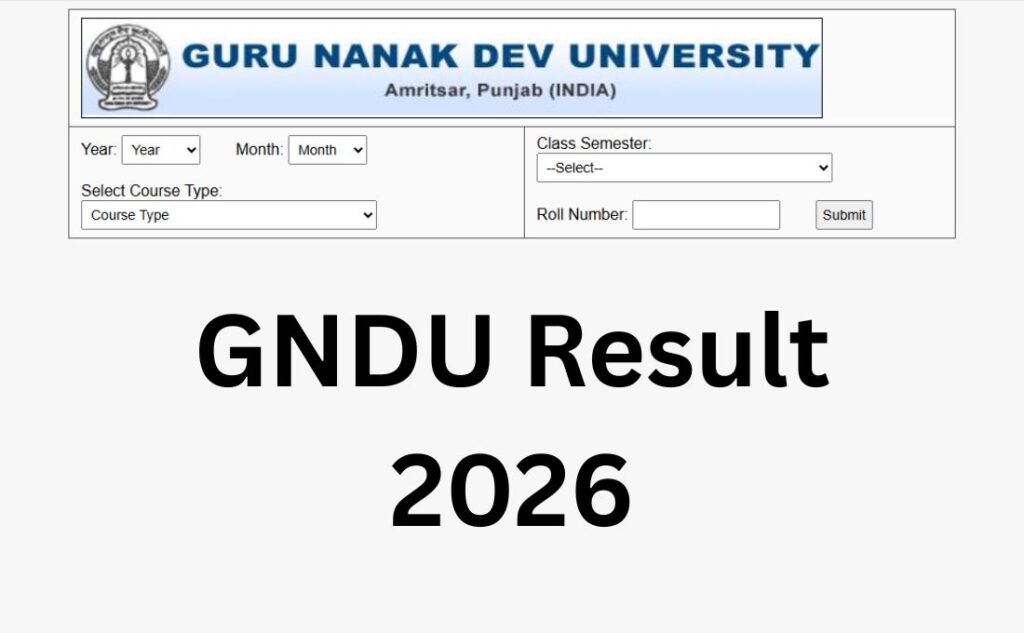
The result form on GNDU’s portal asks for more specific details than most competing guides mention, so here’s exactly what you’ll see and how to fill it correctly.
- Go to the official result portal. Visit collegeadmissions.gndu.ac.in and click on “Results & Gazette” under the Examinations menu, or go directly to the “Semester/Annual System New (UG/PG)” result link.
- Select the Year. Choose the academic/calendar year your exam belongs to.
- Select the Month. GNDU results are grouped by the month the exam was held – typically April, May, September, or December, depending on the course and session.
- Select the Course Type. This is the field most students get wrong. GNDU categorises results into four types (explained in detail below): Pass Course, CBES, CBGS New, or Annual. Pick the one that matches your programme’s examination pattern – not just “UG” or “PG.”
- Select your Course (class). Choose your specific programme from the dropdown – for example, BA, BSc, BCom.
- Select your Semester. Pick the semester number your result belongs to.
- Enter your Roll Number. This is the university/exam roll number issued for that specific examination, not your college registration number.
- Submit and view your result. Your provisional result – marks, subject-wise breakup, and overall status – will display on screen.
Note: Unlike some universities, GNDU’s student-facing result tool generally does not require a password or date of birth for the standard lookup – just the dropdown selections and roll number. If a page asks you for additional sensitive details beyond this, double-check that you’re on collegeadmissions.gndu.ac.in and not a lookalike site.
Understanding GNDU’s Course Type Categories
This distinction rarely gets explained clearly, but it matters because picking the wrong option means your result won’t show up at all.
- Pass Course (Result With Marks) The traditional, non-credit examination pattern still used for certain courses; results are shown as raw marks per subject.
- CBES (University Courses) – Applies to courses run directly by university teaching departments under the Credit and Examination System.
- CBGS New (College Courses) – The Credit Based Grading System applied to courses run through affiliated colleges. Most current UG/PG students in college-based programmes fall under this category.
- Annual – For courses still following a once-a-year (rather than semester-wise) examination pattern.
If you’re not sure which applies to you, check your admit card or datesheet – it will mention the examination pattern your course follows.
Login Credentials Required
For the student result lookup, you typically need:
- Academic year and month of the exam
- Course type (Pass Course / CBES / CBGS New / Annual)
- Course/class and semester
- University roll number
For post-result services – revaluation, duplicate DMC, transcript requests – you’ll need a separate Student ID and password on the collegeadmissions.gndu.ac.in login portal. If you haven’t registered on this portal before, use the “Search Student ID” or “Forgot Password” links on the login page rather than creating a fresh account, since duplicate registrations can cause verification issues later.
What Details Appear on Your GNDU Result?
- Candidate name
- Roll number
- Subject-wise marks (theory and practical, where applicable)
- Total marks and result status (Pass/Re-appear/Result Late)
- CGPA (for CBGS/CBES courses) or aggregate marks (for Pass Course/Annual)
- Semester and course/session details
- Any grace marks applied (usually marked separately)
Keep in mind: the result displayed online is explicitly for immediate reference. It is not the original marksheet and cannot be used as one for admissions, jobs, or verification purposes – you’ll need the physical or digitally issued original for that.
How to Download Your GNDU Marksheet?
- Check and note down your result from the online portal first (screenshot or print it as a provisional reference).
- For the original/consolidated marksheet – issued after successful completion of a CBGS course, or per-semester for other patterns – this is released separately by the examination branch and is typically collected through your college or through the student portal once processed.
- If you need a duplicate marksheet or DMC (say, the original is lost or damaged), log in at collegeadmissions.gndu.ac.in/loginNew.aspx using your Student ID, and apply through the e-services section for duplicate DMC/degree.
- Duplicate certificate requests generally require prior examination details, applicant address, signatures, and fee payment via bank draft or the prescribed online mode – check the current fee schedule under “Fees for Various Purposes” on the university site, since this changes across sessions.
- For transcript verification (used for study-abroad or job applications), use the dedicated transcript portal linked from the Student Services section, not the regular result-lookup page.
Passing Marks and Grading
GNDU’s passing criteria vary by course, faculty, and examination pattern (Pass Course vs. CBGS vs. Annual), so there isn’t one universal number that applies to everyone. As a general rule across most Indian universities, and consistent with GNDU’s own CBGS framework, passing typically requires separate minimum marks in theory and practical components as well as an overall minimum aggregate – always confirm the exact percentage for your specific course from your syllabus or the examination ordinance, since this is exactly the kind of detail that gets revised.
On CGPA-to-percentage conversion: GNDU’s Credit Based Grading System ordinance states that CGPA is converted to a percentage by multiplying it by a factor of 10 (so a CGPA of 6 corresponds to roughly 60%). You may see other figures circulating online – always cross-check against your own official ordinance or provisional marksheet, since conversion factors can differ by course and have been updated over time.
Grade markers you might see on your result:
- R – Re-appear required in the subject(s) shown in brackets
- RL – Result Late, usually pending an administrative or documentation issue
- D – Distinction
Revaluation, Rechecking, and Improvement Exams – Three Different Things
Students often use these terms interchangeably, but GNDU treats them as three separate processes with different procedures, timelines, and outcomes.
Revaluation (re-evaluation)
- Apply online, through your student login on collegeadmissions.gndu.ac.in, within 18 days of result declaration – this window is generally strict.
- Fee: typically around ₹1,200 per subject plus a ₹200 form fee (one form covers multiple subjects), but always confirm current rates via the official fee notification before paying.
- Your answer sheet is evaluated separately by two examiners; the closer two of the three marks (including the original) are averaged to determine the final mark.
- You can withdraw your application within about 10 days of submitting it, but fees are non-refundable once processed.
- The revised result – favourable or unfavourable – is binding once declared.
Rechecking
- A more limited check (verification of totals, unchecked answers, or clerical errors) rather than a full re-evaluation of academic merit.
- Typically applied for by submitting an application to the registrar’s/examination office rather than the online revaluation form.
- Revised results, if any, are usually released some weeks after submission – timelines vary, so track your application status directly with the examination branch.
Improvement exam
- For students who want to reattempt a paper entirely to improve their score, rather than dispute the existing evaluation.
- Requires a separate application and fee, generally handled by the registrar’s office, and is subject to eligibility rules (such as which attempt/session you’re improving).
If you’re unsure which one your situation calls for, contact the relevant examination branch (see the contact table below) before applying — the wrong application type wastes both time and the non-refundable fee.
Result Verification vs. Result Checking (Not the Same Thing)
This is a subtle but important distinction competitors routinely blur.
- Result checking (GNDUEXAMRESULT.aspx) is for you, the student, to see your own marks using year/month/course-type/roll number.
- Result verification (gnduexamresultverification.aspx) is a separate tool, typically used by third parties – employers, other institutions, or verification agencies – to confirm the authenticity of a result using a specific registration number format (structured like 9999.XXX/X.99999). It’s designed to cross-check an already-issued result, not to help a student locate their own marks for the first time.
If you’re a student trying to check your own result and you land on the verification page, you’re in the wrong place – head to the main result-lookup form instead.
Supplementary and Back Paper (Re-appear) Results
If your result shows an “R” against a subject, that’s GNDU’s back-paper/supplementary status – you’ll need to re-appear for that subject in the next available examination cycle for your course. Supplementary/back-paper results are typically checked the same way as regular results, using the same portal, year, and course-type fields, once the university declares the re-appear exam outcome. Keep your original roll number and course details handy, since back-paper results are usually filed under the original examination session, not a separate “supplementary” category on the dropdown.
Name-Wise Result Search
GNDU’s result tool is built around roll number entry rather than a name-based search. If you don’t have your roll number handy, check your admit card, your college’s examination cell, or your original registration documents – name-only search isn’t reliably supported on the official portal, and any third-party site offering to look up results “by name only” should be treated with caution.
Previous Year Results
For older sessions, use the same result-lookup form and simply select the relevant year and month from the dropdown – GNDU’s portal retains historical results for prior sessions rather than archiving them separately. If a very old result (multiple years back) doesn’t appear, it may not be digitised; in that case, apply for a duplicate DMC or verification through the student login portal instead.
Common Problems Students Face – and Fixes
| Problem | What’s Likely Happening | What to Do |
|---|---|---|
| “Result not found” | Wrong course type selected, or result not yet declared for your specific course | Re-check your course type (Pass Course/CBES/CBGS/Annual) against your admit card; confirm declaration status |
| Website slow or not loading | High traffic right after a result announcement | Try again after a few hours, avoid peak evening hours, or try a different browser |
| Roll number not accepted | Typo, or using registration number instead of roll number | Cross-check the roll number on your admit card carefully – the two are not the same |
| Landed on an unfamiliar-looking site | Search engines showing unofficial/lookalike domains | Navigate directly via collegeadmissions.gndu.ac.in; don’t enter details on unverified sites |
| Result shows “RL” | Administrative hold – often a pending document or fee issue | Contact your college examination cell or the relevant GNDU examination branch directly |
| Can’t log in for revaluation | Not yet registered on the student portal, or forgotten password | Use “Search Student ID” or “Forgot Password” on the login page rather than registering again |
What to Do After Your Result?
If you’ve passed: Save a copy (screenshot/PDF) of your provisional result immediately. Wait for the official marksheet/DMC to be issued through your college before using it for admissions or job applications.
If you have a back paper (R): Note the subject(s), check the next re-appear exam schedule via the datesheet page, and register within the notified window.
If you’re unhappy with your marks: Decide whether you need rechecking (clerical/totalling check) or full revaluation (re-assessment by examiners), and apply through the correct channel within the deadline – don’t wait, since the 18-day revaluation window is generally enforced strictly.
If you’re applying elsewhere (jobs, further studies, abroad): You’ll likely need a transcript or verified marksheet copy rather than just the provisional online result – start that request early, since document processing takes time.
Important GNDU Links
| Resource | Link |
|---|---|
| Main result portal | collegeadmissions.gndu.ac.in → Results & Gazette |
| Semester/Annual result (UG/PG) | collegeadmissions.gndu.ac.in/studentArea/GNDUEXAMRESULT.aspx |
| Result verification (third-party use) | collegeadmissions.gndu.ac.in/studentarea/gnduexamresultverification.aspx |
| Datesheet | collegeadmissions.gndu.ac.in/StudentArea/ViewDateSheet.aspx |
| Apply for revaluation / student login | collegeadmissions.gndu.ac.in/loginNew.aspx |
| Gazette download | collegeadmissions.gndu.ac.in/ExUserArea/GNDUEXAMRESULTGAZ.aspx |
| PhD result notifications | collegeadmissions.gndu.ac.in/studentarea/phdnotifications.aspx |
| Merit list | digital.gndu.ac.in/MeritList.aspx |
| Fee structure (all purposes) | digital.gndu.ac.in/pdf/resources/feestru.pdf |
| Main university website | digital.gndu.ac.in |
Who to Contact?
GNDU splits examination queries across three branches by course type – knowing which one covers you saves a lot of back-and-forth:
| Examination Branch | Covers | Contact |
|---|---|---|
| Branch I | BA Semester III–VI, and all professional classes except BBA | 0183-2823062 / 2823063 |
| Branch II | BA Semester I–II, BBA, all MA, BEd, and PG classes, plus Diplomas | 0183-2823064 / 2823065 |
| Branch III | LLB and Campus classes | 0183-2823066 |
General enquiries: helpdesk.gnduexam@gmail.com | Administrative office: +91-183-2258802-09
FAQs
Q1. What is the correct official website to check my GNDU result?
Ans. Use collegeadmissions.gndu.ac.in – this is where the actual result-lookup tool, datesheet, and revaluation portal live. digital.gndu.ac.in is the main university site and links out to it but doesn’t host the result form directly.
Q2. Why do I see so many different GNDU-related websites online?
Ans. GNDU runs several subdomains for different purposes – admissions, examinations, employee services, and online learning. Some third-party and lookalike sites also use “GNDU” in their names without being officially affiliated, which adds to the confusion. Stick to .gndu.ac.in domains linked directly from the official site.
Q3. What details do I need to check my GNDU result?
Ans. You’ll need to select the year, month, course type (Pass Course, CBES, CBGS New, or Annual), your course/class, semester, and enter your roll number. A password or date of birth is generally not required for standard result lookup.
Q4. What’s the difference between Pass Course, CBES, and CBGS New?
Ans. These are different examination patterns GNDU uses. Pass Course shows raw marks and applies to certain traditional courses; CBES applies to university department courses; CBGS New applies to most current college-based UG/PG programmes and uses credit-based grading. Check your admit card to see which applies to your course.
Q5. My result shows “R” against a subject – what does that mean?
Ans. “R” means Re-appear – you need to sit for that subject again in the next available examination cycle. It’s GNDU’s version of a back paper/supplementary status.
Q6. What does “RL” mean on my GNDU result?
Ans. RL stands for Result Late, which usually indicates an administrative hold, such as a pending document or fee clearance, rather than a failing grade. Contact your college’s examination cell to resolve it.
Q7. How is CGPA converted to percentage at GNDU?
Ans. Under GNDU’s Credit Based Grading System ordinance, CGPA is generally converted to percentage by multiplying by a factor of 10. However, conversion factors can vary by course and have changed over time, so verify against your own marksheet or ordinance before relying on this for official purposes.
Q8. How do I apply for revaluation at GNDU?
Ans. Log in to your student account on collegeadmissions.gndu.ac.in, go to “Apply for Reevaluation,” and submit the form with your roll number and session details within 18 days of result declaration. The fee is typically around ₹1,200 per subject plus a ₹200 form fee, though you should confirm current rates officially.
Q9. What’s the difference between revaluation and rechecking at GNDU?
Ans. Revaluation involves two examiners re-assessing your answer script and can change your marks based on academic merit. Rechecking is a more limited process – usually checking totals or unmarked answers for clerical errors – and is generally applied for separately through the examination office rather than the online revaluation form.
Q10. Can I withdraw my revaluation application after submitting it?
Ans. Yes, GNDU allows withdrawal within about 10 days of submission through a separate application, but the fee is non-refundable once the process has started.
Q11. Is the result shown online my final marksheet?
Ans. No. The online result is explicitly for immediate reference only. The original or consolidated marksheet is issued separately by the examination branch and is the document you’ll need for official use.
Q12. How do I get a duplicate DMC or marksheet from GNDU?
Ans. Log in at collegeadmissions.gndu.ac.in/loginNew.aspx with your Student ID and apply through the e-services section for a duplicate DMC or degree. You’ll typically need prior examination details and will have to pay the prescribed fee.
Q13. What is the GNDU result verification page used for?
Ans. It’s a separate tool from the regular result checker, mainly used by third parties like employers or institutions to verify an already-declared result using a specific registration number format. Students checking their own result for the first time should use the main result-lookup form instead.
Q14. I can’t find my roll number on the result portal – what should I do?
Ans. Double-check that you’re entering your university roll number (not your college registration number), and confirm you’ve selected the correct course type and semester. If it still doesn’t show, your result may not be declared yet, or you may need to check with your college’s examination cell.
Q15. How do I check GNDU back paper/supplementary results?
Ans. Use the same result-checking portal and select the year, month, and course type matching your re-appear exam session. Back paper results are generally filed under the original session rather than a separate category.
Q16. Does GNDU support name-wise result search?
Ans. The official portal is built around roll number-based lookup, not name search. Keep your roll number from your admit card handy, and be cautious of any third-party site claiming to offer name-only lookup.
Q17. How can I check older/previous year GNDU results?
Ans. Use the same result form and select the relevant older year and month from the dropdown. Very old, undigitised results may require a duplicate DMC or verification request through the student login portal instead.
Q18. Who do I contact for GNDU examination-related queries?
Ans. GNDU splits queries by examination branch based on course type – Branch I, II, and III each handle different course groups with separate contact numbers, listed in the “Who to Contact” section above. You can also email helpdesk.gnduexam@gmail.com for general queries.