

If your semester result is due, chances are you’ve already got “One View AKTU” typed into your search bar with your admit card open in another tab. Good – that’s exactly where this guide starts. But before you punch in your roll number, there are a few things worth knowing that will save you a failed login attempt or two, and a lot more that matter once your result is actually on screen.
What Is AKTU One View, Exactly?
One View is the official result-display system run by Dr. A.P.J. Abdul Kalam Technical University (AKTU), formerly known as Uttar Pradesh Technical University (UPTU), for all its affiliated colleges across Uttar Pradesh. It’s built into AKTU’s ERP (the university’s Enterprise Resource Planning system) and is designed to show your complete academic record on a single page – hence the name – rather than making you dig through separate semester-wise result pages.
You’ll see it referred to interchangeably as “One View,” “OneView,” and “AKTU One View” across different sites and even on AKTU’s own pages – they all mean the same portal.
| AKTU Result 2026 | |
| University Name |
Dr A.P.J. Abdul Kalam Technical University
|
| Exam |
Semester Exam (Odd & Even)
|
| Category | |
| Status |
Released in phases (semester and course-wise)
|
| AKTU Result 2026 Date |
Ongoing – check portal for your specific semester
|
| Login Credential |
University Roll Number + Date of Birth (Serial Number as alternate)
|
| Marksheet Type |
Provisional (One View) – official copy issued via college
|
| Official Website | www.aktu.ac.in |
Direct Result Link
Official portal: erp.aktu.ac.in/webpages/oneview/oneview.aspx (also reachable via aktu.ac.in → Examination → “One View Display of Student Result Data”)
Important: Only enter your details on the official erp.aktu.ac.in domain. Several third-party “AKTU one view” lookalike sites exist that simply mirror the official portal or ask for extra personal details – they add no value and carry unnecessary risk. Bookmark the official link directly instead of searching for it fresh every result day.
AKTU One View Result 2026 Out – Click to Check
Login Credentials You’ll Need
This is the part that trips up the most students, so let’s be precise about it.
The current One View login on erp.aktu.ac.in asks for:
- University Roll Number – the number printed on your official AKTU admit card, not the internal roll number your college uses for attendance or internal exams. These two numbers look similar but are not interchangeable, and entering the wrong one is the single most common reason for a “no record found” error.
- Date of Birth, entered in DD/MM/YYYY format, exactly as it’s recorded with AKTU
- A captcha code, where displayed
Note that some older result cycles and third-party recaps describe One View as needing “roll number only” – that reflects how the portal behaved in earlier years. The current system requires both the roll number and DOB together as a basic identity check, so if you only enter one and it fails, that’s expected behaviour, not a bug.
If your DOB doesn’t match what’s on file, that’s a college examination-cell correction, not something you can fix by retrying the form.
Steps to Check AKTU One View Result 2026
The complete process to be followed by the students to check and access their AKTU One View Result 2026 has been detailed below:
Step 1: Visit the official website of the Dr A.P.J. Abdul Kalam Technical University at https://aktu.ac.in/
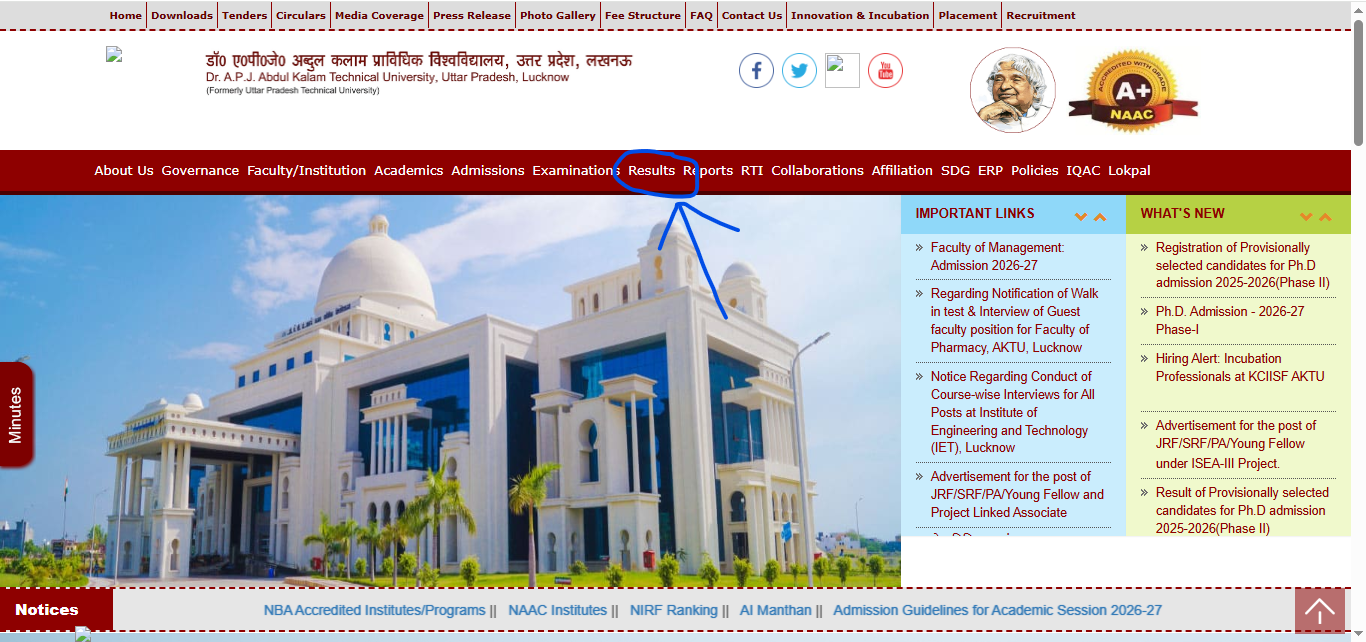
Step 2: On the menu bar of the home page, click on the tab “Results”
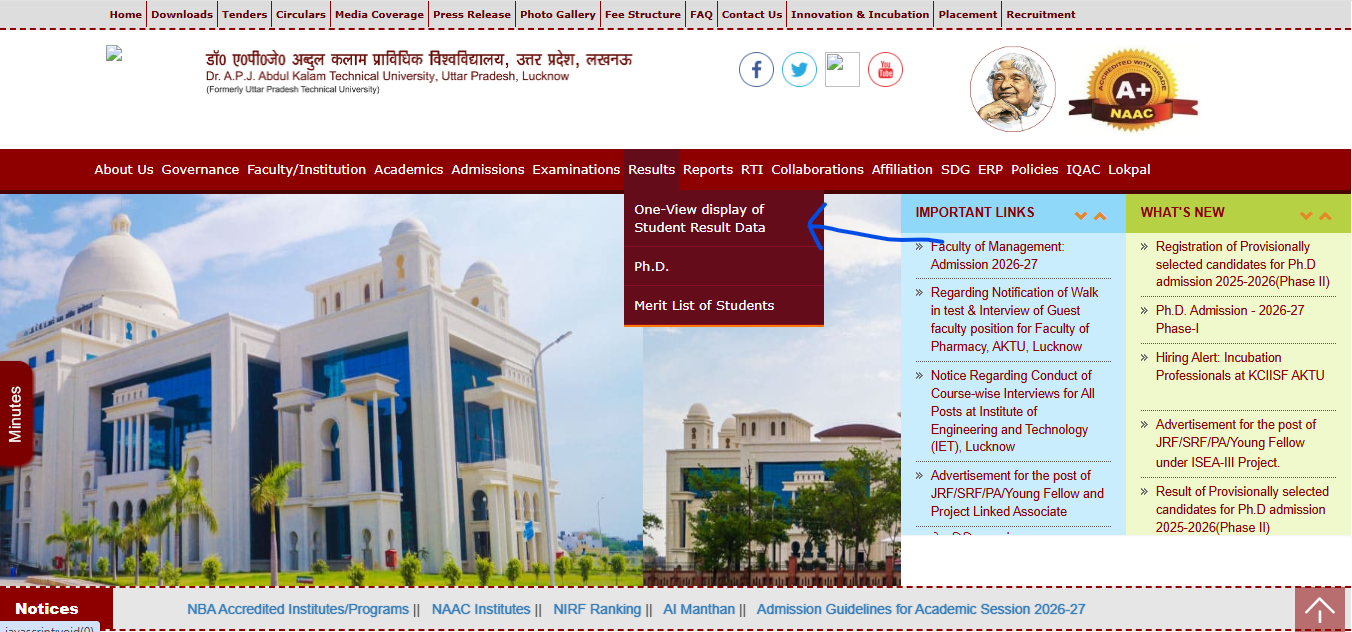
Step 3: From the dropdown menu, click on the tab for “One-View Display of Student Result Data”
Step 4: On clicking the link, a new window will open on the screen containing the login form
Step 5: Enter the “Serial Number” and click on the tab for “Move Forward” to process the form

Step 6: The AKTU One View Result 2026 will appear on the screen
Step 7: Check and save the result for later use.
Details Mentioned on AKTU One View Result 2026
As the AKTU One View Result 2026 has been declared by Dr A.P.J. Abdul Kalam Technical University at its official website, all the students can check and verify the details mentioned below:
- Student’s name
- Father’s name
- Mother’s name
- University name
- Course name
- Semester
- Roll number
- Date of birth
- Subject code
- Subject-wise marks scored
- Subject-wise passing marks
- Overall passing marks
- Overall marks scored
- Status of pass or fail, etc.
Understanding Your One View Scorecard: SGPA, CGPA & Status
Your One View result typically shows:
- Subject-wise theory and internal marks for each paper in that semester
- SGPA (Semester Grade Point Average) – your grade point average for that one semester
- CGPA (Cumulative Grade Point Average) – your running average across all semesters completed so far
- Result/Qualifying status – shown as Pass, Carry-over, or Back, depending on the course and subject
- A “PROVISIONAL” watermark – this is a provisional marksheet, not your final/original one
Because One View shows every semester on one page, it’s easy to accidentally check an old semester and think your latest result isn’t out. Always confirm you’re looking at the correct academic session and semester number before assuming a result is missing.
Results Are Released Course-by-Course, Not All at Once
AKTU doesn’t declare results for every course and semester on the same day. BTech, BPharm, MBA, MCA, MTech, BArch, BHMCT, BVoc, BFAD, MURP, and MArch results are typically rolled out in separate phases across several weeks after evaluation, and odd-semester and even-semester exams run on entirely different calendars. If your friend in a different branch or course already has their result and you don’t, it almost always means your course’s evaluation simply isn’t finished yet – check AKTU’s official notifications page for your specific course and semester rather than assuming a technical fault.
Carry Over Paper (COP), Challenge Evaluation & Improvement Exam – Know the Difference
This is where most guides blur three genuinely different processes together. Here’s the actual distinction:
Carry Over Paper (COP) – AKTU’s official term for what most students call a “back paper” or “backlog.” If you don’t clear a subject, you carry it over and reappear for that specific paper in a later exam cycle, alongside your regular semester subjects. COP results are published separately (often labelled “Odd/Even Semester COP Result”) once that cycle’s evaluation is complete, and are checked through the same One View login.
Challenge Evaluation – a formal recheck of your answer script if you believe it was marked incorrectly. This is a paid process, applied for through the exam form portal within the window announced after result declaration. Historically, AKTU’s refund policy has tied a fee refund to how much your marks increase on re-evaluation, but the exact fee amount and refund percentage change from cycle to cycle – always confirm the current figures from AKTU’s official notification before applying, rather than relying on a number you’ve seen quoted online.
Improvement Exam – a separate option, generally limited to final-year students (7th/8th semester), that lets you reappear in a theory subject you’ve already passed, to try for a better score. It can typically be used only once per subject, applies only to subjects already cleared (not backlogs), and – importantly – your new marks replace the old ones even if they turn out lower. This is worth thinking through carefully rather than opting in reflexively.
None of these three processes happens “on One View” itself – One View only displays results. All three are applied for separately through AKTU’s exam form system, usually routed through your college’s examination cell.
Downloading Your Marksheet
Once your result appears on One View:
- Use the Print One View or equivalent option on the result page to save it as a PDF.
- Keep this provisional marksheet safe – you’ll need it for the next semester’s admission, internships, and even some job applications, long before your original marksheet is issued.
- Your original/final marksheet is issued later by AKTU directly (typically after all semesters or on completion of the course), separate from this online provisional copy.
- Many AKTU-affiliated colleges also push verified digital marksheets to DigiLocker; check there for a government-recognised digital copy if your college has enabled this integration.
Passing Marks
Passing criteria vary somewhat by course and by the specific regulation/scheme year you’re under, but the general pattern across AKTU’s UG and PG programs is a minimum qualifying percentage in both internal (sessional) marks and external/theory marks for each subject, with practicals often carrying a separate minimum. Because exact percentages differ by course and have been revised across regulation years, treat any specific number you see online as indicative only and confirm against your own course’s current examination scheme.
Common Problems Students Face – And Fixes
| Problem | Likely Cause | What to Do |
|---|---|---|
| “No record found” on login | Wrong University Roll Number entered (often the college-internal roll number instead) | Re-check the roll number printed on your official AKTU admit card |
| “No Result Found for the above semester” | That specific semester hasn’t been declared yet | Wait – results roll out by course and semester, not all together |
| DOB not accepted | DOB entered doesn’t match AKTU’s records | Contact your college examination cell to verify/correct the DOB on file |
| Site slow or timing out | Heavy traffic right after a large course’s result goes live | Try during off-peak hours; avoid repeated refreshing |
| Result shows old semester only | Viewing an earlier semester tab by mistake | Double-check the semester/session selector before concluding a result is missing |
| Confusion between COP, challenge evaluation and improvement exam | These three processes are often described interchangeably online | Use the definitions above – each has separate eligibility, fees, and timelines |
| Marks card missing SGPA or shows blank fields | Result may be provisionally uploaded pending final verification | Recheck after a few days; contact your college if it persists beyond the notified date |
What to Do After Your Result
- If you’ve passed: Download and save your provisional marksheet immediately, and check your college’s DigiLocker rollout for a verified digital copy.
- If you have a carry over paper: Watch for the next COP exam form notification on AKTU’s official site; you’ll reappear only in the specific subject(s) you didn’t clear.
- If you believe your marks are wrong: Apply for challenge evaluation through the exam form portal within the announced window – not through One View itself.
- If you’re in your final year and passed but want a better score in a specific theory subject: Weigh the improvement exam option carefully, since your new marks replace the old ones even if lower.
- If you’re graduating: Track AKTU’s original marksheet and degree/convocation process separately from your One View provisional record.
Important Links
| Resource | Link |
|---|---|
| AKTU One View Portal | erp.aktu.ac.in/webpages/oneview/oneview.aspx |
| AKTU Official Website | aktu.ac.in |
| DigiLocker | digilocker.gov.in |
| AKTU Examination Notifications | Check the “Examination” section on aktu.ac.in for COP, challenge evaluation and improvement exam schedules |
AKTU One View Result 2026 – FAQs
Q1. The spelling of my name is wrong on my AKTU One View Result. What should I do now?
Ans. If any student finds a mistake or error on their AKTU One View Result, they must report it back to the examination body as soon as possible along with the relevant proof.
Q2. Is there any fee payment required to apply for AKTU Result revaluation?
Ans. Yes, the students wishing to apply for revaluation of their AKTU Result are required to pay INR 300 as the revaluation fee per subject.
Q3. What is the passing criteria for AKTU Result?
Ans. To secure a pass in AKTU Result, the students are required to score a minimum of 21 marks out of 70 in the external end-semester examination and maintain a total aggregate of at least 40 marks (including internal assessments) out of 100.
Q4. What login details do I need for AKTU One View Result 2026?
Ans. Most students currently need their University Roll Number along with their Date of Birth. Some pages on the portal may still ask for a Serial Number instead – try whichever field is shown on the live login screen.
Q5. Why is my AKTU One View Result not showing up yet?
Ans. AKTU declares results in phases by course, semester, and college, not all on one day. If your specific batch hasn’t been processed yet, the portal will show no record until it is released.
Q6. Is the AKTU One View Result the same as my final marksheet?
Ans. No. The One View copy is a provisional result meant for quick reference. The final, digitally signed marksheet is issued separately through your college’s examination cell.
Q7. Can I use the AKTU One View Result for placements or higher studies applications?
Ans. Yes, most companies and institutes accept the provisional One View result for initial screening. For formal admission or government verification, you’ll usually need the official marksheet from your college.
Q8. What is the difference between Scrutiny and Challenge Evaluation in AKTU?
Ans. Scrutiny only re-checks the total marks added on your answer sheet. Challenge Evaluation means your paper is re-assessed by a different examiner without considering your original marks, and it costs more than Scrutiny.
Q9. How can I download my AKTU semester marksheet?
Ans. Log in to the One View portal using your roll number and date of birth, view your result, then use the browser’s print or save-as-PDF option to download a copy for your records.
Q10. What should I do if the AKTU result website is not loading?
Ans. This usually happens due to heavy traffic right after a result announcement. Try again after some time, use a different browser, or check the result during off-peak hours like early morning.
Q11. My AKTU roll number is showing “No Record Found.” What does this mean?
Ans. This usually means either your result for that semester hasn’t been declared yet, or the roll number/date of birth entered doesn’t match university records. Double-check your admit card details before retrying.
Q12. Does AKTU release supplementary or back paper results separately?
Ans. Yes, supplementary and back paper results are declared separately from regular semester results and are also made available through the same One View portal once processed.
Q13. Can I check previous years’ AKTU results on the same portal?
Ans. Yes, the AKTU One View portal generally allows access to past semester results using your roll number, though very old records may need to be requested from your college if unavailable online.
Q14. Is a captcha required to check AKTU One View Result 2026?
Ans. In most cases, yes. You’ll need to enter the captcha code shown on the login screen along with your roll number and date of birth to proceed.
Q15. Whom should I contact for AKTU result-related issues?
Ans. For result discrepancies, contact your college’s examination cell first, since they coordinate directly with AKTU. For portal-related technical issues, you can also refer to the helpline or contact details listed on the official AKTU website.
Q16. What happens after my AKTU semester result is declared?
Ans. If you’ve passed, you can proceed to the next semester or apply for your final marksheet at course completion. If you have a backlog, you’ll need to check the supplementary exam schedule and re-appear for that subject.