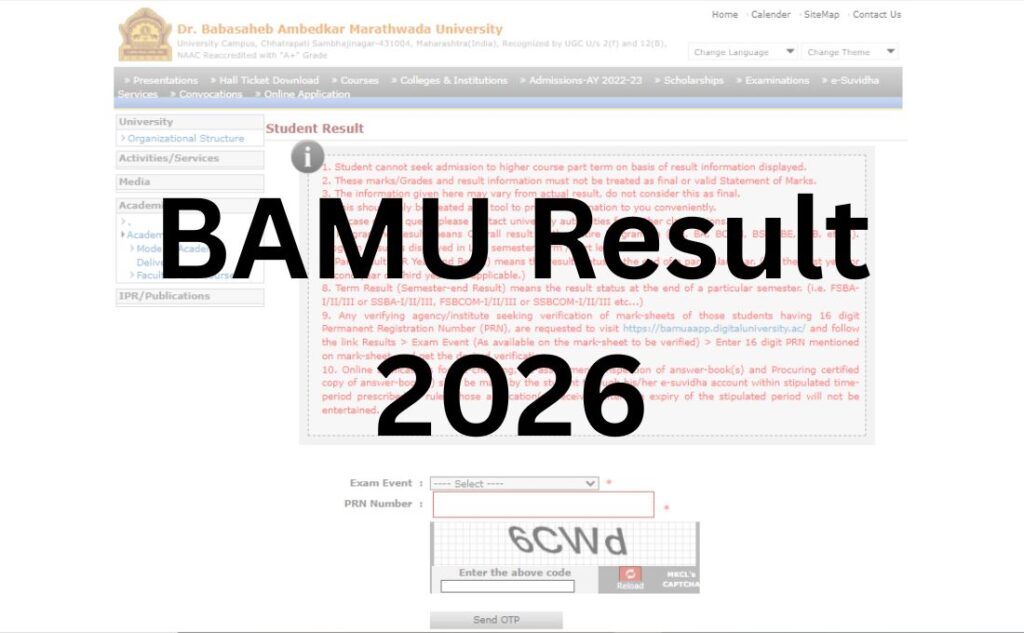

If you’re searching for your BAMU result, you’ve probably already noticed something confusing: Dr. Babasaheb Ambedkar Marathwada University seems to have two websites. One is informational, one is where your actual result lives, and most guides online don’t clearly tell you which is which. This article fixes that — plus walks you through login steps, marksheet downloads, revaluation, and what to do if your result won’t load.
Quick summary: BAMU results for UG and PG courses (BA, BSc, BCom, BBA, BCA, MA, MSc, MCom, MBA, MCA, Law, B.Ed, Engineering, Pharmacy, and more) are published on the university’s MKCL-powered Digital University portal, not on the main bamu.ac.in homepage directly. You’ll need your PRN (Permanent Registration Number) and the correct Exam Event to view it.
Quick Answer Box
Where do I check my BAMU result? Go to bamua.digitaluniversity.ac → Students → Result, or use the direct results shortcut at bamua.digitaluniversity.ac/students/result. You’ll need your PRN and to select the correct Exam Event (e.g., “March/April 2026” or “November/December 2025”).
Has my BAMU result been declared? Result declaration happens in phases, course by course, after each exam session. There is no single “results day” for all courses — check the portal directly for your specific course and semester, since we can’t guarantee a date without an official notification in front of us.
Which Website Do You Actually Need? (Read This First)
This is the part most articles skip, and it’s the reason so many students end up stuck.
BAMU operates three separate online systems, and only one of them handles results:
| Website | What it’s actually for | Do you need it for results? |
|---|---|---|
| bamu.ac.in | The main university website — news, notices, academic calendar, general information | No — it links out to the real portal but doesn’t host results itself |
| bamua.digitaluniversity.ac | The MKCL-run Digital University system — hall tickets, exam forms, syllabus, and results | Yes — this is where your result actually is |
| bamu.unionline.in | The online examination system used only for students appearing in specific online/absentee tests | No — this is for taking certain exams, not checking results |
If you land on bamu.unionline.in while searching for your result, you’re on the wrong site — it’s an exam-delivery platform, not a results portal. This mix-up is common because all three domains contain “bamu” and get mixed together in search results.
BAMU at a Glance
| Detail | Information |
|---|---|
| University Name | Dr. Babasaheb Ambedkar Marathwada University (BAMU) |
| Former Name | Marathwada University (renamed in 1994) |
| Location | Chhatrapati Sambhajinagar (formerly Aurangabad), Maharashtra |
| Established | 23 August 1958 |
| Accreditation | NAAC ‘A+’ Grade (Reaccredited) |
| Affiliated Colleges | Around 489, across four districts |
| Districts Covered | Chhatrapati Sambhajinagar, Jalna, Beed, Dharashiv |
| Result Portal | www.bamua.digitaluniversity.ac |
| Main Website | www.bamu.ac.in |
| Category | University Result |
| Portal Operator | Maharashtra Knowledge Corporation Limited (MKCL) |
| Login Credentials | PRN + Exam Event (+ Seat No./Roll No. where applicable) |
| Courses Covered | UG, PG, Diploma, Law, Education, Engineering, Pharmacy, PhD |
| Marksheet Type | Provisional online marksheet (original issued via college) |
| Digital Marksheet Option | Available via DigiLocker (NAD-linked) |
| Revaluation/Redressal | Available — apply within the notified window |
Note on dates and figures: Result declaration dates, revaluation fees, and the number of pending courses change with every exam cycle. Rather than quote figures that go stale within weeks, we recommend confirming current, session-specific details directly on the portal or through your college’s examination cell.
About Dr. Babasaheb Ambedkar Marathwada University
Founded in 1958 as Marathwada University, the institution was renamed in 1994 in honor of Dr. B.R. Ambedkar. It’s a public state university headquartered in Chhatrapati Sambhajinagar (the city formerly known as Aurangabad — worth knowing, since some official documents and older articles still use “Aurangabad”). The university’s examination system is now digitized end-to-end through MKCL, covering close to 490 affiliated colleges and well over four lakh students across arts, science, commerce, management, law, education, engineering, and pharmacy streams.
What’s the Latest on BAMU Results Right Now?
BAMU doesn’t declare all results on one fixed date. Instead, results roll out course by course and semester by semester, typically 30–45 days after the exam concludes for that particular subject group. The university runs two broad exam cycles each academic year — a Winter session (roughly October–November) and a Summer session (roughly March–April) — plus various supplementary and backlog exams throughout the year.
Because of this staggered release pattern, the honest answer to “has my result come out?” is: it depends entirely on your specific course, semester, and exam event — something only the portal itself can confirm in real time. We’d rather point you to the live source than guess a date that might already be wrong by the time you read this.
Courses & Examination Patterns Covered
BAMU results span multiple academic patterns, which matters because the portal asks you to select the correct one:
| Course Category | Examples |
|---|---|
| Undergraduate (UG) | BA, BSc, BCom, BBA, BCA |
| Postgraduate (PG) | MA, MSc, MCom, MBA, MCA |
| Professional/Law | LLB, LLM |
| Education | B.Ed, M.Ed, B.P.Ed, M.P.Ed |
| Technical | Engineering (B.Tech/B.E.), Pharmacy (B.Pharm, M.Pharm) |
| Research | PhD |
A detail most guides miss: BAMU has been transitioning UG programs to the NEP 2020/2024 pattern, while older batches still fall under the 2018 or 2022 patterns. If your result search comes up empty, double-check you’ve selected the correct pattern year for your admission batch — this is one of the most common (and least explained) reasons students can’t locate their result.
How to Check Your BAMU Result (Two Valid Methods)?
Method 1: Direct via the Digital University Portal (Recommended)
- Go to bamua.digitaluniversity.ac
- Click Students in the top menu, then select Result
- Choose your Exam Event (e.g., “March/April 2026 — B.Com Semester IV”)
- Enter your PRN (Permanent Registration Number)
- Enter any additional details requested (Seat No./Roll No.)
- Submit — your result displays on screen
- Use the download/print option to save a copy immediately, even if you plan to check it again later
Method 2: Starting from the Main University Website
- Visit bamu.ac.in
- Look for a “Result” or “Examination” link — this redirects you to bamua.digitaluniversity.ac
- Follow the same steps as Method 1 once redirected
Tip: Method 1 saves you a click and avoids relying on a redirect link that occasionally gets moved during website updates. Bookmark the digital university URL directly.
Login Credentials Explained
| Credential | What It Is | Where to Find It |
|---|---|---|
| PRN | Permanent Registration Number, assigned at admission | Admission receipt, ID card, or college records |
| Exam Event | The specific exam session/semester you appeared for | Your admit card / hall ticket |
| Seat No. / Roll No. | Exam-specific seat number | Hall ticket |
If you’ve lost your PRN, your college’s examination department can retrieve it — don’t try guessing combinations, as repeated failed attempts can sometimes trigger a temporary lock on the portal.
What’s Mentioned on Your BAMU Result?
Once your result displays, it typically includes:
- Full name and PRN
- Course, semester, and exam event
- Subject-wise marks (theory and practical, where applicable)
- Total marks and percentage
- CGPA/SGPA (for CBCS/NEP pattern courses)
- Result status (Pass/Fail/ATKT)
- Division (First/Second/Pass Class)
Review every field carefully. Errors in name spelling, PRN, or subject codes should be reported immediately — see the troubleshooting section below.
Downloading Your Marksheet — Including the DigiLocker Route
Most students download the provisional marksheet directly from the result page after login. But there’s a second option many competitor articles leave out entirely:
BAMU is integrated with the National Academic Depository (NAD), which means verified digital marksheets and degree certificates are also accessible through the DigiLocker app. This is genuinely useful if:
- You need a verified digital copy quickly for a job application
- Your physical marksheet from college hasn’t arrived yet
- You want a government-recognized digital copy that doesn’t rely on the university portal staying online
Your original physical marksheet still comes through your affiliated college, typically a few weeks after the provisional result is published — the online copy is provisional and meant to bridge that gap.
Passing Marks & Grading
Passing criteria generally require securing minimum marks in both theory and practical/internal components, plus an aggregate minimum — but exact numbers vary by course, pattern (2018/2022/NEP), and subject. Because passing marks differ across faculties and can be revised, verify the exact passing criteria for your specific course and pattern through your college or the official examination department rather than relying on a generic number.
Grace marks, where applicable, are usually awarded automatically by the system in specific, narrow situations (e.g., to bridge a small marks gap in one subject) — this isn’t something you apply for separately.
Revaluation & Rechecking (Redressal) Process
BAMU uses the term “Redressal” for its answer-script review process, which typically covers two distinct options:
| Option | What Happens |
|---|---|
| Rechecking | Verification of totalling, unchecked answers, and clerical errors — no re-evaluation of content |
| Revaluation | Fresh, detailed re-assessment of the answer script by an evaluator |
General process:
- Apply within the window announced after your result (this window is time-limited, so don’t delay)
- Pay the applicable fee per subject/paper
- Track status through the portal or your college
- Revised marks, if any, are updated and communicated through the same result system
Because fee amounts and application windows are revised periodically, always confirm current fees and deadlines through the official redressal circular posted on the portal for your specific exam session, rather than a fixed number from an old article.
Supplementary & Backlog (ATKT) Results
Students who don’t clear one or more subjects can typically appear for the next available exam event for that subject under the ATKT (Allowed to Keep Term) provision. These results follow the same portal and login process — you’ll simply select the relevant supplementary/backlog exam event instead of the regular one. Eligibility rules (how many backlogs are allowed before progression is blocked) vary by faculty, so check with your college if you’re unsure of your standing.
Common Problems While Checking Your Result (And Fixes)
| Problem | Likely Cause | What to Do |
|---|---|---|
| “Result not found” | Wrong Exam Event selected, or result not yet declared for your course | Double-check the exact session name; if declared, wait and retry |
| PRN not recognized | Typo, or PRN belongs to a different pattern/admission year | Verify PRN with your college office |
| Portal running slow or timing out | High traffic right after a result announcement | Try during off-peak hours (early morning/late night) |
| Site looks broken or unresponsive | Server load, not necessarily an outage | Wait 15–20 minutes and refresh; avoid repeated rapid submissions |
| Landed on the wrong “bamu” site | Confusing bamu.ac.in, bamua.digitaluniversity.ac, and bamu.unionline.in | Use the direct link: bamua.digitaluniversity.ac/students/result |
| Name/marks look incorrect | Data entry error at college or university level | Report immediately to your college’s exam cell with proof (hall ticket, admit card) |
What to Do After Your Result?
- If you passed: Download and save your provisional marksheet immediately, and check with your college on when the original marksheet will be issued.
- If you have a backlog: Note the subject(s) and check the next supplementary/backlog exam event dates.
- If you want revaluation: Apply within the notified window — don’t wait, as these windows close quickly.
- If you’re graduating: Start tracking degree certificate and convocation processes through your college and the university’s downloads/circular section.
- If you’re applying for jobs or further studies: Use the DigiLocker-linked digital marksheet if your physical copy hasn’t arrived yet.
Important Links
| Resource | Link |
|---|---|
| Official University Website | www.bamu.ac.in |
| Result Portal (Digital University) | www.bamua.digitaluniversity.ac |
| Direct Result Page | www.bamua.digitaluniversity.ac/students/result |
| Examinations Section | www.bamua.digitaluniversity.ac/students/examination |
| Hall Ticket | www.bamua.digitaluniversity.ac/students/hall-ticket |
| Circulars & Notices | www.bamua.digitaluniversity.ac/circular |
| Online Exam System (not for results) | www.bamu.unionline.in |
| Registrar Contact | registrar@bamu.ac.in |
Conclusion
The BAMU result system is straightforward once you know where to look — the real friction is that most students first land on the wrong website. Remember the split: bamu.ac.in is informational, bamua.digitaluniversity.ac is where your actual result lives, and bamu.unionline.in is for online exams only, not results. Keep your PRN handy, double-check your Exam Event selection, and bookmark this page so you can come back whenever a new result is due — we’ll keep the process guide current even as exam dates change each session.
BAMU Result 2026 – FAQs
Q1. What is the official website for BAMU results?
Ans. BAMU results are published on the Digital University portal at bamua.digitaluniversity.ac, not directly on the main bamu.ac.in homepage. The main site links out to this portal, but the actual result-checking system runs on the MKCL-powered digital platform.
Q2. What is bamu.unionline.in used for?
Ans. This is a separate online examination platform used only for specific online or absentee-retest exams. It does not host results, so if you’ve landed here while searching for your result, you’re on the wrong site.
Q3. What credentials do I need to check my BAMU result?
Ans. You’ll need your PRN (Permanent Registration Number) and the correct Exam Event for your semester. Some result pages also ask for your Seat Number or Roll Number as printed on your hall ticket.
Q4. Why can’t I find my result even though others in my class can see theirs?
Ans. Results are declared course-by-course and subject-by-subject, not all at once. Your specific course or paper may simply not be processed yet, even if a related course has already been declared.
Q5. I selected my PRN and exam event correctly, but the result still doesn’t show. What now?
Ans. Double-check you’ve selected the right academic pattern (2018, 2022, or NEP 2024), since results are pattern-specific. If it still doesn’t appear, contact your college’s examination cell to confirm your PRN and admission batch.
Q6. How do I download my BAMU marksheet?
Ans. After your result displays on the portal, use the download or print option on the same page to save a PDF copy. This provisional marksheet is valid for most immediate purposes while your original physical marksheet is processed by your college.
Q7. Can I get my BAMU marksheet through DigiLocker?
Ans. Yes. BAMU is linked to the National Academic Depository (NAD), so verified digital marksheets and degree certificates are accessible through the DigiLocker app for eligible sessions, offering a government-recognized alternative to the portal download.
Q8. What is the BAMU revaluation process called?
Ans. BAMU refers to its review process as “Redressal,” which includes two options — rechecking (verifying totals and unchecked answers) and revaluation (a full re-assessment of the answer script by an evaluator).
Q9. How much does BAMU revaluation cost?
Ans. Revaluation and rechecking fees are revised periodically per exam session, so there isn’t a single fixed figure that stays accurate year-round. Check the official redressal circular on the portal for the current fee before applying.
Q10. What is the deadline to apply for BAMU revaluation?
Ans. The application window opens shortly after result declaration and stays open for a limited period, which varies by session. Apply as soon as your result is out rather than waiting, since late applications typically aren’t accepted.
Q11. What happens if I fail a subject at BAMU?
Ans. You’re generally allowed to reappear in the subject under the ATKT (Allowed to Keep Term) system during the next available supplementary or backlog exam event, following the same PRN-based login process for results.
Q12. Is there a separate portal for BAMU supplementary/backlog results?
Ans. No — supplementary and backlog results appear on the same bamua.digitaluniversity.ac portal. You simply select the relevant backlog or supplementary Exam Event instead of the regular semester event.
Q13. What details are shown on the BAMU result?
Ans. Your result typically shows your name, PRN, course, semester, subject-wise marks, total marks, percentage, CGPA/SGPA, result status, and division.
Q14. My name or marks appear incorrect on the result. What should I do?
Ans. Contact your college’s examination cell immediately with your hall ticket and admit card as proof, so they can raise a correction request with the university’s examination department.
Q15. Why is the BAMU result portal slow or not loading?
Ans. Heavy traffic right after a fresh result announcement is the most common cause. Try again during off-peak hours, avoid repeatedly resubmitting the form, and check that you’re on the correct URL.
Q16. Does BAMU have a mobile app for checking results?
Ans. The Digital University portal is mobile-friendly and accessible through any smartphone browser. Students should still verify results through the official portal rather than unofficial apps or lookalike sites.
Q17. Is bamu.ac.in the same as bamua.digitaluniversity.ac?
Ans. No. bamu.ac.in is the university’s main informational website, while bamua.digitaluniversity.ac is the separate, MKCL-run examination and results system. Both are official, but only the second one actually processes results.
Q18. How soon after the exam does BAMU declare results?
Ans. Results are generally processed within about 30 to 45 days of an exam concluding for a given course, though this varies by subject and session. For a specific course, the portal itself is the only reliable source for real-time status.