
If you’re searching for your CVRU Result, you’ve probably typed in your roll number a dozen times already, refreshed the page, and still weren’t sure where the real official link is. This guide clears that up completely.
This page covers everything about the result of Dr. C.V. Raman University (CVRU), Bilaspur, Chhattisgarh — the direct official result link, step-by-step login instructions, what to do if your result shows an error, marksheet download, revaluation, supplementary/back paper results, and answers to every question students usually ask.
Quick note before you start: There are actually three universities using the “CVRU” name — Bilaspur (Chhattisgarh), Bihar, and Madhya Pradesh. They are run by the same AISECT group but are legally separate universities with separate result portals. If you’re not sure which one applies to you, check the disambiguation box below before you proceed.
Quick Highlights Table
| Detail | Information |
|---|---|
| University Name | Dr. C.V. Raman University (CVRU), Bilaspur |
| Result Status | Check live status on official portal (varies by course/semester) |
| Academic Session | 2025–26 |
| Courses Covered | UG, PG, Diploma, PhD, Distance/CDOE programmes |
| UG/PG | Both |
| Official Website | cvru.ac.in |
| Result Portal | cvru.ac.in/results |
| Category | University Result |
| Student Login (ERP) | erp.cvru.ac.in/onlineexam/Login.aspx |
| Required Credentials | Roll Number + Captcha |
| Marksheet Availability | Provisional online; original from college/university after processing |
| Revaluation | Available — apply through Controller of Examination office |
| Supplementary Result | Available for backlog/back-paper students |
| Latest Update | No fixed declaration date confirmed at time of writing — verify on official portal |
Important: This table is a summary for quick reference. Result dates change every semester, so always cross-check the live status on cvru.ac.in before assuming a date.
Direct Result Link
- Official Website: cvru.ac.in
- Result Portal (main): cvru.ac.in/results
- Student ERP Login (for detailed academic record): erp.cvru.ac.in/onlineexam/Login.aspx
- Distance Education (CDOE) students: Use the “Students Corner” section on cvru.ac.in for CDOE-specific notices and results
Instructions:
- Open the official result portal link above — never use a third-party site to “log in.”
- Enter your Roll Number exactly as printed on your admit card.
- Solve the captcha shown on screen.
- Click Search Result to view your statement of marks.
Important note: CVRU’s own result page carries a standard academic disclaimer — the online result is for immediate reference only and is not a substitute for the original marksheet issued later by the university. Keep this in mind before using the online printout for admissions or job applications; always confirm with the physical marksheet for anything official.
Which CVRU Is Yours? (Disambiguation)
| Campus | Location | Official Website |
|---|---|---|
| Dr. C.V. Raman University (original) | Kota, Bilaspur, Chhattisgarh — established 2006 | cvru.ac.in |
| Dr. C.V. Raman University, Bihar | Bhagwanpur, Vaishali district, Bihar — established 2018 | cvrubihar.ac.in |
| CVRU, Madhya Pradesh | Madhya Pradesh campus | cvrump.ac.in |
If your admit card, ID card, or admission letter mentions “Bilaspur” or “Chhattisgarh,” you belong to the original CVRU and should use cvru.ac.in. If it mentions Bihar or MP, use the respective state portal — the login credentials and result formats are not interchangeable between these three universities.
About the University
Dr. C.V. Raman University, Bilaspur was established on 3 November 2006 in Kota, Bilaspur, Chhattisgarh, and is promoted by the All India Society for Electronics and Computer Technology (AISECT). It is named after Dr. C.V. Raman, India’s first Nobel Laureate in Physics. The university offers programmes across Engineering & Technology, Information Technology, Commerce & Management, Science, Arts, Law, Education, Physical Education, and Pharmaceutical Sciences, at UG, PG, Diploma, and PhD levels, along with distance/online programmes through its Centre for Distance and Online Education (CDOE). CVRU holds approvals including UGC recognition and AICTE approval for its technical programmes, and it serves a large student base across regular, distance, and professional courses.
Latest Result Update
CVRU declares semester and annual results on a rolling basis after each examination cycle, typically several weeks after exams conclude, once evaluation and moderation are complete. At the time this article was published, no fixed declaration date for the current session’s pending results was listed on the official website.
What this means for you: Don’t rely on rumors from WhatsApp groups or unofficial result-aggregator sites claiming a specific date. Bookmark cvru.ac.in/results and check it directly — that is the only page CVRU updates itself. This article will be reviewed and updated as new official notifications are released.
Courses Covered
| Category | Examples |
|---|---|
| Undergraduate (UG) | BA, BSc, BCom, BCA, BBA, BE/BTech, LLB, BPharm |
| Postgraduate (PG) | MA, MSc, MCom, MBA, MCA, MTech, LLM |
| Diploma | Diploma in Engineering, Diploma in Pharmacy, Diploma in Computer Applications |
| Doctoral | PhD across Engineering, IT, Science, Commerce, Education, Library Science |
| Distance/CDOE | UG and PG programmes offered through the Centre for Distance and Online Education |
How to Check the CVRU Result?
- Go to the official result page: cvru.ac.in/results
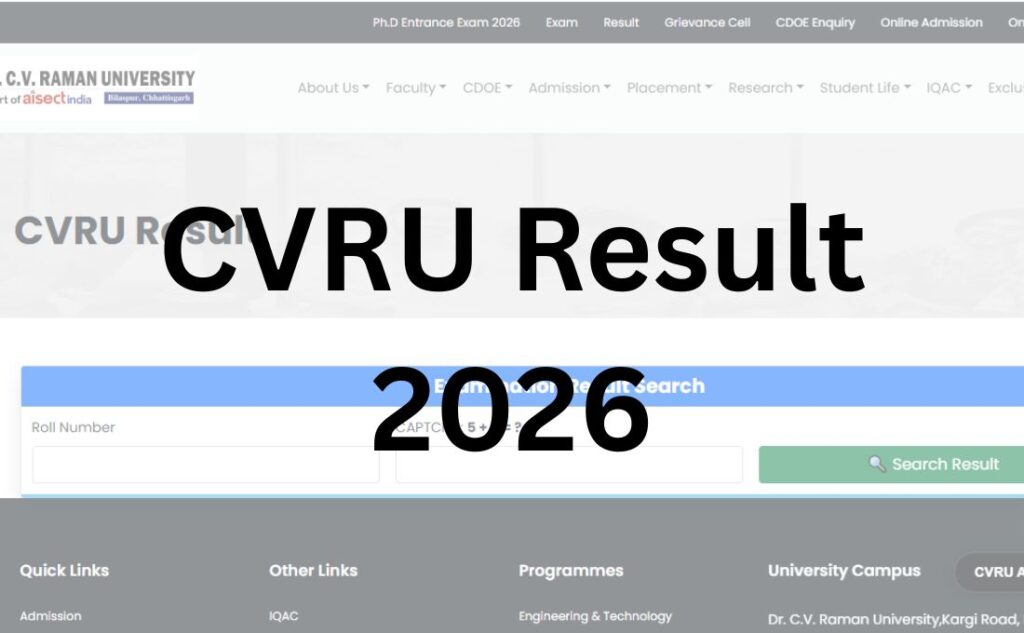
- Locate the “Examination Result Search” box on the page.
- Enter your Roll Number in the input field (use the roll number printed on your admit card, not your application number).
- Type the Captcha code shown exactly as displayed — captchas are case-sensitive.
- Click Search Result.
- Your result will display your name, roll number, programme, semester, marks, percentage, division, and result status.
- Click Print Result to save a PDF/printout for your records.
If nothing appears, it usually means the result for your specific programme or semester has not been declared yet — see the “Common Problems” section below.
Login Credentials Required
| Credential | Where to Find It |
|---|---|
| Roll Number | Printed on your admit card / hall ticket |
| Captcha | Auto-generated image shown on the result page |
| ERP Login (for full academic portal) | Registration/enrollment number and password issued by the university |
| Date of Birth (if asked, on some sub-portals) | As per your admission records |
If you’ve lost your roll number, contact your college’s examination cell — CVRU does not release results using only name and date of birth for security reasons.
Details Mentioned on the CVRU Result
- Student’s Name
- Roll Number
- Father’s Name and Mother’s Name
- Programme (e.g., BCA, BCom, BE)
- Semester/Year
- Subject-wise marks (where applicable)
- Total Marks
- Percentage
- Result status (Pass/Fail/ATKT)
- Division (First/Second/Third)
Note: The online statement is computer-generated and does not require a physical signature, as stated on the official CVRU result page itself.
How to Download the Marksheet?
- Visit cvru.ac.in/results and pull up your result using your roll number and captcha, as described above.
- Use the Print Result button to generate a PDF or direct printout of your statement of marks.
- Save this PDF safely — this is your provisional record.
- For the original, signed marksheet, you will need to collect it from your college/department or the university examination office after the standard processing period following result declaration (this timeline is set by the Controller of Examinations and communicated through your college).
- For CDOE/distance learners, marksheet collection instructions are usually posted under the “Students Corner” section of the CDOE portal.
Important warning: Never pay any third-party website or agent claiming to “expedite” or “generate” your original marksheet. Only the university and your college issue the original document.
Passing Marks
CVRU follows standard university norms where students generally need to secure minimum qualifying marks in both theory and practical/internal components to pass a subject, with an overall aggregate requirement as prescribed for each programme by the respective faculty/school. Because passing criteria can differ slightly by programme (Engineering vs. Arts vs. Law vs. Pharmacy, for instance) and by ordinance revisions, always confirm the exact passing marks for your specific course from your department’s examination guidelines or the Controller of Examinations office rather than assuming a single university-wide number applies to every course.
Revaluation Process
If you believe your result should be reviewed, CVRU allows students to apply for revaluation/re-checking through the university’s examination cell.
- Eligibility: Generally available to students who have appeared for the exam and received their result; specific eligibility can vary by programme.
- Application: Apply through your college’s examination department or directly to the Controller of Examinations office at CVRU, using the prescribed revaluation application form.
- Fees: A per-subject revaluation fee applies; the exact amount is notified by the university and can change each session — confirm the current fee from your college or the examination office before applying.
- Timeline: Applications are typically accepted within a specific window after result declaration — check the notice board/portal for the exact number of days applicable to your session, as this is set separately for each exam cycle.
- Result: The revised result, if any change occurs, is communicated through the same result portal or directly by the examination department.
Because CVRU’s revaluation fee and deadline windows are notified separately for each exam session rather than being fixed permanently, this article will not quote a specific number that could go outdated — always confirm current fees and the deadline directly with the Controller of Examination.
Supplementary / Back Paper Result
Students who do not clear one or more subjects (commonly called ATKT — Allowed to Keep Term) can appear for supplementary or back-paper examinations as per the university’s academic calendar. After appearing:
- The supplementary/back result is declared separately from the main semester result, usually a few weeks after the supplementary exam.
- It is checked the same way as the main result — using your roll number on cvru.ac.in/results.
- Clearing the backlog subject typically updates your overall division/CGPA as per university norms.
If your back-paper result doesn’t appear on the portal after a reasonable time, contact your examination cell directly, since supplementary results are sometimes processed department-wise.
Name-Wise Result
CVRU’s official result search currently works by Roll Number, not by student name. This is a security measure to prevent misuse. If you don’t have your roll number, retrieve it from your admit card or ask your college’s exam section — name-wise search is not available on the official portal.
Previous Year Results
The official CVRU portal primarily displays current and recent-session results. For previous year or archived results, students typically need to:
- Check the “Notices” or “Students Corner” sections of cvru.ac.in for archived result links, or
- Request a transcript/consolidated marksheet directly from the Controller of Examinations’ office, which maintains historical academic records for all students.
Common Problems While Checking Results (and Fixes)
| Problem | Likely Cause | Solution |
|---|---|---|
| Website loading slowly | High traffic right after declaration | Wait a few minutes and retry, or try during off-peak hours (early morning) |
| “Result not found” | Result not declared yet for your course, or wrong roll number | Re-check roll number on admit card; confirm declaration status via college |
| Captcha not matching | Case sensitivity or image glitch | Refresh the captcha and re-enter carefully |
| Invalid credentials on ERP login | Wrong enrollment number/password | Use “forgot password” option or contact IT/examination cell |
| Browser not loading the form | Outdated browser or blocked scripts | Try Chrome/Edge in updated version, disable ad-blockers temporarily |
| Result shows blank fields | Data still being uploaded by university | Wait and retry after a few hours; contact exam cell if persists over days |
What to Do After the Result?
- If you passed: Download and save your provisional marksheet; proceed with the next semester’s admission/registration formalities as instructed by your department.
- If you failed a subject (ATKT): Note the subject(s) and check the supplementary exam schedule and back-paper application process through your college.
- If you want revaluation: Apply within the notified window through the Controller of Examination office.
- For admission to the next semester/year: Follow your college’s re-registration deadlines — don’t wait until the last date.
- For placements or higher studies: Use your provisional result for immediate applications, but arrange your original marksheet/transcript in time for verification deadlines.
Important Links Table
| Resource | Link |
|---|---|
| Official Website | www.cvru.ac.in |
| Result Portal | www.cvru.ac.in/results |
| Controller of Examination | www.cvru.ac.in/controller_of_examination |
| Academic Calendar | www.cvru.ac.in/iode/academic_calendar |
| Grievance Cell | www.cvru.ac.in/admissions/student-grievance-registration |
| Contact | www.cvru.ac.in/contact |
CVRU Result 2026 – FAQs
Q1. Is the CVRU result out for 2026?
Ans. Result declaration dates vary by programme and semester and are not fixed at the time of writing. Always check the live status directly on cvru.ac.in/results rather than relying on unofficial dates circulating online.
Q2. What is the official CVRU result website?
Ans. The official website for Dr. C.V. Raman University, Bilaspur is cvru.ac.in, with the dedicated result page at cvru.ac.in/results.
Q3. How do I check my CVRU result using roll number?
Ans. Visit cvru.ac.in/results, enter your roll number exactly as printed on your admit card, solve the captcha, and click Search Result to view your marks.
Q4. What if my CVRU roll number shows “result not found”?
Ans. This usually means your result hasn’t been declared yet, or the roll number was entered incorrectly. Double-check the number on your admit card, and if the issue continues after declaration, contact your college’s examination cell.
Q5. Can I check the CVRU result by name instead of roll number?
Ans. No, the official portal only supports search by roll number for security reasons. Name-wise search is not available.
Q6. How do I download my CVRU marksheet?
Ans. After viewing your result on cvru.ac.in/results, use the “Print Result” option to save a PDF. The original signed marksheet is collected separately from your college after standard processing.
Q7. What is CVRU’s revaluation process?
Ans. Students can apply for revaluation through their college or directly with the Controller of Examination office, within the window notified for that specific exam session, along with the applicable per-subject fee.
Q8. How can I check my CVRU supplementary/back paper result?
Ans. Supplementary results are checked the same way as regular results — using your roll number on cvru.ac.in/results — once the university declares them, typically a few weeks after the supplementary exams.
Q9. Is CVRU Bilaspur the same as CVRU Bihar or CVRU MP?
Ans. No. These are three separate universities under the AISECT group with independent result portals — cvru.ac.in (Bilaspur), cvrubihar.ac.in (Bihar), and cvrump.ac.in (Madhya Pradesh). Use the one matching your admit card.
Q10. What details appear on the CVRU result?
Ans. Your name, roll number, parents’ names, programme, semester, marks, percentage, division, and result status (pass/fail).
Q11. Why is the CVRU result website slow after declaration?
Ans. High traffic right after a result is announced can slow down the server. Try again after a few minutes or check during early morning hours.
Q12. Does CVRU send results via SMS or email?
Ans. CVRU’s primary and most reliable method of result declaration is the official website. There’s no confirmed official SMS/email result delivery system, so rely on the portal directly.
Q13. What should I do if my CVRU result shows wrong marks?
Ans. Apply for revaluation/re-checking through the Controller of Examination office within the notified timeframe, along with any required fee.
Q14. Where do I collect my original CVRU marksheet?
Ans. Original signed marksheets are issued through your respective college or the university examination department after online results are processed — check with your college for the exact collection schedule.
Q15. Is the online CVRU result a valid official document?
Ans. The online result is meant for immediate reference and is explicitly stated by CVRU as not a substitute for the original marksheet, which is issued separately by the university.
Q16. How do I check results for CVRU distance/CDOE programmes?
Ans. Distance education students should check the “Students Corner” section of cvru.ac.in for CDOE-specific result notices, alongside the main result portal.
Q17. Can I use my CVRU application number to check results?
Ans. No, the result portal requires your roll number, not your application/enrollment number. These are two different identifiers.