
Osmania University (OU), Hyderabad, publishes UG, PG, and professional course results on its official portal, www.osmania.ac.in, throughout the academic year in batches — semester-wise, backlog, and revaluation results are usually released separately. This guide walks you through checking your result, understanding your marksheet, applying for revaluation, and what to do next, whether you’ve passed, failed, or landed a backlog.
Quick note on accuracy: Result dates change every semester and for every course. This page explains the process in detail and references recent, verified announcements as examples. Always cross-check your specific course and semester result status on osmania.ac.in before taking any action.
Quick Highlights
| Detail | Information |
|---|---|
| University Name | Osmania University (OU), Hyderabad |
| Official Website | www.osmania.ac.in |
| Result Portal | osmania.ac.in → Examination → Examination Results |
| Category | University Result |
| Courses Covered | UG, PG, Diploma, Professional, Distance/CDE courses |
| Credentials Needed | Hall Ticket / Registration Number (and DOB for some portals) |
| Result Type | Provisional online result; official grade card issued via college |
| Marksheet | Downloadable PDF (provisional); original grade card from college after ~3 weeks |
| Revaluation | Available; applied through TS Online centres or the exam portal |
| Backlog/Supplementary | Declared separately after regular results |
| Passing Criteria | Minimum 40% aggregate marks per paper (UG, CBCS) |
Osmania University Result 2026 Direct Result Link
The online portal sharing access to subject-wise Osmania University Result 2026 has been activated at the official website. The table below shares the direct links connecting to the result login window. Click on the link and access the result by filling in the login form:
| Osmania University Result 2026 | ||
| Result | Date | Link |
| BHMCT (CBCS) JUN/JUL-2026 RESULTS | August 14, 2026 | |
| BCTCA (CBCS) JUN/JUL-2026 RESULTS | August 14, 2026 | |
| PG DIPLOMA IN REHABILIATATION PSYCHOLOGY FEB/MAR-2026 RV RESULTS | August 14, 2026 | |
| LLB-HONOURS-3YDC-NON-CBCS-JUN-JUL-2026 RESULTS | August 13, 2026 | |
| LLB-HONOURS-3YDC-CBCS-JUN-JUL-2026 RESULTS | August 13, 2026 | |
| LLB-3-YDC-BALLB-5YDC-NON-CBCS-JUN-JUL-2026 RESULTS | August 13, 2026 | |
| LLB-3-YDC-BALLB-5YDC-CBCS-JUN-JUL-2026 RESULTS | August 13, 2026 | |
| B.COM-LLB-5YDC-NON-CBCS-JUN-JUL-2026 RESULTS | August 13, 2026 | |
| B.COM-LLB-5YDC-CBCS-JUN-JUL-2026 RESULTS | August 13, 2026 | |
| BBALLB-5YDC-NON-CBCS-JUN-JUL-2026 RESULTS | August 13, 2026 | |
| BBA-LLB-5YDC-CBCS-JUN-JUL-2026 RESULTS | August 13, 2026 | |
| BCA-CBCS-JUN-JUL-2026 1st to 6th-SEMESTER RESULTS | August 4, 2026 | |
| M.Phil PSY.D May-2026 Results | August 3, 2026 | |
| M.Phil Professional Diploma In Clinical Psychology Part I May-2026 Results | August 3, 2026 | |
| M.Phil Clinical Psychology May-2026 Results | August 3, 2026 | |
| M.Pharmacy PCI I-Sem, III-Sem Main and Backlog and II-Sem Backlog June-2026 Results | August 1, 2026 | |
| MBA (CBCS-Day) IV-Semester (Regular,Backlog & Improvement) I,II & III-Semester (Backlog & Improvement) June 2026 Results | August 1, 2026 | |
| PG (CDE) I -Sem (Backlog 2024 batch only) & III Sem (Backlog) April/May -2026 Results | August 1, 2026 | |
About Osmania University
Osmania University was established in 1918 in Hyderabad, which makes it one of the oldest universities in India. It was set up in Hyderabad and named after Nawab Mir Osman Ali Khan, the last Nizam of Hyderabad — and it holds a fairly unique place in Indian academic history as the first university in the country to teach in Urdu.
Over a century later, OU has grown into one of the largest university systems in the state. It runs through roughly 8 campus institutions, 12 faculties, and 53 departments, with more than 720 colleges affiliated to it across Telangana, plus a network of research centres and academic institutes. It’s UGC-recognised and carries an ‘A+’ grade from NAAC, which is why so many students across Telangana end up sitting for an OU exam at some point — whether they’re enrolled directly or through an affiliated college.
If you’re checking a result on this page, chances are you studied through one of OU’s UG, PG, diploma, or doctoral programmes in Arts, Science, Commerce, Engineering, Law, Pharmacy, or Education — all of which fall under the same examination and results system covered below.
Courses Covered Under OU Results
| Undergraduate (UG) | Postgraduate (PG) | Other |
|---|---|---|
| BA | MA | Diploma courses |
| B.Sc / B.Sc (Hons) | M.Sc | Certificate courses |
| B.Com | M.Com | B.Ed / M.Ed |
| BBA | MBA | B.Lib / M.Lib |
| BSW | MCA | BHMS |
| B.Pharmacy | LLM | Pharm D |
| LLB | Ph.D | GNM |
Distance/Correspondence (CDE) results for BA, B.Com, and similar programmes are also hosted on the same portal under a separate results tab.
How to Check Osmania University Result Online?
Follow these steps carefully:
Step 1: Visit the official website of the Osmania University at https://www.osmania.ac.in/
Step 2: Scroll down on the home page to find and click on the tab for “Examination Results”
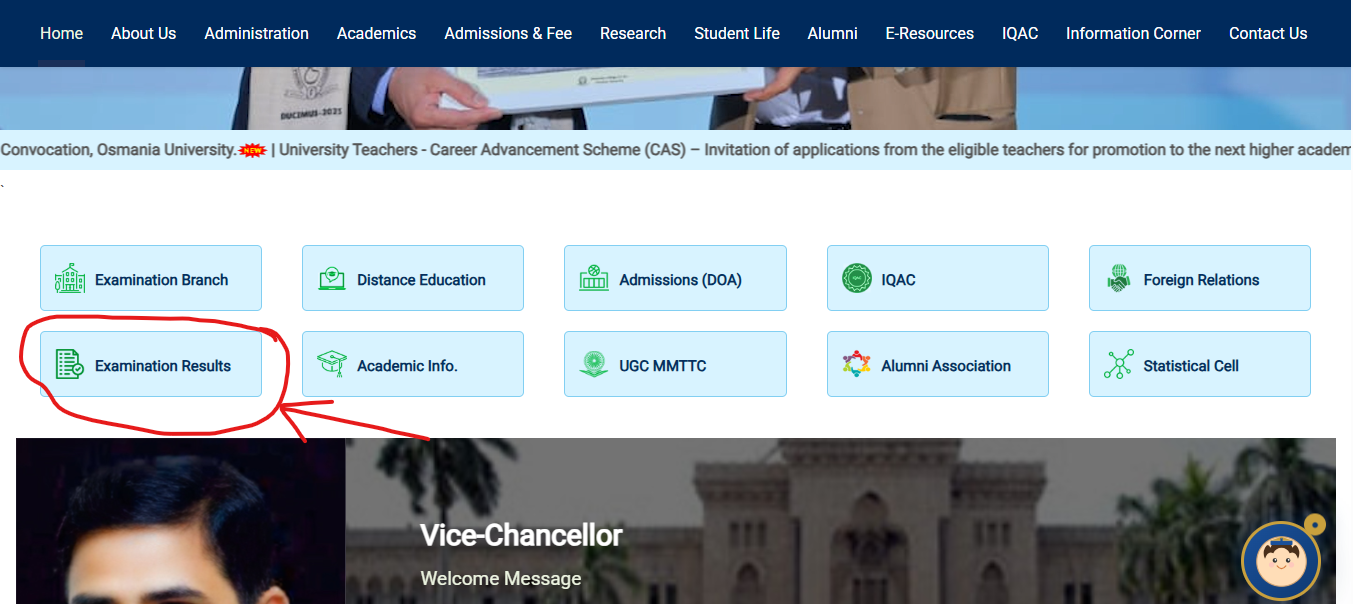
Step 3: On clicking the tab, a new window will open on the screen containing the subject wise links for Osmania University Result 2026
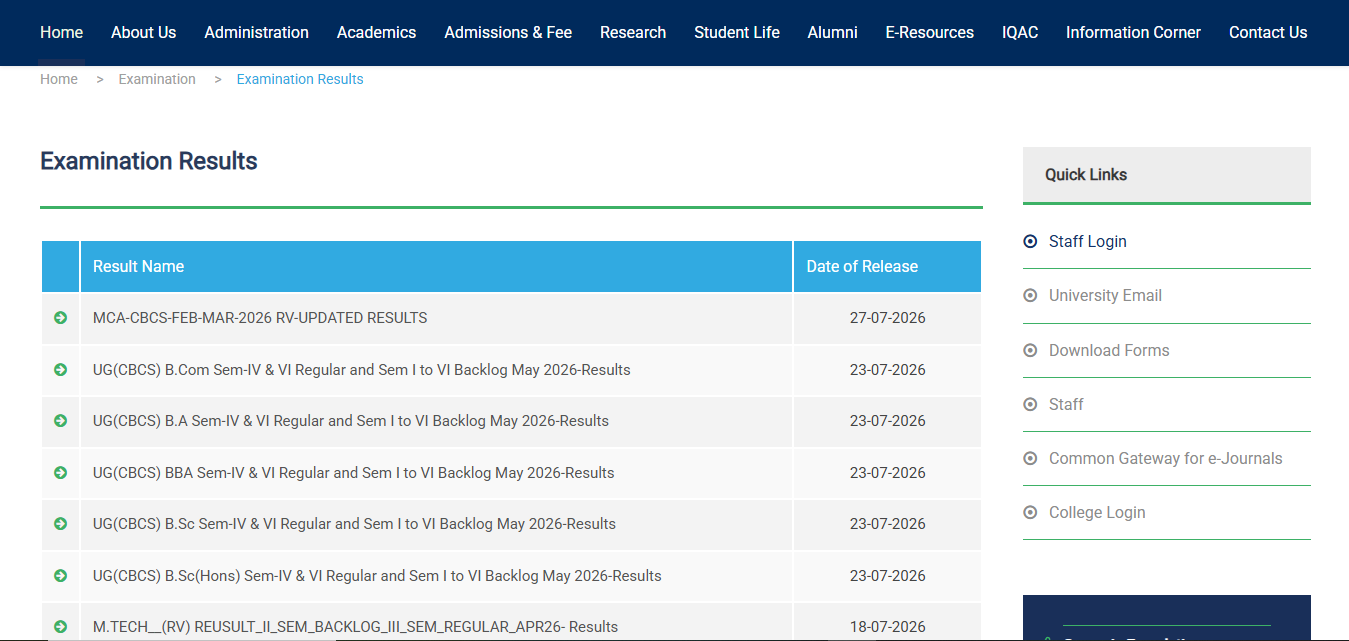
Step 4: Click on the link and the login form will appear on the screen
Step 5: Enter the “Hall Ticket Number” in the required section of the login form

Step 6: Click on the tab for “Submit”
Step 7: The Osmaina University Result 2026 will appear on the screen
Step 8: Check and save the result for later use.
Login Credentials Required
| Field | Where to Find It |
|---|---|
| Hall Ticket Number | Printed on your admit card for that exam |
| Registration Number | Printed on your admission/ID card and previous grade cards |
| Date of Birth | As per your academic records |
| Captcha | Displayed on the result page itself (case-sensitive) |
If your hall ticket number is not accepted, double-check for extra spaces, leading zeros, or a mismatch between UG and PG registration formats — these are the most common entry errors.
Details Mentioned on the OU Result
Your result page/marksheet typically includes:
- Student Name
- Hall Ticket / Registration Number
- Course and Semester
- College Code and Name
- Subject-wise marks (Internal + External)
- Total marks and SGPA/CGPA
- Grade letters per subject
- Overall result status (Pass / Fail / Detained / Ab)
- Division/Class (where applicable)
How to Download Your Marksheet?
- Complete the result-check steps above.
- On the result screen, click Download or Print.
- Save the file as a PDF on your device — name it clearly (e.g., “OU_Sem4_RollNo.pdf”) so it’s easy to find later.
- Take a physical printout for admissions, scholarship, or job applications where required.
- Verify every field — name spelling, roll number, and marks — immediately. Report discrepancies to your college examination cell right away, since corrections take longer once admissions or placement season is underway.
Note: The original grade card (an official, college-attested document) is usually collected in person from your respective college a few weeks after the online result is published — this is different from the downloadable PDF.
Passing Marks and Grading System
Osmania University follows Choice Based Credit System (CBCS) regulations for UG courses.
- Minimum passing marks: <cite index=”16-1″>40% aggregate score in each paper (combining internal and external marks)</cite>. There is no separate minimum for internal assessment alone.
- Grading scale: <cite index=”16-1″>A 10-point scale with grade letters such as OS, S, A, B, C, D, E, and F</cite>, depending on the specific regulation year.
- SGPA vs CGPA: <cite index=”16-1″>SGPA measures performance in a single semester; CGPA measures cumulative performance across all semesters of the degree</cite>.
- CGPA to percentage: Different official documents and departments have referenced different conversion approaches over the years — some use CGPA × 10, others cite CGPA × 9.5, and some semester-level guidance uses (SGPA × 10) − 7.5. Because this has genuinely varied by regulation batch and course, do not rely on any online calculator for official purposes — confirm the exact formula printed on your own grade card or with your department’s examination cell.
- Division cutoffs (commonly cited): around 60% for First Class and 70% for First Class with Distinction, but always confirm against your specific regulation year, since cutoffs can differ by course and admission batch.
Revaluation Process
If you’re not satisfied with your marks in a paper, OU allows revaluation (re-correction) and recounting/photocopy requests.
Typical process:
- Applications are usually invited through TS Online centres shortly after regular results are declared, along with the required fee and a copy of your marks memo.
- You can also request a photocopy of your answer script before deciding whether to apply for revaluation.
- Submit the application separately for revaluation and for photocopy — they are treated as distinct requests.
- Pay the prescribed fee (fees have varied across notifications — for example, some notifications list a nominal TS Online service charge alongside a per-paper revaluation/photocopy fee; exact current fees are published in each semester’s official revaluation notification on osmania.ac.in, so always check the current circular rather than a past figure).
- Revaluation results are declared separately from regular results, usually within a few weeks to a couple of months.
Outcome: After revaluation, your marks may increase, decrease, or remain unchanged — this is standard across Indian universities and is disclosed in the official notification.
Supplementary / Backlog Result
Students who fail one or more papers, or are absent, can appear for backlog/supplementary examinations in the next available exam cycle for that semester. Backlog results are declared separately from regular semester results and follow the same online-checking process — select “Backlog” or “Supplementary” under the exam session filter on the results page instead of “Regular.”
Name-wise Result
Osmania University’s result portal is primarily built for roll number/registration number-based search. A dedicated name-wise search facility is not consistently available across all course result pages. If you don’t know your hall ticket number, contact your college examination section, which maintains records linking your name to your registration number.
Previous Year Results
Older semester results generally remain accessible through the same “Examination Results” section by selecting the relevant academic session/year from the dropdown. If an older result is not visible online, your college’s examination cell can issue a certified copy of your grade card.
Common Problems While Checking Results (and Fixes)
| Problem | Likely Cause | Fix |
|---|---|---|
| Website slow / not loading | Heavy traffic right after declaration | Wait 30–60 minutes and retry, or check during off-peak hours (early morning) |
| “Result not found” | Result not yet declared for your specific course/semester, or wrong session selected | Re-check the exact semester/session filter; confirm via your college |
| Invalid hall ticket error | Typo, wrong format, or mixing UG/PG number formats | Re-enter carefully; check your admit card for the exact format |
| Captcha not matching | Case-sensitivity or visual similarity (0/O, 1/l) | Zoom in and retype carefully; refresh for a new captcha |
| Browser not loading page properly | Outdated browser or heavy ad content on third-party mirrors | Use Chrome/Firefox in incognito mode directly on osmania.ac.in |
| Marks not updated/show blank | Server sync delay right after declaration | Retry after a few hours; contact the examination branch if it persists for days |
What to Do After the Result?
- If you passed: Download and save your marksheet; wait for your official grade card from college; use your result for admission to the next year/semester, scholarships, or job applications.
- If you have a backlog: Note the paper(s) you failed and register for the next supplementary/backlog exam through your college.
- If you want re-checking: Apply for photocopy and/or revaluation within the notified window — don’t wait, as these windows typically close within a few weeks of result declaration.
- If you’re graduating: Use your final CGPA/percentage for higher studies applications, competitive exam eligibility, or placement drives — but verify the correct CGPA-to-percentage formula from your college first.
- If you’re moving to a new semester: Complete re-registration/admission formalities with your college before the semester begins.
Important Links
| Resource | Link |
|---|---|
| Official Website | https://www.osmania.ac.in |
| Examination Results Section | osmania.ac.in → Examinations → Examination Results |
| Revaluation/Photocopy Notifications | Published under Examinations/Notifications on osmania.ac.in |
| TS Online (Revaluation Application) | Available at designated TS Online centres, as notified per semester |
| Contact / Examination Branch | Available under “Contact Us” on osmania.ac.in |
FAQs
Q1. Has the Osmania University result been declared?
Ans. It depends on your specific course and semester — OU declares results in batches throughout the year rather than all at once. Check the “Examination Results” section on osmania.ac.in and select your exact course, semester, and session to see current status.
Q2. Where can I check my Osmania University result?
Ans. On the official website, osmania.ac.in, under the Examinations tab. Avoid third-party sites, as they may show outdated or incorrect information.
Q3. What details do I need to check my OU result?
Ans. Generally your Hall Ticket Number or Registration Number, and in some cases your Date of Birth, along with a captcha code shown on the result page.
Q4. Is the online OU result final?
Ans. No, the online result is provisional. Your official grade card is issued through your college after verification, typically a few weeks later.
Q5. How do I download my OU marksheet?
Ans. After viewing your result online, click the Download or Print option and save the PDF. Verify all details immediately for accuracy.
Q6. What are the passing marks at Osmania University?
Ans. UG students under CBCS regulations generally need a minimum of 40% aggregate marks (internal + external combined) in each paper to pass.
Q7. How is CGPA converted to percentage at OU?
Ans. Different regulation years and departments have used different formulas (such as CGPA×10 or CGPA×9.5). Always confirm the exact formula from your own grade card or examination cell rather than a generic online calculator.
Q8. What if my OU result shows “Not Found”?
Ans. This usually means the result hasn’t been declared yet for your course/semester, or you selected the wrong session filter. Confirm with your college examination section.
Q9. How do I apply for OU revaluation?
Ans. Revaluation applications are usually invited through TS Online centres shortly after regular results, along with the prescribed fee and your marks memo copy. Check the current semester’s official notification for exact steps and fees.
Q10. What is the difference between revaluation and recounting?
Ans. Revaluation involves re-checking your answer script’s evaluation; recounting simply re-adds the marks already awarded, without changing the evaluation itself.
Q11. How do I check my OU backlog/supplementary result?
Ans. Follow the same steps as a regular result check, but select “Backlog” or “Supplementary” under the exam session option instead of “Regular.”
Q12. Can I check OU results by name instead of roll number?
Ans. A dedicated name-wise search isn’t uniformly available across all OU result pages. You typically need your hall ticket/registration number; your college can help retrieve it if you’ve lost it.
Q13. Why is the OU result website slow or not loading?
Ans. This usually happens due to heavy traffic right after a result is declared. Try again after some time, preferably during off-peak hours.
Q14. When will I get my original OU grade card?
Ans. Your official grade card is generally collected from your respective college a few weeks after the online result is published — this is separate from the downloadable provisional marksheet.
Q15. What should I do if there’s an error in my OU marksheet?
Ans. Report it to your college examination cell immediately with supporting documents. Corrections can take time, so act as soon as you notice the discrepancy.
Q16. Are Osmania University results available for previous years?
Ans. Yes, in most cases you can select the relevant academic session from the results page dropdown. If unavailable online, request a certified copy from your college.