
Checking your YCMOU result shouldn’t feel like a treasure hunt – but for many students, it does. That’s because Yashwantrao Chavan Maharashtra Open University (YCMOU) doesn’t run its results from one single website. There’s the main university site, a separate result and login portal, and even a third portal just for revaluation. Get confused between the three, and you could end up on the wrong page or, worse, an unofficial one.
This guide clears up exactly where to check your YCMOU result, how the PRN-based login works, what to do if your result isn’t showing, and how the revaluation process actually works step by step — including a mandatory step most students (and most articles) miss.
Quick Answer: Check your YCMOU result at ycmou.digitaluniversity.ac using your 16-digit PRN (Permanent Registration Number). The main site, ycmou.ac.in, links out to this portal — it does not host the result-checking tool itself.
Quick Highlights Table
| Detail | Information |
|---|---|
| University Name | Yashwantrao Chavan Maharashtra Open University (YCMOU) |
| Result Status | Declared in phases, course-wise (check portal for your specific course) |
| Academic Session | Dec/Jan and May/June exam sessions (twice a year) |
| Courses Covered | UG, PG, Diploma, Certificate programmes |
| UG/PG | Both |
| Official Website | www.ycmou.ac.in |
| Result Portal | www.ycmou.digitaluniversity.ac |
| Category | University Result |
| Required Credentials | 16-digit PRN / Seat Number + Captcha |
| Marksheet Availability | Downloadable PDF (provisional); original Statement of Marks issued later |
| Revaluation | Available for theory papers only, via a two-step scan-copy-then-revaluation process |
| Supplementary Result | Declared along with regular result on the same portal |
| Latest Update | Verify the exact declaration date via the official portal, as this changes every exam session |
Direct Result Link
Official Result Portal: ycmou.digitaluniversity.ac
Official University Website: ycmou.ac.in
How to reach it safely: Go to ycmou.ac.in → Student Zone → Examination Result. This page will forward you to the actual result-checking tool on the digitaluniversity.ac portal.
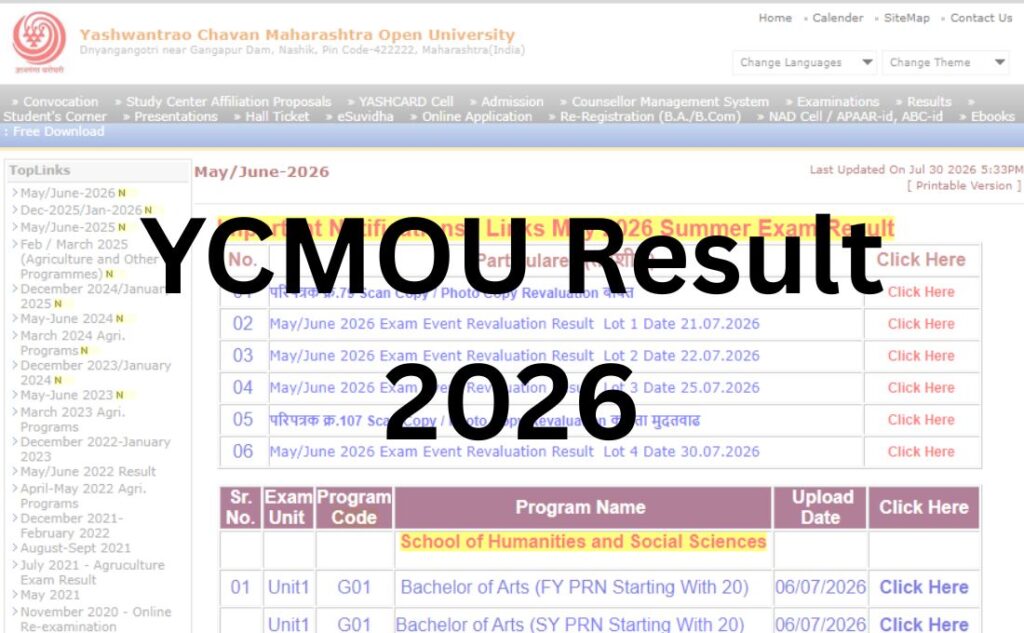
| YCMOU Result 2026 | |
| Session | Link |
| May/June-2026 | Click Here |
| Dec-2025/Jan-2026 | |
| May/June-2025 | Click Here |
| Feb / March 2025 (Agriculture and Other Programmes) | |
| December 2024/January 2025 | |
| May-June 2024 | Click Here |
| March 2024 Agri. Programs | |
| December 2023/January 2024 | |
| May-June 2023 | Click Here |
| March 2023 Agri. Programs | |
| December 2022-January 2023 | |
| May/June 2022 Result | |
| April-May 2022 Agri. Programs | |
| December 2021- February 2022 | |
| August-Sept 2021 | |
| July 2021 – Agriculture Exam Result | |
| May 2021 | Click Here |
| November 2020 – Online Re-examination | |
Important Note: YCMOU’s result link changes every exam session because each session gets its own page ID on the portal (the URL literally ends in a different number each time). This is exactly why old bookmarked links from a previous exam cycle often show “no result found” — it’s not that your result is missing, it’s that you’re on last session’s page. Always start from ycmou.ac.in’s Examination Result section rather than reusing an old saved link.
About the University
Yashwantrao Chavan Maharashtra Open University was established on 1 July 1989 under Act XX of 1989 of the Maharashtra State Legislature, making it the fifth open university in India. Headquartered in Nashik, the university’s 147-acre campus — named “Dnyangangotri” — sits beside the Gangapur Dam. YCMOU’s jurisdiction covers the entire state of Maharashtra, and it is recognised under Section 12(B) of the UGC Act, 1956, and holds a NAAC ‘A’ grade accreditation.
The university runs UG, PG, diploma, and certificate programmes through distance and open learning, spread across schools including Humanities & Social Sciences, Commerce & Management, Sciences, Computer Sciences, Education, Agricultural Sciences, and Health Science. It operates through regional centres in Nashik, Mumbai, Pune, Nagpur, Amravati, Kolhapur, Nanded, and Chhatrapati Sambhajinagar, which serve as support points for students who can’t visit the main campus.
Latest Result Update
YCMOU conducts examinations twice a year, in the December/January and May/June sessions (agriculture-related programmes sometimes follow a separate April/May cycle). Results are not released all at once — they come out in a phased, course-wise manner, meaning your batchmate in a different course may see their result days or weeks before or after you do.
Because exact declaration dates shift every session and are announced through official circulars, don’t rely on a specific date you read elsewhere — including this one. Check the “Circular/Notice” section of ycmou.ac.in or the Examination Result page directly for the current session’s status. Treat any date mentioned in third-party articles as an estimate, not a confirmed schedule.
Courses Covered Under YCMOU Results
| Undergraduate (UG) | Postgraduate (PG) | Other |
|---|---|---|
| B.A. | M.A. | Diploma programmes |
| B.Com | M.Com | Certificate courses |
| B.Sc | M.Sc | B.Ed / B.Ed Special Education |
| BCA | MCA | Ph.D. |
| BBA | MBA | Second-year repeater batches |
Results are published separately for each of these, so you must select your exact course and exam event on the portal rather than searching generically.
How to Check YCMOU Result (Step by Step)?
- Visit the official site: Go to www.ycmou.ac.in.
- Navigate to Student Zone → Examination Result.
- Click “Online Provisional Result” — this redirects you to ycmou.digitaluniversity.ac.
- Select the correct Exam Event from the dropdown (e.g., Dec/Jan 2026 or May/June 2026 — pick the session you actually appeared for).
- Choose your course (B.A., B.Com, MBA, etc.) from the list, since results are organised course-wise, not university-wide.
- Enter your PRN (16-digit Permanent Registration Number) or seat/roll number as asked.
- Enter the captcha code exactly as shown.
- Click Submit/Search. Your result will display with subject-wise marks and status.
- Download the PDF of your provisional marksheet for your records.
Note for PRNs starting with “20”: Some students with PRNs beginning in “20” are redirected to a separate search window on the portal. If your normal search doesn’t return a result and your PRN starts with 20, look for this specific link before assuming there’s an error.
Login Credentials Required
| Credential | Where It’s Used |
|---|---|
| PRN (Permanent Registration Number) | Primary identifier for result lookup and student login |
| Seat Number / Roll Number | Alternative identifier on some result pages |
| Date of Birth (YYMMDD format) | Default password for student login/dashboard (not needed for basic result lookup) |
| Captcha | Verification step to confirm you’re not a bot |
Your PRN doesn’t change across your entire academic journey at YCMOU — it’s worth saving it somewhere permanent rather than digging through old admission documents every exam season.
Details Mentioned on the YCMOU Result
- Student Name
- PRN / Seat Number
- Course and Semester/Year
- Subject-wise marks (theory, internal, practical where applicable)
- Total marks and percentage
- Result status (Pass/Fail/ATKT)
- Examination session
Note: The online result is provisional. It is meant for immediate reference, not for official submission to employers or other institutions. The original Statement of Marks (SoM) is issued separately by the university and is the only document with full legal validity.
How to Download Your YCMOU Marksheet?
- Complete the result-checking steps above until your result is displayed.
- Look for a Download / Print button on the result page.
- Save the PDF to your device — most portals also let you print directly.
- Cross-check every detail (name spelling, PRN, subject codes, marks) against your admit card immediately after downloading.
- If anything looks wrong, don’t wait — report it (see the discrepancy section below) before it delays your next steps.
Passing Marks
According to YCMOU’s general examination norms, students need a minimum of 40% in each paper, which includes the theory component along with assignment or project work submitted before the exam.
Important: Exact passing criteria can vary slightly by course, and separate theory/practical minimums, grace mark policies, and CGPA thresholds for specific programmes are set out in each course’s own examination ordinance. Always verify the exact passing criteria for your specific course through your study centre or the official examination notification — don’t assume a blanket 40% applies identically to every programme.
Revaluation Process (The Part Most Guides Get Wrong)
Unlike many universities where you can apply for revaluation directly, YCMOU requires a mandatory two-step process, and skipping the first step means your revaluation application won’t even be accepted.
Step 1: Apply for a Scan Copy / Photocopy of Your Answer Book (Form-B)
You cannot apply for revaluation without first obtaining a scanned or photocopy of your evaluated answer script.
- Apply in the prescribed Form-B, available through the YCMOU examination services / RCRV portal.
- Must be submitted within the timeline stated in the current circular (commonly 15 days of result declaration — confirm the exact window for your session).
- A fee applies per copy.
Step 2: Apply for Revaluation (Form-C)
Once you’ve received your scanned answer book and are still not satisfied with the marks:
- Apply for revaluation using Form-C, within the window stated on the portal (commonly 10 days from receiving your scan copy).
- A per-paper fee applies (commonly cited around ₹500/paper, but confirm the current fee via the official notification, as fee structures are revised periodically).
- Revaluation applies only to theory papers. Term papers, project papers, internal assessment, and viva-voce marks cannot be revalued.
Where to apply: YCMOU runs a dedicated portal for this — portal.ycmou.org.in (RCRV section) — separate from both the main site and the main result portal. If you only know about ycmou.ac.in and ycmou.digitaluniversity.ac, you’ll likely miss this one, so bookmark it specifically if you plan to apply for revaluation.
Helpline for revaluation queries: available through the numbers listed on the RCRV portal; email queries typically go to the revaluation ID published on that same page.
Supplementary / Back Paper (ATKT) Result
Supplementary or backlog (ATKT) results are published on the same result portal as regular results, under the relevant exam event for repeater/back-paper students. Select the correct exam event for repeaters when searching — it’s usually listed separately from the fresh-attempt session.
Name-wise Result
YCMOU’s official portal is built around PRN/seat-number lookup rather than name-based search. Name-wise result lists are not officially provided by the university for individual lookup; they’re occasionally compiled by third-party aggregator sites, which you should treat with caution since they are not the source of truth. Always cross-verify any name-wise listing against the official PRN-based result.
Previous Year Results (Archive)
The Examination Result page on ycmou.ac.in retains links to several past exam sessions (going back to 2021–2022) for reference. If you need an older result and it isn’t listed there, the digitaluniversity.ac portal itself may still host it under its archived exam events — try selecting the specific past session from the exam event dropdown rather than assuming it’s gone.
Common Problems While Checking YCMOU Result – And Fixes
| Problem | Likely Cause | Fix |
|---|---|---|
| “Result not found” | Wrong exam event selected, or result not yet declared for your course | Re-select the correct session/course; check declaration status via official circular |
| Website slow or not loading | High traffic right after declaration | Try during off-peak hours (early morning/late night); avoid refreshing repeatedly |
| Invalid PRN error | Typo, or PRN format mismatch | Double-check your admit card for the exact 16-digit PRN |
| Captcha not matching | Case-sensitivity or visual similarity between characters (0/O, 1/l) | Refresh the captcha and re-enter carefully |
| Old bookmarked link shows nothing | Each session gets a new page ID on the portal | Start fresh from ycmou.ac.in → Examination Result instead of reusing old links |
| Landed on a suspicious “YCMOU result” site | Unofficial aggregator or ad-heavy clone site | Only trust ycmou.ac.in and ycmou.digitaluniversity.ac; never enter personal details elsewhere |
What to Do After Your Result?
- If you passed: Download and safely store your provisional marksheet. Wait for the official Statement of Marks before using your result for admissions, jobs, or further study applications.
- If you failed a paper: Check the ATKT/backlog exam schedule and re-registration process through your study centre.
- If you want to challenge your marks: Follow the two-step scan copy → revaluation process detailed above.
- If you’re proceeding to admissions or placements: Most institutions accept the downloaded provisional marksheet temporarily, but confirm with the receiving institution whether they need the original SoM.
- If you’re applying for higher studies: Start your migration certificate and transcript applications early through the e-Suvidha/examination services portal, since postal processing (for documents like the migration certificate) can take time.
Important Links Table
| Resource | Link |
|---|---|
| Official University Website | www.ycmou.ac.in |
| Result Portal | www.ycmou.digitaluniversity.ac |
| Revaluation / RCRV Portal | www.portal.ycmou.org.in |
| Examination Information | www.ycmou.ac.in/student-zone/examination-information |
| Examination Services (transcripts, migration, verification) | Available via Student Login on the result portal |
| Regional Centres | www.ycmou.ac.in (Regional Centres menu) |
| Circulars & Notices | www.ycmou.ac.in/circular-notice |
Frequently Asked Questions (FAQs)
Q1. Where can I check my YCMOU result?
Ans. Your YCMOU result is available on ycmou.digitaluniversity.ac. Start from the official site, ycmou.ac.in, and use the “Examination Result” link under Student Zone to reach the correct, current-session result page safely.
Q2. What details do I need to check my YCMOU result?
Ans. You need your 16-digit PRN (Permanent Registration Number) or seat/roll number, along with entering the captcha code shown on the result page. Selecting the correct exam event and course is equally important.
Q3. Why does my old YCMOU result link show no result?
Ans. Each exam session gets a new page on the result portal, so a link saved from a previous session won’t show your current result. Always navigate fresh from ycmou.ac.in rather than reusing bookmarks.
Q4. Is the YCMOU result available immediately after exams?
Ans. No. Results are released in a phased, course-wise manner, so different programmes go live on different dates within the same session. Check the current circular for your specific course’s status.
Q5. Is the online YCMOU marksheet the final document?
Ans. No, the downloaded result is provisional. The original Statement of Marks (SoM) is issued separately by the university and is required for official purposes.
Q6. What is the minimum passing percentage at YCMOU?
Ans. Generally, students need at least 40% per paper, combining theory and assignment/project components. Exact criteria can vary by course, so confirm through your study centre or official notification.
Q7. How do I apply for YCMOU revaluation?
Ans. You must first apply for a scan copy of your answer book (Form-B). Only after receiving it can you apply for revaluation (Form-C), and only for theory papers. Both applications go through the RCRV portal at portal.ycmou.org.in.
Q8. Can I get revaluation for practical or project marks?
Ans. No. YCMOU’s revaluation process applies only to theory papers. Term papers, project papers, internal assessment, and viva-voce marks are not eligible for revaluation.
Q9. How much does YCMOU revaluation cost?
Ans. Reported fees are around ₹500 per paper for revaluation and a separate fee for the scan copy, but these amounts are periodically revised. Always confirm current fees through the official notification before applying.
Q10. What is the YCMOU exam schedule/session pattern?
Ans. YCMOU conducts exams twice a year, typically in the December/January and May/June sessions, with a separate cycle for some agriculture programmes.
Q11. My YCMOU result shows an error. What should I do?
Ans. Report discrepancies via email with your full name, PRN, seat number, exam centre, course name and code, subject name and code, and a clear description of the issue, as instructed on the official Examination Result page.
Q12. Can I check YCMOU results by name instead of PRN?
Ans. No official name-wise search exists on the university’s own portal. Result lookup is PRN or seat-number based. Be cautious of third-party sites claiming to offer name-wise search.
Q13. Where do I apply for a duplicate marksheet or migration certificate?
Ans. These are handled through the YCMOU examination services portal (accessible via student login) or by submitting the prescribed offline forms at your regional centre, depending on the document.
Q14. Is ycmou.digitaluniversity.ac the only official result portal?
Ans. It’s the main one for checking results and student login. However, revaluation and rechecking applications go through a separate portal, portal.ycmou.org.in, so don’t assume one site covers everything.
Q15. What if the YCMOU website is too slow to load during result day?
Ans. Heavy traffic right after a declaration can slow the portal. Try checking during off-peak hours, avoid repeated refreshing, and ensure you’re on the official domain rather than switching to unofficial mirrors out of frustration.
Q16. Are YCMOU supplementary/backlog results declared separately?
Ans. Backlog (ATKT) results are typically listed on the same portal under the relevant exam event for repeater students, alongside regular results.
Q17. What should I do if my name is misspelt on the YCMOU marksheet?
Ans. Contact the university with the required proof documents to have it corrected before requesting your final Statement of Marks, so the error doesn’t carry over to your official document.
Q18. Does YCMOU send results by SMS or email?
Ans. The university does not officially guarantee SMS/email result delivery; the result portal is the primary and most reliable channel. Don’t rely solely on third-party SMS alert services.