
If you’ve searched “MJPRU result” and landed on three or four different-looking websites, you’re not alone. Mahatma Jyotiba Phule Rohilkhand University runs its result system through a dedicated portal separate from its main website — and there’s a third, similarly named portal for entrance exam results that trips up a lot of students by accident.
This guide walks you through exactly where to check your MJPRU result, how the roll-number lookup actually works (it needs more than just your roll number), and how to tell scrutiny apart from challenge evaluation before you pay for either.
Quick Answer: Check your MJPRU result at mjpruiums.in/Results/ExamResult.aspx — the university’s IUMS (Integrated University Management System) portal. The main site, mjpru.ac.in, is for university information and links out to this portal; it doesn’t host the result tool itself.
Quick Highlights Table
| Detail | Information |
|---|---|
| University Name | Mahatma Jyotiba Phule Rohilkhand University (MJPRU), Bareilly |
| Result Status | Declared course-wise, roughly 30–60 days after exams (varies by course) |
| Academic Session | Semester and Annual exams; multiple result types available |
| Courses Covered | UG, UG Diploma, PG, PG Diploma, Ph.D. |
| UG/PG | Both |
| Official Website | mjpru.ac.in |
| Result Portal | mjpruiums.in (IUMS Portal) |
| Category | University Result |
| Required Credentials | Roll Number + Result Type + Session + Course selections |
| Marksheet Availability | Downloadable provisional marksheet (PDF/print) |
| Revaluation | Two separate options — Scrutiny and Challenge Evaluation (different scope and fee) |
| Supplementary Result | Available as “Supplementary/Back Result” under Result Type on the portal |
| Latest Update | Verify exact declaration date via mjpru.ac.in notifications, as this changes per exam cycle |
MJPRU Result 2026 Direct Link
Official Result Portal (IUMS): mjpruiums.in/Results/ExamResult.aspx
Official University Website: mjpru.ac.in
Important — Don’t confuse these domains: MJPRU’s result portal is mjpruiums.in (IUMS = Integrated University Management System). A separate portal, admission.mjpruims.in (note: “mjpruims,” not “mjpruiums” — the letters are transposed), is used specifically for LLB/LLM entrance exam results, not regular semester results. These names are one letter apart and easy to mistype. If you’re checking a regular UG/PG semester result and land on an entrance-exam-only page, double-check the spelling in your address bar.
About the University
Mahatma Jyotiba Phule Rohilkhand University was established in 1975 as Rohilkhand University and was renamed in 1997 in honour of the social reformer Mahatma Jyotiba Phule. Headquartered in Bareilly, Uttar Pradesh, on Pilibhit Bypass Road, the university’s campus spans roughly 206 acres. MJPRU has an affiliating structure with over 215 affiliated colleges and institutes across its jurisdiction, offering undergraduate, postgraduate, diploma, and doctoral programmes across humanities, sciences, commerce, education, law, and professional courses.
Latest Result Update
MJPRU declares results on a rolling, course-wise basis — typically 30 to 60 days after an examination cycle ends, though this window shifts depending on the course and session. Semester and Annual exam results are announced separately, and the university also periodically releases results for Improvement exams, Special Back Examinations, and Re-Evaluation/Challenge Evaluation outcomes on the same portal.
Because exact declaration dates are announced through official notifications and vary by course, don’t rely on a specific date from any third-party article — including this one. Check the notice board section of mjpru.ac.in for the current status of your specific course.
Courses Covered Under MJPRU Results
| Undergraduate (UG) | Postgraduate (PG) | Other |
|---|---|---|
| B.A. | M.A. | UG Diploma |
| B.Sc. | M.Sc. (including M.Sc. CS) | PG Diploma |
| B.Com | M.Com | Ph.D. |
| BCA | MBA | LL.M. |
| BBA | MCA | |
| LL.B. | ||
| B.Ed. / B.El.Ed. / B.P.Ed. |
How to Check MJPRU Result (Step by Step)?
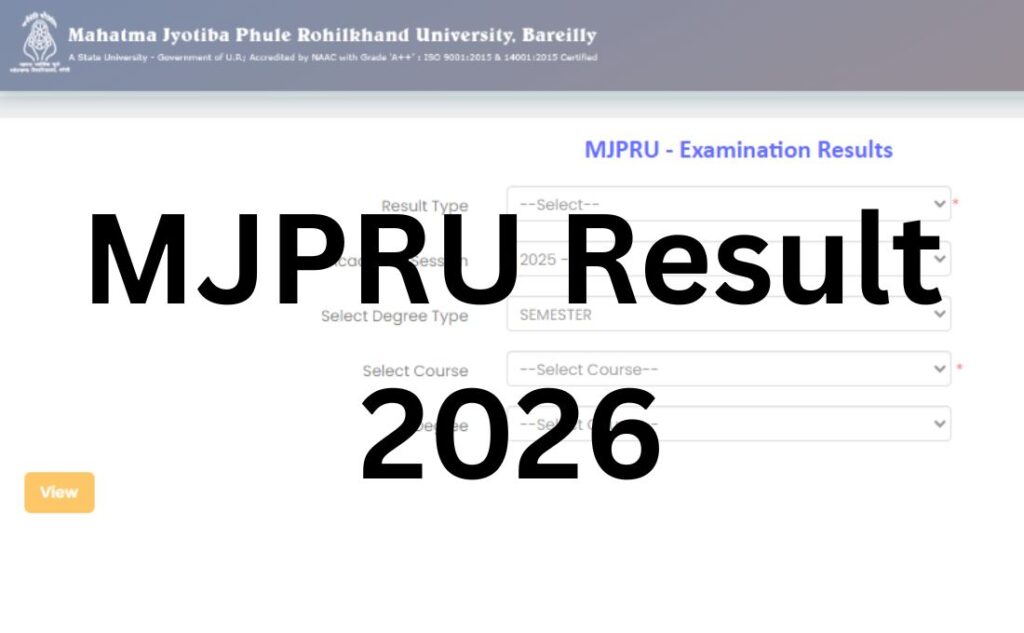
MJPRU’s result portal uses a multi-step filter system — you can’t just type your roll number and go. Here’s the full sequence:
- Visit the IUMS Result Portal: Go to mjpruiums.in/Results/ExamResult.aspx.
- Select the Result Type from the dropdown: Main Result, Re-Evaluation Result, Improvement Result, Supplementary/Back Result, Single Subject Result, Left Out (Practical), or Special Permission. Pick the one matching your exam type — this is the step most students skip and the most common reason results “don’t show.”
- Select the Academic Session (e.g., 2025–2026) from the dropdown.
- Select Degree Type — Semester or Annual.
- Select Course — Under Graduate, Post Graduate, UG Diploma, PG Diploma, or Ph.D.
- Select your specific Degree (e.g., B.A., B.Com, M.Sc.) from the filtered list.
- Enter your Roll Number.
- Enter the captcha code exactly as shown.
- Submit — your result will display with subject-wise marks and status.
- Download or print the provisional marksheet for your records.
Tip: If your result shows blank or an error, first re-check that you selected the correct Result Type and Academic Session before assuming your result isn’t out — a wrong dropdown selection is by far the most common cause.
Login Credentials Required
| Credential | Purpose |
|---|---|
| Roll Number | Primary identifier for result lookup |
| Result Type Selection | Determines which result category the portal searches (Main, Reval, Improvement, etc.) |
| Academic Session, Degree Type, Course, Degree | Narrow the search to your exact examination record |
| Captcha | Verifies you’re not a bot |
Details Mentioned on the MJPRU Result
- Student Name
- Roll Number
- Course and Semester/Year
- Subject-wise marks (theory and practical, where applicable)
- Total marks, percentage, and Grade/CGPA (where applicable)
- Result status (Pass / Fail / RL / ATKT)
- Signature/seal reference of the Controller of Examinations
Note: The online result is a provisional marksheet, meant for immediate reference. For admissions, recruitment, or scholarship verification, most institutions will ask for the original marksheet issued by MJPRU or your affiliated college — don’t treat the downloaded PDF as the final document.
How to Download Your MJPRU Marksheet?
- Complete the result-checking steps above until your result is displayed on screen.
- Use the Print/Save option on the result page to generate a PDF.
- Check every field — name spelling, roll number, subject codes, and marks — against your admit card immediately.
- Keep both a digital copy and a physical printout, since some admission and job processes still ask for a physical provisional marksheet.
Passing Marks
MJPRU, like most Uttar Pradesh state universities, sets minimum passing thresholds per paper (typically combining theory and internal/practical components). Exact passing percentages differ by course and are set out in each programme’s examination ordinance — this article won’t state a single blanket number, since applying the wrong figure to the wrong course can genuinely mislead you. Check your specific course’s examination scheme (available via mjpru.ac.in) or confirm with your college’s examination cell for the precise passing criteria that apply to you.
Scrutiny vs. Challenge Evaluation — Know the Difference Before You Pay
This is where most competitor guides blur two very different processes into one generic “revaluation” — and where MJPRU students often overpay or pick the wrong option.
Scrutiny (Re-totaling Only)
- What it does: Re-checks that every answer was actually marked and re-totals your scores. It does not re-grade or re-assess the quality of your answers.
- Best for: Suspected addition errors or a page/question that seems to have been skipped by the examiner.
- Cost: Around ₹50 per paper (confirm current fee via official notification).
Challenge Evaluation (Full Re-Evaluation)
- What it does: A completely fresh evaluation of your answer script by a different examiner — used when you believe the marking itself, not just the totaling, was wrong.
- Best for: Cases where you genuinely believe your answers deserved more marks than awarded.
- Cost: Reported around ₹2,000–2,500 per subject (figures vary across sources and sessions — confirm the current fee via official notification before applying).
- Refund rule: If the marks awarded after challenge evaluation increase by 20% or more over your original marks, a partial fee refund is typically issued. Exact refund amounts have been reported differently across sessions, so check the current circular.
How to decide: If you think a page or question was left unmarked or the total was added wrong, go with scrutiny first — it’s cheaper and faster. If you believe the actual grading of your answers was unfair, challenge evaluation is the appropriate (and costlier) route.
Supplementary / Back Paper Result
MJPRU lists “Supplementary/Back Result” as its own selectable Result Type on the IUMS portal — treat it as a separate lookup, not a variant of the main result. Additionally, MJPRU periodically conducts a Special Back Examination (MCQ/OMR-based) for students with a limited number of backlog papers across specific semesters under the NEP 2020 curriculum — eligibility is usually capped at 4–5 main theory/practical papers, with vocational/elective subjects excluded from that cap. Watch for a separate notification and application window for this exam, since it isn’t automatically clubbed with your regular result.
Name-wise Result
MJPRU’s own IUMS portal is built around roll-number-based lookup, filtered further by result type, session, and course — it does not offer a native name-based search. Some third-party aggregator sites claim name-wise search; treat these as secondary references only and always confirm against your official roll-number-based result.
Previous Year Results (Archive)
The IUMS portal’s Academic Session dropdown goes back several years (2014–2015 through the current session as of this writing), so older results are generally still retrievable — you just need to select the correct past session, degree type, and course rather than assuming archived results have been removed.
Common Problems While Checking MJPRU Result — And Fixes
| Problem | Likely Cause | Fix |
|---|---|---|
| Result shows blank/no record | Wrong Result Type, Session, or Course selected | Re-check all five dropdown selections before assuming the result isn’t out |
| “RL” (Result Later) or withheld status | Exam-form discrepancy, pending fee, or unfair-means case pending resolution | Contact your college examination cell and MJPRU’s Controller of Examinations office |
| Website slow or unresponsive | Heavy traffic right after a declaration | Try off-peak hours; avoid repeated refreshing |
| Landed on the wrong portal | Confused mjpruiums.in with the similarly named admission.mjpruims.in | Double-check the domain spelling; regular semester results are on mjpruiums.in, not the admission portal |
| Roll number not recognised | Typo, or wrong Academic Session selected | Verify roll number against your admit card; try adjacent sessions if unsure |
| Captcha mismatch | Case sensitivity or similar-looking characters | Refresh and re-enter carefully |
What to Do After Your Result?
- If you passed: Save and print your provisional marksheet. Apply for your original marksheet/degree through your college or the university as per the usual process.
- If you have a backlog: Watch for the Supplementary/Back Result window or the Special Back Examination notification if your backlog qualifies under its limited-paper criteria.
- If your marks seem wrong: Decide between scrutiny (re-totalling) and challenge evaluation (full re-grading) based on what you actually suspect went wrong, then apply within the deadline stated on your result notification.
- If your result shows “RL” or withheld: Don’t wait — contact your college’s examination cell immediately, since these statuses usually need a specific action (fee clearance, form correction) before release.
- If you’re proceeding to admissions or a job: Confirm whether the receiving institution accepts the provisional marksheet or requires the original document from MJPRU/your college.
Important Links Table
| Resource | Link |
|---|---|
| Official University Website | Click Here |
| Result Portal (IUMS) | Click Here |
| LLB/LLM Entrance Result Portal (separate, do not confuse) | Click Here |
| Student Forms (scrutiny, challenge evaluation, migration, etc.) | Click Here |
Frequently Asked Questions (FAQs)
Q1. Where can I check my MJPRU result?
Ans. Your MJPRU result is available on the IUMS portal at mjpruiums.in/Results/ExamResult.aspx. The main site, mjpru.ac.in, provides information and links to this portal but doesn’t host the result tool itself.
Q2. What details do I need to check my MJPRU result?
Ans. You need your Roll Number, plus correct selections for Result Type, Academic Session, Degree Type, and Course/Degree on the portal before your result will display.
Q3. Why does my MJPRU result show blank even though results are declared?
Ans. This is usually because one of the five dropdown selections (Result Type, Session, Degree Type, Course, Degree) doesn’t match your actual exam record. Re-check each selection before assuming the result isn’t out.
Q4. Is mjpruiums.in the same as admission.mjpruims.in?
Ans. No. These are two different portals with very similar names. mjpruiums.in is for regular UG/PG semester and annual results. admission.mjpruims.in is specifically for LLB/LLM entrance exam results. Check the spelling carefully.
Q5. Is the online MJPRU result valid for admissions and job applications?
Ans. The online result is a provisional marksheet, useful for immediate reference. For admissions, recruitment, and scholarship verification, you may need to submit the original marksheet issued by MJPRU or your college.
Q6. What is the minimum passing percentage at MJPRU?
Ans. Passing criteria vary by course and are defined in each programme’s examination ordinance. Check your specific course’s scheme via mjpru.ac.in or your college’s examination cell rather than assuming one fixed percentage applies to all courses.
Q7. What is the difference between scrutiny and challenge evaluation at MJPRU?
Ans. Scrutiny only re-totals your marks and checks that nothing was left unmarked – it doesn’t re-grade your answers, and costs around ₹50 per paper. Challenge evaluation is a full re-evaluation by a different examiner, costing significantly more (reported around ₹2,000–2,500 per subject), with a partial refund if your marks rise by 20% or more.
Q8. How much does MJPRU challenge evaluation cost?
Ans. Reported fees are around ₹2,000–2,500 per subject, though figures have varied across sessions in available sources. Always confirm the current fee through the official notification before applying.
Q9. What does “RL” mean on my MJPRU result?
Ans. “RL” typically stands for Result Later or withheld status, usually caused by an exam-form discrepancy, a pending fee, or a pending unfair-means case. Contact your college’s examination cell and the Controller of Examinations for resolution.
Q10. How long does it take for MJPRU to declare results after exams?
Ans. Results are generally declared 30 to 60 days after an examination cycle, though the exact timeline depends on the course and session. Check official notifications for your specific course.
Q11. What is the MJPRU Special Back Examination?
Ans. It’s an MCQ/OMR-based exam for students with a limited number of backlog papers (commonly up to 4-5 main papers) across specific semesters under the NEP 2020 curriculum. It requires a separate application and isn’t automatically combined with your regular result.
Q12. Can I check my MJPRU result by name instead of roll number?
Ans. The official IUMS portal is built around roll-number lookup filtered by result type, session, and course. It does not offer native name-based search; treat any third-party name-search claims with caution.
Q13. My MJPRU result has an error in my name or marks. What should I do?
Ans. Contact your college’s examination cell first, and escalate to the Controller of Examinations office at MJPRU if unresolved. For suspected marking errors, use scrutiny or challenge evaluation depending on what you believe went wrong.
Q14. Where do I check MJPRU supplementary/back paper results?
Ans. Select “Supplementary/Back Result” specifically under the Result Type dropdown on the IUMS portal — it’s a separate lookup from the Main Result option.
Q15. Is there a name-wise or roll-number-forgotten recovery option?
Ans. The university’s own systems require a roll number for lookup. If you’ve lost your roll number, check your admit card, exam form receipt, or contact your college’s examination cell to recover it.
Q16. What if the MJPRU result website is too slow to load?
Ans. Heavy traffic right after a result declaration can slow the portal. Try checking during off-peak hours and avoid excessive refreshing, which can add to server load.
Q17. Are MJPRU improvement exam results checked the same way as regular results?
Ans. Yes – select “Improvement Result” under Result Type on the same IUMS portal, along with the matching session and course details.
Q18. Does applying for challenge evaluation guarantee higher marks?
Ans. No. Challenge evaluation means a fresh, independent evaluation – your marks could go up, stay the same, or even go down. The partial fee refund only applies if the difference is 20% or more in your favour.