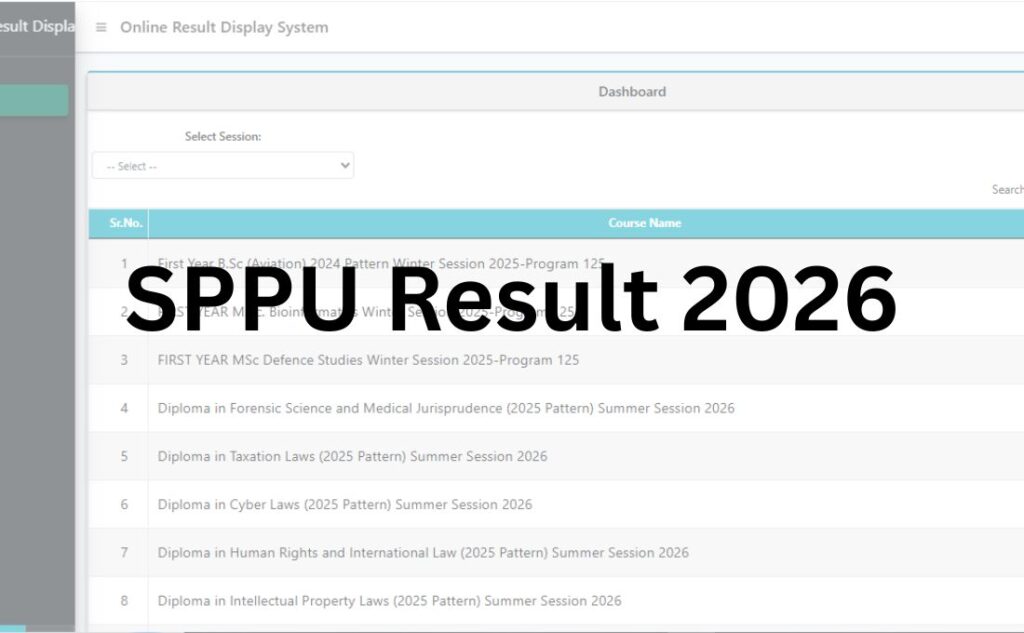

The SPPU Result for the winter and summer session exams of the academic session 2025-26 have been released online by Savitribai Phule Pune University at its official website. The university released the First Year B.Pharmacy(2019 Pattern) Summer Session 2026, First Year M.Pharm(2019 Pattern) Summer Session 2026, Second Year BACHELOR OF SCIENCE (COMPUTER SCIENCE)([(NON-NEP) to NEP 2019-2024 PATTERN)]) Summer Session 2026, Second Year BACHELOR OF SCIENCE (COMPUTER APPLICATION)([(NON-NEP) to NEP 2019-2024 PATTERN)]) Summer Session 2026, etc., at its online portal at www.unipune.ac.in on July 23, 2026.
While trying to check their SPPU Result for any of the bachelor’s, master’s, or doctorate-level course, the students need to use his/ her seat number and mother’s name as the required login credentials. The SPPU Result 2026 will contain key details like the student’s name, father’s name, mother’s name, roll number, course name, semester, subject-wise marks, status of pass or fail, etc.
It is to be noted that the university has uploaded the provisional marksheets of the SPPU Result 2026 at the online portal, while the original marksheet will be shared with the students by their respective faculty members within a few weeks.
| SPPU Result 2026 | |
| University Name | Savitri Bai Phule Pune University (SPPU) |
| Exam | Semester Exam |
| Category | University Result |
| Status | Released |
| SPPU Result 2026 Date | August 23, 2026 |
| Login Credential | Seat Number and Mother’s Name |
| Official Website | www.unipune.ac.in |
SPPU Result 2026 Direct Link
The Savitri Bai Phule Pune University has activated the online portal, sharing access to the SPPU Result 2026 at its official website. To make the process easier for all the students, we have added the direct links connecting them with the subject-wise SPPU Result in the table below:
| SPPU Result 2026 | ||
| Result | Date | Link |
| First Year B.Pharmacy(2019 Pattern) Summer Session 2026 | August 23, 2026 | Click Here |
| First Year M.Pharm(2019 Pattern) Summer Session 2026 | August 23, 2026 | Click Here |
| Second Year BACHELOR OF SCIENCE (COMPUTER SCIENCE)([(NON-NEP) to NEP 2019-2024 PATTERN)]) Summer Session 2026 | August 21, 2026 | Click Here |
| Second Year BACHELOR OF SCIENCE (COMPUTER APPLICATION)([(NON-NEP) to NEP 2019-2024 PATTERN)]) Summer Session 2026 | August 21, 2026 | Click Here |
| First Year Masters in Hotel Management and Catering Technology(2025 PATTERN) Summer Session 2026 -Program 125 | August 20, 2026 | Click Here |
| FIRST YEAR Master of Computer Application (MCA) INTEGRATED(2025 PATTERN) Summer Session 2026 -Program 125 | August 20, 2026 | Click Here |
| First Year BACHELOR OF SCIENCE (ANIMATION)((2025 Pattern(NEP 2020))) Summer Session 2026 | August 19, 2026 | Click Here |
| Second Year BACHELOR OF COMMERCE (BUSINESS MANAGEMENT)((2024 Pattern(NEP 2020))) Summer Session 2026 | August 18, 2026 | Click Here |
| Second Year BACHELOR OF COMMERCE (COMPUTER APPLICATION)((2024 Pattern(NEP 2020))) Summer Session 2026 | August 18, 2026 | Click Here |
| Second Year BACHELOR OF SCIENCE([(NON-NEP) to NEP 2019-2024 PATTERN)]) Summer Session 2026 | August 18, 2026 | Click Here |
| Second Year BACHELOR OF SCIENCE (HOSPITALITY STUDIES)([(NON-NEP) to NEP 2019-2024 PATTERN)]) Summer Session 2026 | August 18, 2026 | Click Here |
| Second Year BACHELOR OF SCIENCE (CYBER & DIGITAL SCIENCE)([(NON-NEP) to NEP 2019-2024 PATTERN)]) Summer Session 2026 | August 18, 2026 | Click Here |
| First Year Pharm.D. (Doctor of Pharmacy) Summer Session 2026 | August 17, 2026 | Click Here |
| Second Year Pharm.D. (Doctor of Pharmacy) Summer Session 2026 | August 17, 2026 | Click Here |
| Second Year BACHELOR OF SCIENCE (BIOTECHNOLOGY)([(NON-NEP) to NEP 2019-2024 PATTERN)]) Summer Session 2026 | August 14, 2026 | Click Here |
| First Year M.Sc. BOTANY(2019 Pattern) Summer Session 2026 | August 13, 2026 | Click Here |
| First Year M.Sc. BOTANY(2019 Pattern) N+2+1 Winter Session 2025 | August 13, 2026 | Click Here |
| Second Year M.Sc. BOTANY(2019 Pattern) N+2+1 Winter Session 2025 | August 13, 2026 | Click Here |
| Second Year M.Sc. BOTANY((NON-NEP TO NEP) (2019-2023 PATTERN)) Summer Session 2026 | August 13, 2026 | Click Here |
| First Year MA/M.Sc. GEOGRAPHY (2019 Pattern) N+2+1 Winter Session 2025 | August 13, 2026 | Click Here |
| Second Year MA/M.Sc. GEOGRAPHY (2019 Pattern) N+2+1 Winter Session 2025 | August 13, 2026 | Click Here |
| FIRST YEAR Advanced Course in Journalism Winter Session 2025-Program 125 | August 11, 2026 | Click Here |
| First Year M.Sc. BOTANY(2023 Pattern (NEP 2020)) Summer Session 2026 | August 11, 2026 | Click Here |
| Second Year M.Sc. BOTANY(2023 Pattern (NEP 2020)) Summer Session 2026 | August 11, 2026 | Click Here |
| Second Year B.Pharmacy(2019 Pattern) Summer Session 2026 | August 11, 2026 | Click Here |
| First Year M.Sc. BOTANY((2025 Pattern (NEP 2020))) Summer Session 2026 | August 06, 2026 | Click Here |
| First Year M.Sc. ANALYTICAL CHEMISTRY(2019 Pattern) Summer Session 2026 | August 06, 2026 | Click Here |
| Second Year M.Sc. ANALYTICAL CHEMISTRY(2019 Pattern) Summer Session 2026 | August 06, 2026 | Click Here |
| Second Year M.Sc.(Computer Science)(2019 Pattern) N+2+1 Winter Session 2025 | August 06, 2026 | Click Here |
| First Year M.Sc.(Computer Science)(2019 Pattern) N+2+1 Winter Session 2025 | August 06, 2026 | Click Here |
| Second Year M.Sc.(Computer Science)(2019 Pattern) Summer Session 2026 | August 05, 2026 | Click Here |
| Second Year M.Sc.Tech/M.Tech(2019 Pattern) N+2+1 Winter Session 2025 | August 05, 2026 | Click Here |
| Third Year M.Sc.Tech/M.Tech(2019 Pattern) N+2+1 Winter Session 2025 | August 05, 2026 | Click Here |
| First Year M.Sc.(Computer Science)(2019 Pattern) Summer Session 2026 | August 05, 2026 | Click Here |
| First Year M.Sc.ORGANIC CHEMISTRY(2019 Pattern) Summer Session 2026 | August 05, 2026 | Click Here |
| Second Year M.Sc.ORGANIC CHEMISTRY(2019 Pattern) Summer Session 2026 | August 05, 2026 | Click Here |
| FIRST YEAR B.F.A..(Applied Arts) Winter Session 2025-Program 125 | August 05, 2026 | Click Here |
| B.V.A. (PAINTING) Winter Session 2025-Program 125 | August 05, 2026 | Click Here |
| FIRST YEAR B.F.A.Painting Winter Session 2025-Program 125 | August 05, 2026 | Click Here |
| FIRST YEAR B.V.A. (Sculpture) Winter Session 2025-Program 125 | August 05, 2026 | Click Here |
| First Year Master of Computer Applications (MCA)(2020 Pattern) Winter Session 2025 (N+2+1) | August 05, 2026 | Click Here |
| Second Year Master of Computer Applications (MCA)(2020 Pattern) Winter Session 2025 (N+2+1) | August 05, 2026 | Click Here |
| First Year Master of Computer Application (MCA)((2024 Pattern(NEP 2020))) Summer Session 2026 | August 05, 2026 | Click Here |
| Second Year Master of Computer Application (MCA)((2024 Pattern(NEP 2020))) Summer Session 2026 | August 05, 2026 | Click Here |
| First Year Master of Computer Application (MCA)((2025 Pattern(NEP 2020))) Summer Session 2026 | August 05, 2026 | Click Here |
| First Year MBA((2019 REVISED)) Winter Session 2025 (N+2+1) | August 05, 2026 | Click Here |
| Second Year MBA((2019 REVISED)) Winter Session 2025 (N+2+1) | August 05, 2026 | Click Here |
| FIRST YEAR Advanced Course in School Psychology (ACSP) Winter Session 2025-Program 125 | August 05, 2026 | Click Here |
| First Year M.Sc. Computer Applications(2020 Pattern) Summer Session 2026 | August 05, 2026 | Click Here |
| Second Year M.Sc. Computer Applications(2020 Pattern) Summer Session 2026 | August 05, 2026 | Click Here |
| FIRST YEAR M.A. Defence and Strategic Studies Winter Session 2025-Program 125 | August 05, 2026 | Click Here |
| First Year BACHELOR OF BUSINESS ADMINISTRATION(2019 Pattern) Winter Session 2025 | August 03, 2026 | Click Here |
| Second Year BACHELOR OF BUSINESS ADMINISTRATION(2019 Pattern) Winter Session 2025 | August 03, 2026 | Click Here |
| First Year Bachelor of Business Administration(COMP. APPLI.)(2019 Pattern) Winter Session 2025 | August 03, 2026 | Click Here |
| Second Year Bachelor of Business Administration(COMP. APPLI.)(2019 Pattern) Winter Session 2025 | August 03, 2026 | Click Here |
| Third Year Bachelor of Business Administration(COMP. APPLI.)(2019 Pattern) Winter Session 2025 | August 03, 2026 | Click Here |
| First Year Bachelor of Business Administration (I.B.) (2019 Pattern) Winter Session 2025 | August 03, 2026 | Click Here |
| Second Year Bachelor of Business Administration (I.B.) (2019 Pattern) Winter Session 2025 | August 03, 2026 | Click Here |
| S.E.(2024 Pattern (NEP 2020)) Summer Session 2026 | August 02, 2026 | Click Here |
Steps to Check SPPU Result 2026
The online portal to access the SPPU Result 2026 is now live at the official website, and students can connect to it by following the steps detailed below:
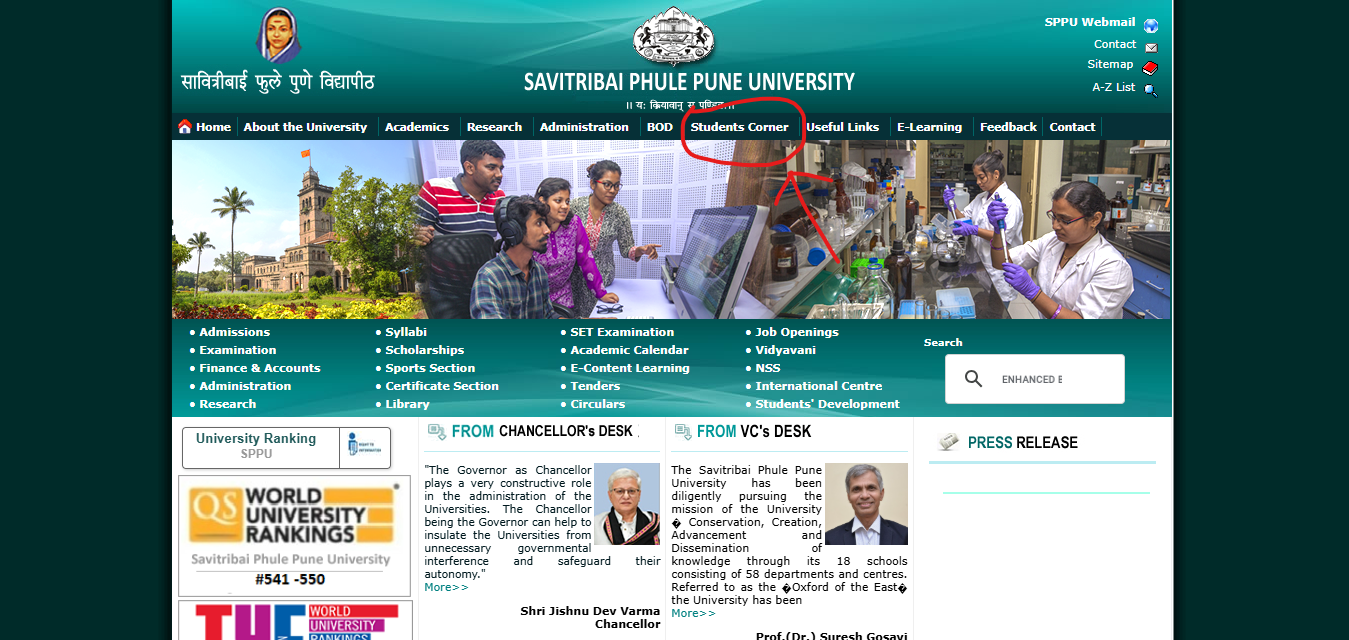
Step 1: Visit the official website of the Savitri Bai Phule Pune University (SPPU) at www.unipune.ac.in
Step 2: On the menu bar of the home page, click on the tab for “Students Corner”
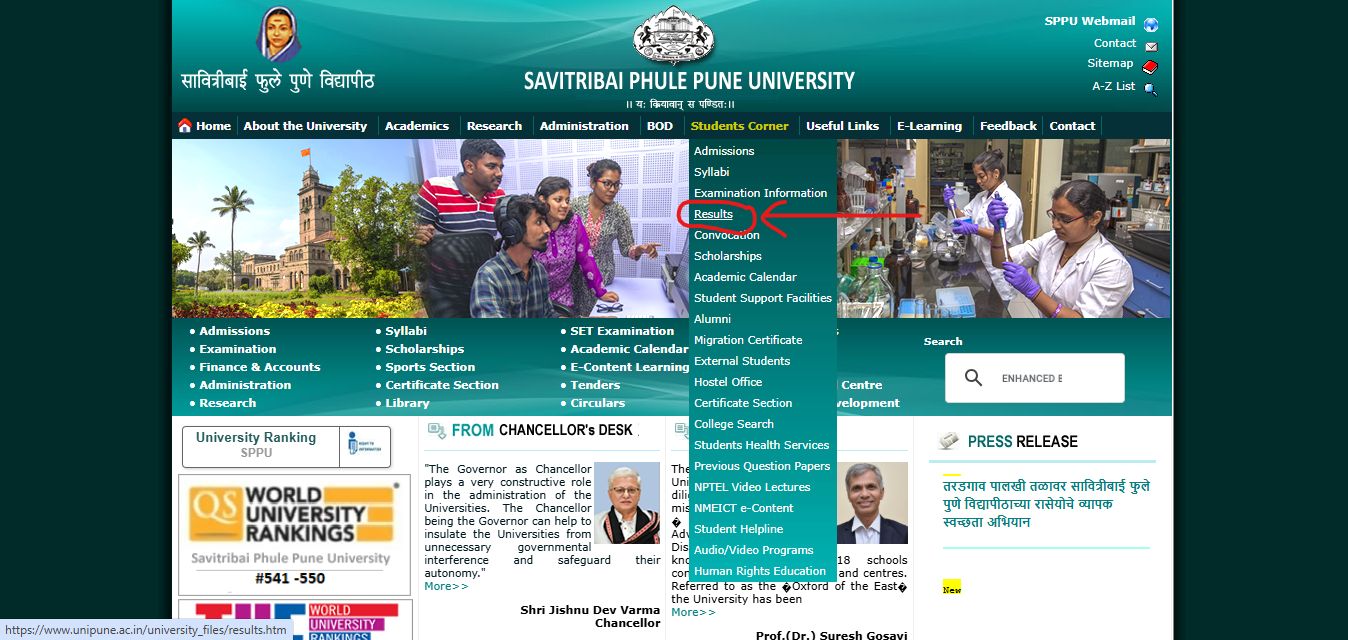
Step 3: From the drop-down menu, click on the tab for “Results”
Step 4: A new window will open on the screen
Step 5: Click on the tab “Click Here for Online Results”
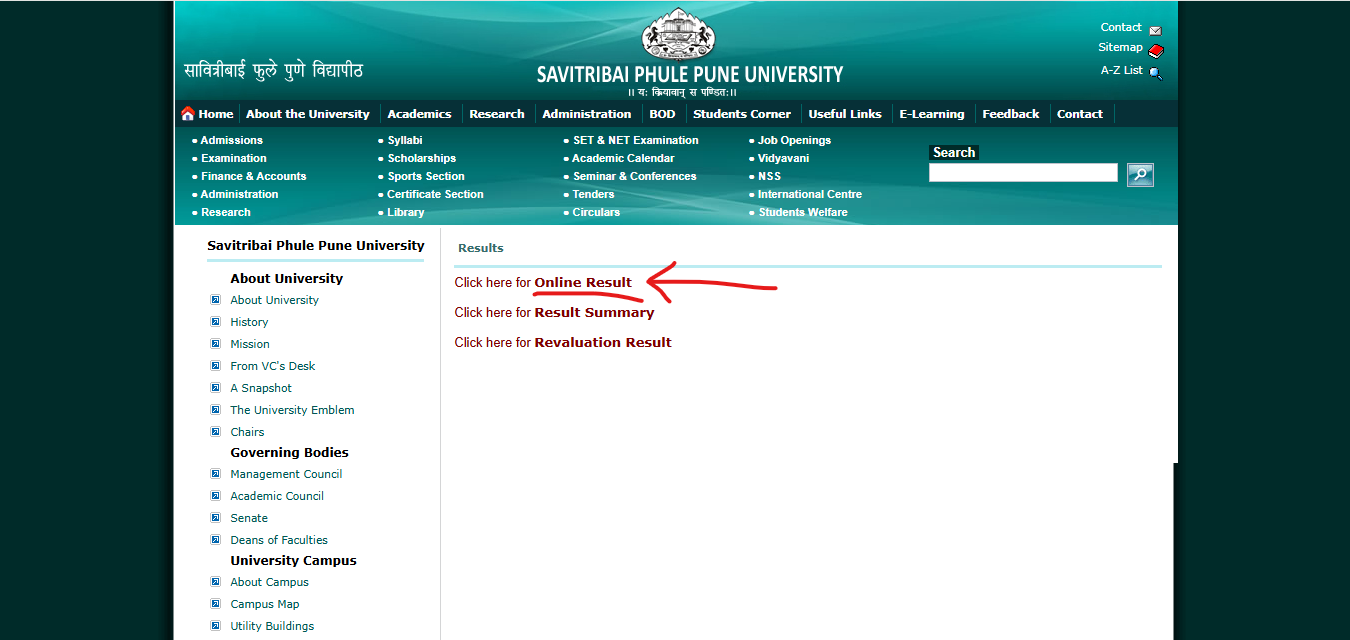
Step 6: A new window will open on the screen containing the subject-wise SPPU Result 2026
Step 7: Click on “Go for Result” in front of the respective result to check
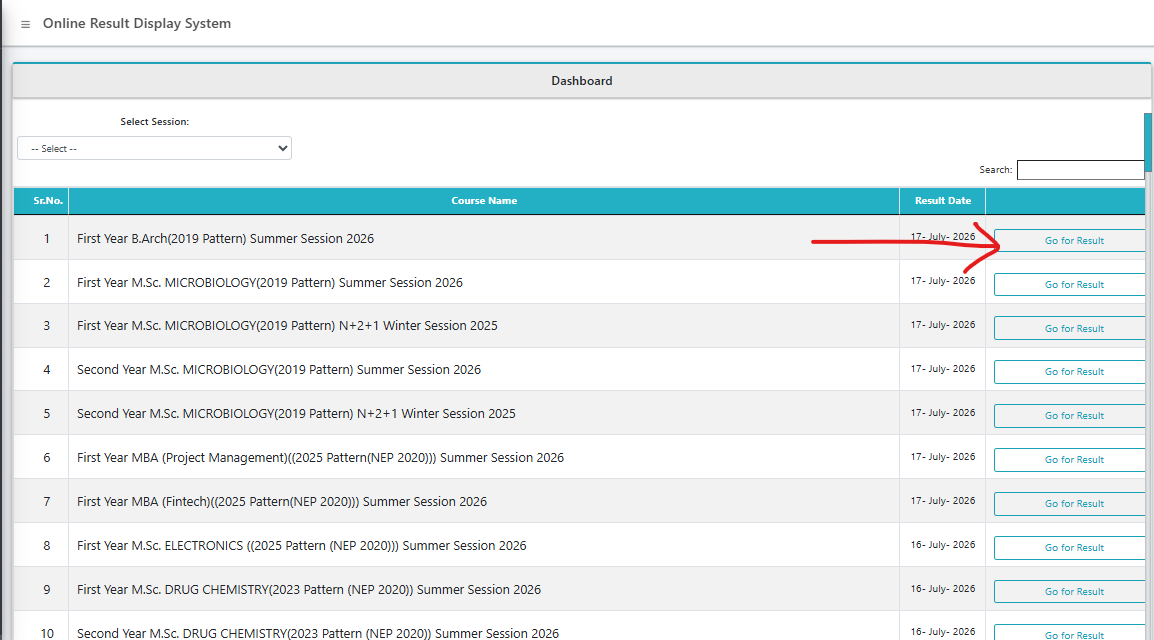
Step 8: The login form to access the UNIPUNE Result 2026 will open on the screen
Step 9: Enter the “Seat Number” and “Mother’s Name” in the asked sections of the login form
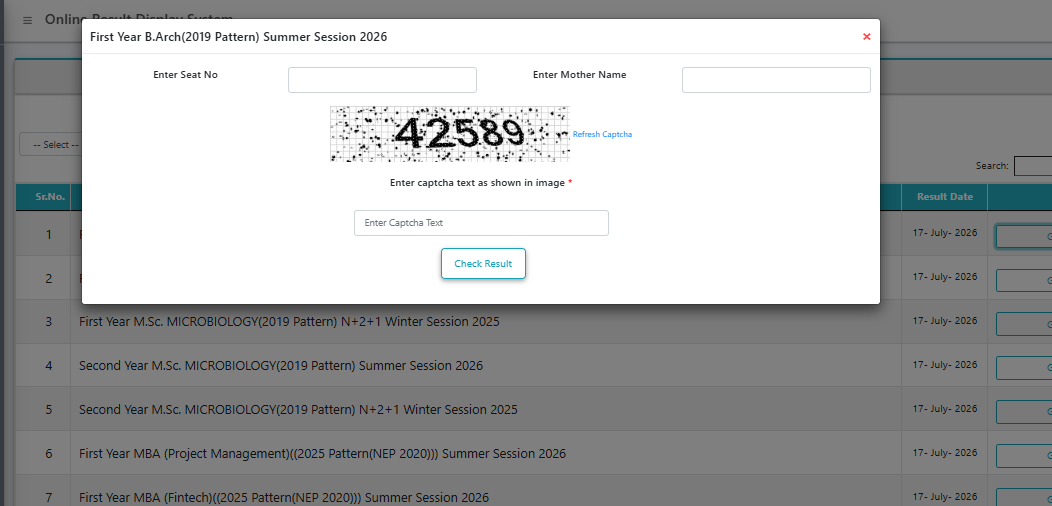
Step 10: Enter the “Security Captcha” and process the form by clicking on “Check Result”
Step 11: The SPPU Result 2026 will appear on the screen
Step 12: Check and save the result for later use.
Details Mentioned on SPPU Result 2026
After accessing their SPPU Result 2026, all the students need to check and verify some key details like:
- Student’s name
- Father’s name
- Mother’s name
- College name
- Course name
- Roll number
- Date of birth
- Semester
- Subject code
- Subject-wise marks
- Status of pass or fail, etc.
SPPU Result 2026 – FAQs
Q1. Why do I see multiple SPPU websites for results – unipune.ac.in, onlineresults.unipune.ac.in, and exampcr.unipune.ac.in?
Ans. SPPU splits its online services across separate portals. The main site, unipune.ac.in, is for notifications and navigation. Actual results are hosted at onlineresults.unipune.ac.in. Photocopy and revaluation applications are handled on a different portal, exampcr.unipune.ac.in. Using the wrong one is a common reason students think their result “isn’t out” when it actually is.
Q2. What login details do I need to check my SPPU result?
Ans. You’ll need your Seat Number and Mother’s Name as they appear in university records. Some pages also ask for a security captcha. If your mother’s name was recorded differently at admission (spelling, order of names), the portal may reject a correct entry – check your admission form for the exact spelling used.
Q3. Is PRN the same as Seat Number for SPPU results?
Ans. No. Your PRN (Permanent Registration Number) identifies you across your entire degree, while your Seat Number is exam-specific and changes every semester. The result portal login uses Seat Number, but the photocopy and revaluation portal (exampcr.unipune.ac.in) asks for PRN. Keep both handy.
Q4. Can I apply for revaluation directly, or do I need the photocopy first?
Ans. At SPPU, photocopy and revaluation are usually opened as separate windows, and most students are expected to review the photocopy of their answer book before deciding whether revaluation is worth the fee. Check the specific notification for your exam, since some subjects allow direct revaluation without a photocopy step.
Q5. How much does SPPU charge for revaluation or a photocopy?
Ans. Fees differ for professional and non-professional courses and are revised periodically, so treat any number you see online as indicative only. Please verify the exact photocopy and revaluation fee via the official notification on exampcr.unipune.ac.in before making a payment.
Q6. Is the SPPU revaluation fee refundable?
Ans. Generally, once paid, the fee is not refunded simply because your marks don’t change after revaluation. However, if your application isn’t processed at all – for instance due to a technical or eligibility issue – the university may refund it. Confirm the current refund policy in the official instructions before applying.
Q7. How long does SPPU take to release revaluation results?
Ans. Revaluation results are typically declared a few weeks after the application window closes, though the exact timeline varies by exam and session. If revised marks come out, they replace your original score in official records. Keep checking the same result portal you used originally for updates.
Q8. My SPPU result shows “provisional” – what does that mean?
Ans. A provisional marksheet is the online copy released immediately after evaluation, meant for quick reference and admissions purposes. It’s valid for most short-term needs, but the original marksheet, issued through your college or the examination section, is the document you’ll eventually need for final verification and record-keeping.
Q9. Does SPPU release results for affiliated colleges too, or only university departments?
Ans. Both. SPPU conducts examinations and declares results for its own departments as well as hundreds of affiliated colleges across Pune, Ahmednagar, and Nashik districts. Students from affiliated colleges check results the same way – through the official portal using Seat Number and Mother’s Name – regardless of which college they attend.
Q10. What if my SPPU result is not showing up at all?
Ans. First confirm your exact course, pattern (like NEP 2020 vs the older credit pattern), and semester, since SPPU lists results separately for each combination. If the result genuinely hasn’t been declared yet, it won’t appear regardless of correct login details. Also try again after some time, as portals can be slow right after a fresh declaration.
Q11. Why does SPPU list separate results for “2023 Pattern” and “2025 Pattern (NEP 2020)” for the same course?
Ans. SPPU has been transitioning courses to NEP 2020 in phases, so students admitted in different years may follow different syllabi and evaluation patterns even within the same programme. Always select the result link matching your specific admission year and pattern – picking the wrong one will show “no record found.”
Q12. Does SPPU give grace marks?
Ans. Yes, grace marks may be awarded automatically under certain university-defined conditions, usually to help a student clear a subject they’ve narrowly failed. The exact rules depend on the course and regulations in force for that academic session, so they aren’t applied uniformly to every result.
Q13. I found an error in my marks or personal details on the SPPU marksheet. What should I do?
Ans. Report it to your college’s examination cell or SPPU’s Board of Examination and Evaluation as soon as possible, along with supporting documents like your admit card or ID proof. Corrections to name, marks, or other details generally aren’t accepted after long delays, so raise it early.
Q14. Can I check someone else’s SPPU result using just their name?
Ans. No. SPPU’s result portal doesn’t offer name-based or roll-list search for privacy reasons – you need the individual’s Seat Number and Mother’s Name. This is different from some other university portals that display name-wise merit lists; SPPU keeps results strictly login-gated.
Q15. Where can I check my previous years’ SPPU results?
Ans. Older results sometimes remain accessible on the same result portal by selecting the relevant exam session from the dropdown. If an old result doesn’t load, contact your college’s examination department directly – they can issue a duplicate marksheet or confirm your historical record from university archives.
Q16. What is ATKT, and how does it affect my SPPU result?
Ans. ATKT (Allowed to Keep Term) lets students with a limited number of backlog subjects move to the next year while clearing pending papers alongside regular exams. Your SPPU result will show your ATKT status along with subject-wise pass/fail details. Check your specific course rules for the maximum ATKT subjects allowed.
Q17. My SPPU marksheet shows CGPA, but I need a percentage for a job or admission form. What do I do?
Ans. Many SPPU courses under NEP 2020 report results in CGPA, while some older-pattern courses still show percentages directly. If you need a percentage equivalent, use the conversion formula mentioned on your marksheet or request an official conversion certificate from your college’s examination cell.
Q18. I’ve cleared all my papers – what should I do after checking my SPPU result?
Ans. Download and save your provisional marksheet immediately. Depending on your course, next steps could include collecting your original marksheet from college, applying for degree certificate/convocation, starting admission to the next course, or beginning placement processes. Keep multiple copies of your result for future reference.