
If you’re searching for your Rajju Bhaiya University Result 2026, you’re not alone – and you’ve probably already noticed the confusion online. Some sites call it “PRSU,” others say “Prof. Rajendra Singh University,” and older pages still refer to it as “Allahabad State University.” All three names point to the same institution. This guide clears that up first, then walks you through exactly where and how to check your result, download your marksheet, and what to do next – whether you’ve passed, have a backlog, or want to apply for scrutiny.
Quick note before you start: Result declaration dates vary by course, semester, and session. Always cross-check the exact date and portal link for your specific programme on the official website before assuming your result isn’t out – some courses are declared weeks apart from others even within the same session.
Quick Highlights
| Detail | Information |
|---|---|
| University Name | Prof. Rajendra Singh (Rajju Bhaiya) University, Prayagraj (PRSU) |
| Formerly Known As | Allahabad State University |
| Location | Prayagraj, Uttar Pradesh |
| Result Status | Declared on a rolling basis for various UG/PG/law courses — check your specific course |
| Academic Session | 2025–26 (odd and even semester, verify per course) |
| Courses Covered | UG, PG, LLB, BALLB, diploma, and PhD programmes across affiliated colleges |
| Official Website | prsuniv.ac.in |
| Result-Specific Portal | mresult.prsuprayagraj.in |
| Samarth Academic Portal | prsuniv.samarth.edu.in |
| Category | University Result |
| Credentials Needed | Roll number / registration number (course-dependent) |
| Marksheet Availability | Downloadable PDF via result portal |
| Revaluation/Scrutiny | Available; window usually opens shortly after result — confirm dates via notification |
| Backlog/Back Paper Result | Declared separately from regular results |
| Latest Update | Regular, back-paper, and law-programme results have been released in phases through 2026 |
Direct Result Link – Which Portal Do You Actually Need?
This is where most students get stuck, because Rajju Bhaiya University runs three different online systems, and each one serves a different purpose:
- prsuniv.ac.in – the university’s main website. Use this to find official notifications, the “Examination” or “Results” menu, and links to the other two portals. Start here if you’re unsure which one applies to you.
- mresult.prsuprayagraj.in – a dedicated result-checking subdomain used for declaring semester-wise UG, PG, and professional course (LLB/BALLB) results. This is usually where you’ll enter your roll number and actually see your marks.
- prsuniv.samarth.edu.in (Samarth eGov portal) – the university’s broader academic management system, used for admissions, registration, and in some cases revaluation/scrutiny applications and certain result-linked academic records.
| Rajju Bhaiya University Result 2026 | |||
| Main / Semester Examination | Medical Examination Result | Back Examination Result | Ph.D. Examination Result / R.D.C. Decision |
| Session 2025-26 | Session 2024-25 | Session 2024-25 (Special Back Paper Exam Even ) | R.D.C. Letter 2023 |
| Session 2024-25 | Session 2023-24 | Session 2023-24 (Special Back Paper Exam ) | Back Pre-Ph.D Course Work Examination Result |
| Session 2023-24 | Session 2022-23 | Session 2021-22 (Special Back Paper Exam Mass Copy/UFM) | Pre-Ph.D Course Work Examination Result |
| Session 2022-23 | Session 2021-22 | Session 2018-19 | Pre-Ph.D Course Work Internal Test 1 Result |
| Session 2021-22 | Session 2020-21 | Session 2018-19 (Special Back Paper Exam) | Pre-Ph.D Course Work Internal Test 2 Result |
| Session 2020-21 | Session 2019-20 | Session 2017-18 | |
| Session 2019-20 | Session 2018-19 | Session 2016-17 | |
| Session 2018-19 | Session 2017-18 | ||
| Session 2017-18 | Session 2016-17 | ||
| Session 2016-17 | |||
About Rajju Bhaiya University
Prof. Rajendra Singh (Rajju Bhaiya) University, Prayagraj was established in 2016 under the Uttar Pradesh State Universities (Amendment) Act, 2013, and is recognised by the University Grants Commission (UGC). It was earlier known as Allahabad State University before being renamed. The university has a wide network of affiliated colleges across the Prayagraj region and offers undergraduate, postgraduate, and diploma programmes across Arts, Commerce, Science, Education, and Law, alongside select postgraduate programmes in Agriculture. If your college result card mentions “PRSU” as the awarding body, this is the university you’re dealing with – the name change doesn’t affect the validity of your degree or marksheet.
Latest Result Update
Through 2026, the university has released results in phases rather than all at once. Recent declarations have covered undergraduate semester results (BA, BSc, BCom across multiple semesters), postgraduate results (MA, MSc, MCom, MEd across various subjects), and law programme results (LLB and BALLB across several semesters), along with select back-paper and postgraduate agriculture results.
Because declarations are staggered by course and semester, the safest way to confirm your own status is to check the specific result link for your course and semester on the official portal, rather than assuming from a general announcement. If your result isn’t listed yet, it typically means your specific course/semester batch hasn’t been processed – not that something is wrong with your application.
Courses Covered Under PRSU Result System
| UG Programmes | PG Programmes | Professional/Other |
|---|---|---|
| BA | MA | LLB |
| BSc | MSc | BALLB |
| BCom | MCom | BEd / MEd |
| BBA | — | Diploma courses |
| BCA | — | PhD |
Results for affiliated college students are also processed through the same central system – you don’t need a separate portal for your specific college.
How to Check Rajju Bhaiya University Result 2026 – Step by Step?
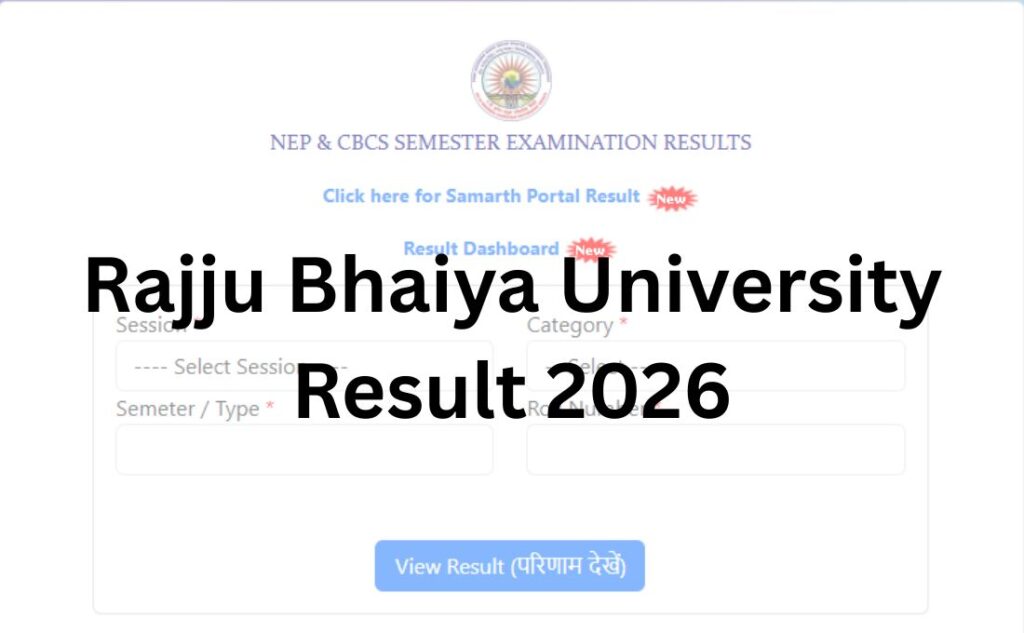
- Go to the official website – prsuniv.ac.in, or directly to the result portal mresult.prsuprayagraj.in if you already know your course result is listed there.
- Look for the “Result” or “Examination” section. On the main site, this is usually under a “Students” or “Examination” menu.
- Select your session – choose the correct academic session (2025-26, or the relevant year) since older sessions are archived separately.
- Choose your course and semester from the list of declared results – results are usually listed course-wise and semester-wise, not as one combined list.
- Enter your roll number or registration number in the field provided. Some result links may also ask for your date of birth.
- Submit and view your result – your scorecard will display on screen with subject-wise marks.
- Download the PDF and save it, then take a printout for your records.
Login Credentials Required
| Credential | When it’s needed |
|---|---|
| Roll Number | Almost always required — this is your primary identifier |
| Registration Number | Required on some result links, especially for PG and law courses |
| Date of Birth | Occasionally required as a secondary verification field |
| Captcha | Standard anti-bot verification on most result pages |
Details Mentioned on Your Result
Your PRSU scorecard typically includes:
- Candidate name
- Roll number and registration number
- Course and semester/year
- Examination session
- Subject-wise marks (theory and practical, where applicable)
- Total marks obtained
- Result status (Pass/Fail/Reappear)
- Division or grade (where applicable)
- CGPA or percentage, depending on the course’s evaluation scheme
Always verify every field on your scorecard the moment it’s available. Errors in name spelling, roll number, or subject codes are far easier to correct immediately after declaration than months later.
How to Download Your Marksheet?
- Visit the result portal and locate your declared result using the steps above.
- Once your result displays on screen, look for a “Download,” “Print,” or PDF icon.
- Save the file to your device with a clear filename (e.g., your roll number + semester).
- Take at least one printed copy – many colleges and future employers ask for a physical copy alongside the original marksheet issued by your college.
- If the download doesn’t trigger, try right-clicking the result page and using your browser’s “Print to PDF” option as a workaround.
Passing Marks
Passing criteria (minimum theory marks, minimum practical marks, and overall aggregate requirements) vary by course, faculty, and sometimes by the specific curriculum framework your batch follows. Grace marks provisions, where applicable, are also course-specific.
We’re not listing exact numbers here deliberately – these figures are set by the university’s examination ordinance and can change between sessions or courses. Please verify your course’s exact passing criteria through your college examination department or the official notification for your session, rather than relying on any third-party figure (including this one, if it were listed).
Scrutiny / Revaluation Process
If you’re not satisfied with your marks, PRSU allows students to apply for scrutiny or revaluation within a window after results are declared.
General process:
- Wait for the official scrutiny/revaluation notification – this is usually released a short period after the main result, though the exact number of days varies by session.
- The application is typically submitted online through the Samarth portal or a dedicated form linked from the result notification.
- A prescribed fee (per subject or per paper) is payable at the time of application; this fee changes between sessions, so always check the current notification rather than any fixed figure you find online.
- Once submitted, the revised marks (if any change occurs) are published separately, usually as a supplementary notification.
Supplementary / Back Paper Result
Students with a backlog in one or more subjects need to appear for back-paper (supplementary) exams, and these results are declared separately from the regular semester result – often weeks or months later. If you don’t see your back-paper result alongside your main semester result, this is expected; check the back-exam-specific notification and result link instead of assuming it’s missing from the main list.
Name-wise Result
PRSU’s result system is primarily roll-number and registration-number based. Name-wise search is not consistently available across all result links – if you don’t know your roll number, retrieving your result by name alone may not work, and you should check your admit card or college records first.
Previous Year Results
Older session results (2024-25, 2023-24, and earlier, including those issued under the Allahabad State University name) are generally archived and accessible through the same result portals, usually under a separate “session” or “archive” dropdown. If you can’t locate a past result, your college examination cell is the fastest route to a certified copy.
Common Problems While Checking Your Result – And Fixes
| Problem | Likely Cause | What to Do |
|---|---|---|
| Website loading slowly | High traffic right after declaration | Try again after 30–60 minutes, or check late at night/early morning |
| “Result not found” error | Result not yet declared for your specific course/semester, or wrong roll number entered | Double-check your roll number; confirm your course’s declaration status separately |
| Invalid captcha repeatedly | Page caching issue | Refresh the page fully (Ctrl+F5) before retrying |
| Server error / page not loading | Server overload or maintenance | Wait and retry; try the alternate portal (main site vs. result subdomain) |
| Browser compatibility issue | Older browser or blocked scripts | Switch to Chrome/Firefox and ensure JavaScript is enabled |
| Roll number not recognized | Typo, or you’re on the wrong session/portal | Re-check your admit card; confirm you’ve selected the correct academic session |
What to Do After Your Result?
- If you’ve passed: Download and save your marksheet, and begin the process for your original marksheet/degree through your college.
- If you have a backlog: Note your back-paper subjects and watch for the supplementary exam notification and schedule.
- If you want to apply for scrutiny: Follow the revaluation process above within the applicable window.
- If you’re moving to the next semester/year: Check your college for registration deadlines for the upcoming session.
- If you’re applying for further studies or jobs: Most institutions and employers accept the provisional online marksheet initially, but will eventually ask for your original marksheet and degree certificate — start that process with your college early.
Important Links
| Resource | Link |
|---|---|
| Official Website | www.prsuniv.ac.in |
| Result Portal | www.mresult.prsuprayagraj.in |
| Samarth Academic Portal | www.prsuniv.samarth.edu.in |
| Admission Portal | www.prsunivadm.samarth.edu.in |
| Examination Cell Contact | Available via the “Contact” page on prsuniv.ac.in |
FAQs
Q1. Is Rajju Bhaiya University the same as Allahabad State University?
Ans. Yes. Prof. Rajendra Singh (Rajju Bhaiya) University, Prayagraj was earlier known as Allahabad State University. The renaming doesn’t affect the validity of degrees or marksheets issued under either name.
Q2. What is PRSU?
Ans. PRSU is the commonly used abbreviation for Prof. Rajendra Singh (Rajju Bhaiya) University, Prayagraj – the official name of the institution.
Q3. Where can I check my Rajju Bhaiya University result 2026?
Ans. You can check it on the official website prsuniv.ac.in, or directly on the dedicated result portal mresult.prsuprayagraj.in, depending on which one hosts your specific course’s result link.
Q4. What details do I need to check my result?
Ans. You’ll typically need your roll number, and in some cases your registration number and date of birth, along with a captcha code.
Q5. Why is my result not showing yet?
Ans. Results are declared course-wise and semester-wise in phases, not all at once. Your specific batch may simply not have been processed yet – check the notification for your exact course and semester.
Q6. How do I download my marksheet?
Ans. Once your result displays after entering your roll number, use the download or print option on the result page to save it as a PDF, then take a printout for your records.
Q7. Is the online marksheet my final marksheet?
Ans. No, the online result is generally a provisional marksheet. Your original marksheet is issued separately by your college or the university examination department.
Q8. What if I fail in one or two subjects?
Ans. You’ll need to appear for the back-paper/supplementary exam for those subjects. Back-paper results are declared separately from the main semester result.
Q9. How do I apply for revaluation or scrutiny?
Ans. After the official scrutiny/revaluation notification is released, you can typically apply online through the Samarth portal or a linked form, along with the prescribed fee for that session.
Q10. What is the revaluation fee?
Ans. The fee varies by session and is set in the official notification each time. Always confirm the current fee through the latest circular rather than relying on old figures.
Q11. Can I check my result using just my name?
Ans. Name-wise search isn’t consistently available. It’s best to have your roll number or registration number ready before checking.
Q12. What should I do if the result website is slow or not loading?
Ans. This usually happens due to heavy traffic right after a result is declared. Try again after some time, or attempt the alternate portal (main site vs. result-specific subdomain).
Q13. Where do I find my roll number if I’ve lost it?
Ans. Check your admit card, previous marksheet, or contact your college’s examination department.
Q14. Are LLB and BALLB results declared on the same portal as UG/PG results?
Ans. Yes, law programme results are declared through the same result ecosystem, though sometimes on a separate notification from regular UG/PG announcements – check both if you don’t see yours immediately.
Q15. Can I access previous years’ results?
Ans. Yes, older session results are generally archived and accessible through the same portals under a separate session/archive option.
Q16. Who do I contact for result-related errors?
Ans. Report any discrepancy in your marksheet (wrong name, roll number, or marks) to your college administration or the university’s examination department as soon as you notice it.