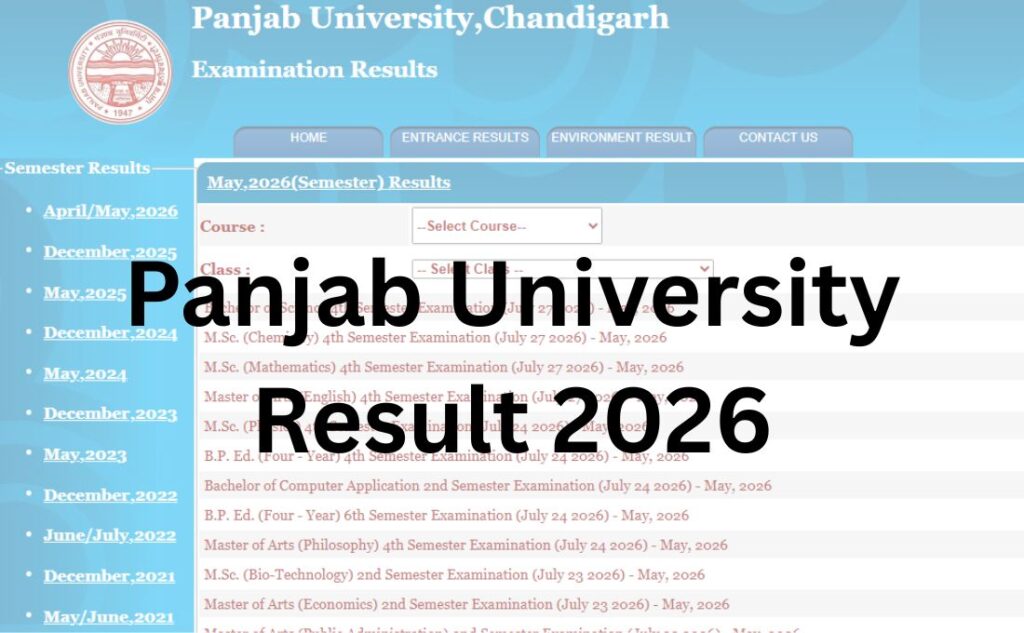

If you are looking for your Panjab University Result, you have come to the right place. This guide gives you the official result link, a simple step-by-step process to check your marks online, and everything else you need to know — from login details and marksheet download to revaluation and backlog rules.
Panjab University, Chandigarh (PUCHD), is one of India’s oldest and most respected universities, and it declares results for hundreds of undergraduate, postgraduate, diploma, and doctoral programmes throughout the year. Because results for different courses come out on different dates, this page is built to stay useful no matter which semester or programme you are checking.
Important: Panjab University does not send results by email, SMS, or post. The only way to check your result is through the official university result portal. Always verify your marks on the official website before taking any action.
Quick Highlights
| Detail | Information |
|---|---|
| University Name | Panjab University, Chandigarh (PUCHD) |
| Established | 1882 (as University of Punjab, Lahore); relocated to Chandigarh in 1956 |
| Result Status | Declared on a rolling, course-wise basis throughout the year |
| Academic Session | 2025–26 |
| Courses Covered | UG, PG, Diploma, Certificate, PhD, Entrance Tests (PU-CET) |
| Category | University Result |
| Official Website | www.puchd.ac.in |
| Result Portal | www.results.puexam.in |
| Required Credentials | Roll number / registration number, and in some cases date of birth |
| Marksheet Availability | Provisional marksheet available online; final marksheet from the Examination Branch |
| Revaluation | Available; apply within the window announced for each result |
| Supplementary/Reappear | Available for backlog subjects in the next exam cycle |
| Latest Update | Check the “Examination → Results” tab on www.puchd.ac.in for the newest notifications |
Panjab University Result 2026 Direct Link
The direct link connecting students with the subject wise login portal to access the Panjab University Result 2026 is attached in the table below:
| Panjab University Result 2026 Direct Link | ||
| Result | Date | Direct Link |
| M.Sc. (Microbial Biotechnology) 2nd Semester Examination – May, 2026 | August 14, 2026 | |
| B.Sc. Agriculture 2nd Semester Examination – May, 2026 | August 13, 2026 | |
| Master of Computer Applications (MCA) (Two Year Degree Programme) 2nd Semester Examination – May, 2026 | August 13, 2026 | |
| Master of Laws (LLM 2 Year Course at UILS) 2nd Semester Examination – May, 2026 | August 12, 2026 | |
| Master of Laws [UILS] (LLM One Year Course) 2nd Semester Examination – May, 2026 | August 12, 2026 | |
| Master of Physical Education 2nd Semester Examination – May, 2026 | August 12, 2026 | |
| B.Sc. (Microbial and Food Technology) 4th Semester Examination – May, 2026 | August 12, 2026 | |
| PG Diploma in Guidance & Counselling 2nd Semester Examination – May, 2026 | August 11, 2026 | |
| Master of Arts (Public Administration) 1st Semester Examination – May, 2026 | August 10, 2026 | |
| Master of Arts (Police Administration) 4th Semester Examination – May, 2026 | August 10, 2026 | |
| B.Sc. (Hons) (Bio-Informatics) 6th Semester Examination – May, 2026 | August 10, 2026 | |
| B.Sc. (Home Science) (FYUP) 2nd Semester Examination – May, 2026 | August 07, 2026 | |
| M.Sc. (Zoology) 2nd Semester Examination – May, 2026 | August 07, 2026 | |
| Bachelor of Commerce (FYUP) 4th Semester Examination – May, 2026 | August 07, 2026 | |
| Bachelor of Computer Application (FYUP) 4th Semester Examination – May, 2026 | August 07, 2026 | |
| Bachelor of Business Administration (FYUP) 4th Semester Examination – May, 2026 | August 06, 2026 | |
| PG Diploma in Mass Communication 2nd Semester Examination – May, 2026 | August 06, 2026 | |
| Bachelor of Arts 2nd Semester Examination – May, 2026 | August 06, 2026 | |
| Bachelor of Arts (Honours) Social Sciences (FYUP) 6th Semester Examination – May, 2026 | August 06, 2026 | |
| Master of Arts (Sociology) 4th Semester Examination – May, 2026 | August 05, 2026 | |
| B.Sc. (Microbial and Food Technology) FYUP 4th Semester Examination – May, 2026 | August 05, 2026 | |
| Bachelor of Business Administration 4th Semester Examination – May, 2026 | August 04, 2026 | |
| B.Sc. (Fashion Designing) (FYUP) 4th Semester Examination – May, 2026 | August 03, 2026 | |
| Bachelor of Science 2nd Semester Examination – May, 2026 | August 03, 2026 | |
👉 Official Result Portal: www.results.puexam.in
You can also reach course-specific result pages from here:
- UG Examination Results: www.ugexam.puexam.in
- PG Examination Results: www.pgexam.puexam.in
- Datesheets (Exam Schedules): www.exams.puchd.ac.in
Note: Several third-party websites copy Panjab University’s results and rank on Google. These sites are not official and may display outdated or incorrect information. Always cross-check your result on the official portal linked above before using it for admission, job applications, or any official purpose.
About Panjab University
Panjab University was established in 1882 as the University of Punjab in Lahore (now in Pakistan) and was re-established in Chandigarh in 1956 after Partition. Today, it is recognised by the UGC and holds an A++ grade from NAAC with a CGPA of 3.68 on a four-point scale. It has also been ranked in the NIRF 2025 rankings.
The university’s main campus spans roughly 550 acres across Sector 14 (North Campus) and Sector 25 (South Campus) in Chandigarh. It has around 74 teaching and research departments, 6 constituent colleges, and over 200 affiliated colleges spread across Punjab, Chandigarh, and neighbouring regions.
Panjab University offers a wide mix of undergraduate, postgraduate, diploma, certificate, and doctoral programmes across arts, sciences, commerce, law, engineering, pharmacy, and management, along with distance and online education through its Centre for Distance and Online Education (CDOE/USOL).
Latest Result Update
Panjab University regularly declares results for different examinations throughout the year — including regular semester exams, entrance tests, and supplementary exams. Some of the university’s recent result-related announcements include the declaration of PU-CET (PG) results and PU-LL.B. entrance test results, both published on the official news section of puchd.ac.in.
Because Panjab University runs on a rolling result-declaration model — meaning different courses and semesters get their results at different times — there is no single “result date” for the whole university.
What this means for you: Instead of waiting for a general announcement, check the result portal directly using your course name and semester. The fastest way to confirm your exact result date is the “Examination → Results” and “Notice Board” sections on puchd.ac.in.
Courses Covered Under Panjab University Result
| Level | Popular Courses |
|---|---|
| Undergraduate (UG) | BA, BSc, BCom, BCA, BBA, B.Voc, BE, B.Pharmacy |
| Postgraduate (PG) | MA, MSc, MCom, MBA, MCA, M.Tech, M.Pharmacy |
| Diploma/Certificate | PG Diploma courses, short-term certificate courses |
| Doctoral | PhD across departments |
| Entrance-based | PU-CET (UG), PU-CET (PG), PU-LL.B. Entrance Test, PU-B.Ed. Entrance Test |
| Distance/Online | Courses under Centre for Distance and Online Education (CDOE/USOL) |
How to Check Panjab University Result Online?
Follow these steps carefully to avoid errors while checking your result:
Step 1: Visit the official website of the Punjab University at https://puchd.ac.in/
Step 2: On the menu bar of the home page, click on the tab for “Examination”
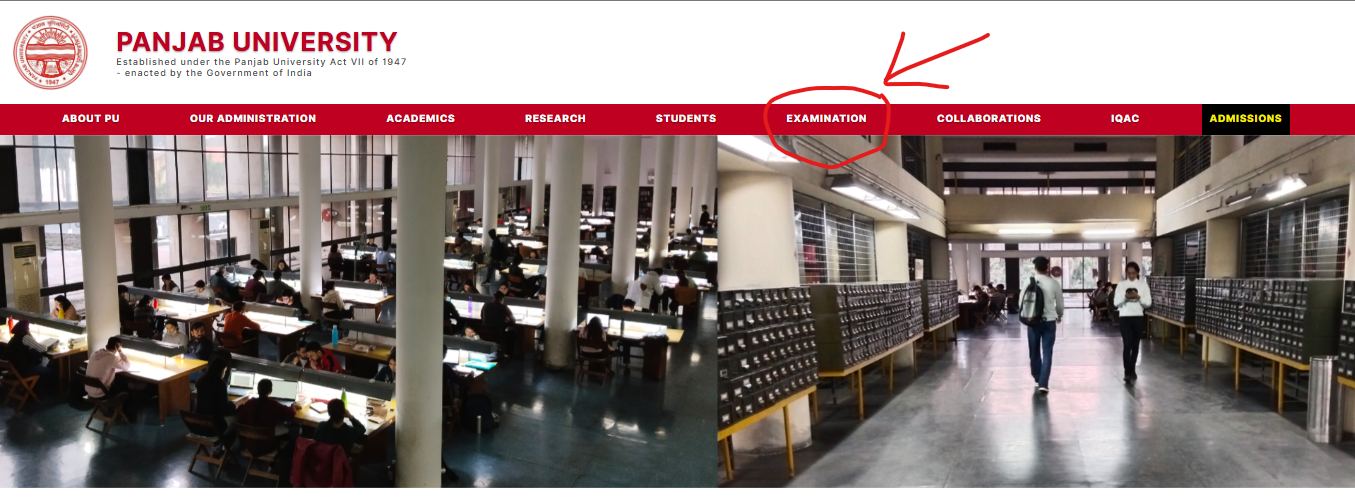
Step 3: On clicking the tab, a dropdown menu will appear on the screen
Step 4: Click on the tab for “Results”
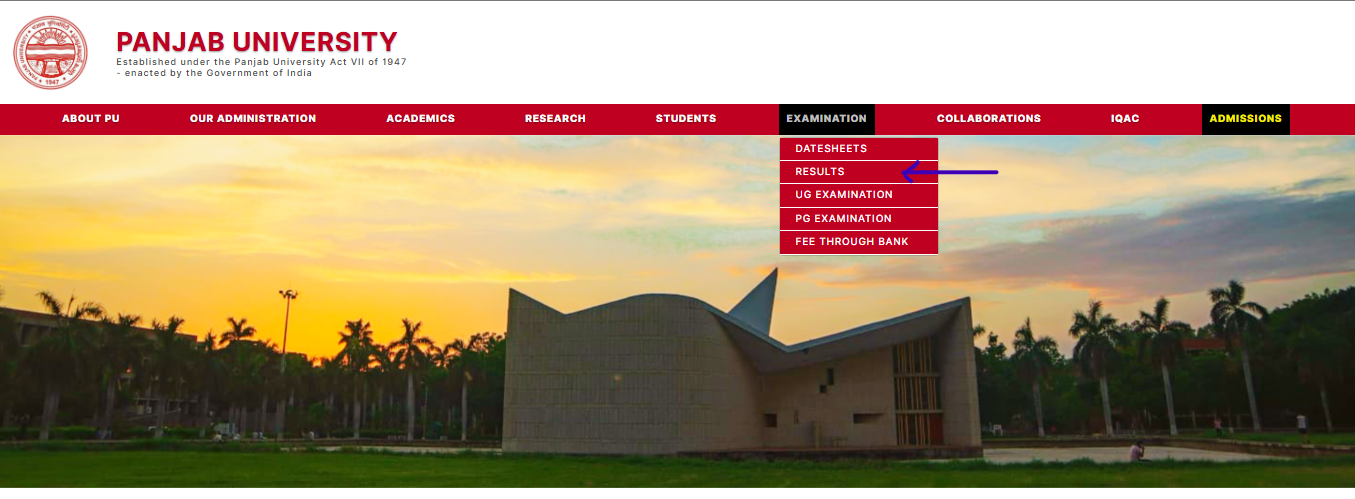
Step 5: On clicking this tab, a new window will open on the screen
Step 6: Select the “session” from the dropdown menu
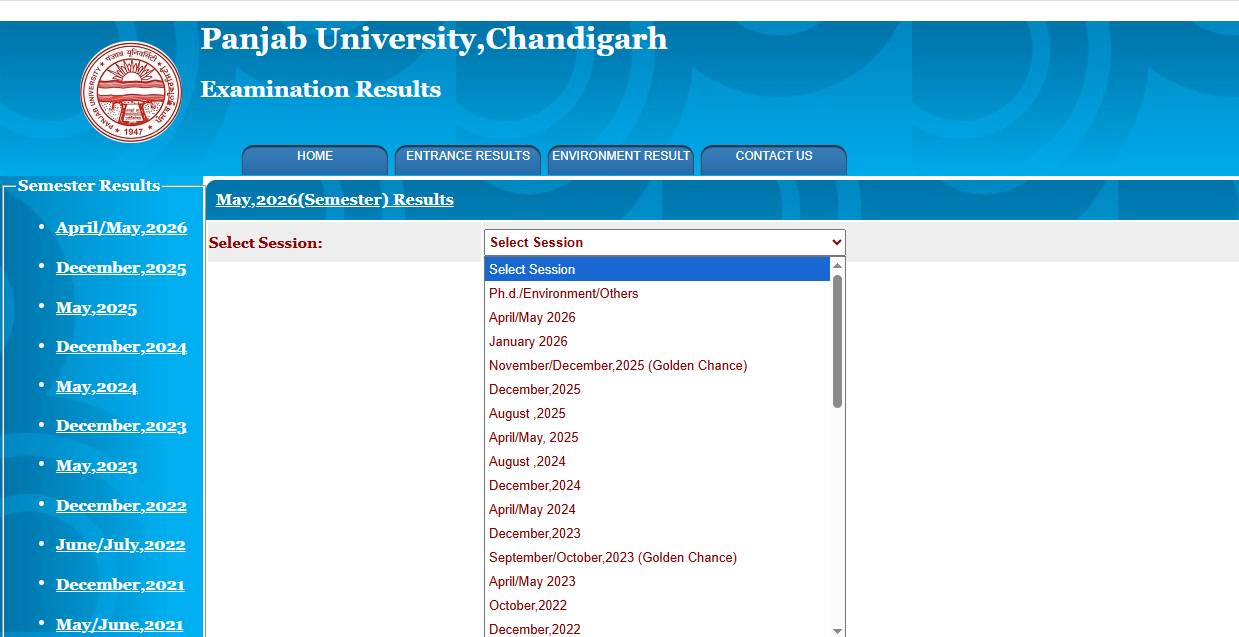
Step 7: The subject wise links connecting with the Panjab University Result 2026 will appear on the screen
Step 8: Click on the link and the PU Result 2026 will appear on the screen.
Details Mentioned on Your Result
Once your result is displayed, check that it clearly shows:
- Full name
- Roll number and enrollment/registration number
- Course and semester/year
- Subject-wise marks (theory and practical, where applicable)
- Total marks obtained and maximum marks
- Result status (Pass/Fail/Reappear/Compartment)
- CGPA/SGPA and percentage (for CBCS courses)
- Division (First/Second/Third, where applicable)
- Examination session (e.g., May–June or November–December)
If any of these details look incorrect, do not ignore it — report it to the Examination Branch immediately, since errors can delay your final marksheet or degree.
How to Download Your Marksheet?
- Go to results.puexam.in and open your course’s result page.
- Enter your roll number and required details.
- Once your result appears, look for a “Download,” “Print,” or “PDF” option.
- Save the file to your device with a clear name (e.g., “PU_BCom_Sem4_Marksheet”).
- Take a printout for your records, since colleges and employers often ask for a physical copy.
Important: The result shown online is usually a provisional marksheet. Your original, signed marksheet is issued later by the Examination Branch or your affiliated college, and may need to be collected in person or through your institution.
Passing Marks
Passing criteria can vary slightly by course, department, and scheme (annual vs semester vs CBCS), so always confirm exact figures for your specific programme from your syllabus or the Examination Branch. As a general pattern followed by most Indian universities, including Panjab University:
- Students usually need a minimum percentage in both theory and practical/internal assessment components separately, not just in the aggregate.
- An overall minimum aggregate (commonly around 35–40%, depending on the course) is also required to pass.
- Some departments award grace marks under specific university rules — for example, to help a student clear a single subject or reach the next grade boundary. Grace marks are usually applied automatically if eligible, but you can confirm this at your college examination cell.
Always check your specific course ordinance/scheme on puchd.ac.in for exact passing criteria, since science, professional, and CBCS-based courses can have different rules from traditional annual-mode courses.
Revaluation Process
If you are not satisfied with your marks, Panjab University allows students to apply for revaluation or rechecking within a specific window after the result is declared. Here’s how it generally works:
| Step | Details |
|---|---|
| Eligibility | Any student who has appeared for the exam and received a result |
| Application Window | A limited number of days after result declaration (check the specific notification for your result) |
| Where to Apply | Through the official PU examination portal or forms available at puchd.ac.in/Examination Branch |
| Fees | Charged per subject; the exact amount is notified with each result |
| Processing Time | Typically a few weeks after the application deadline closes |
| Outcome | Marks may increase, decrease, or remain unchanged after revaluation, as per university rules |
Note: Always apply for revaluation within the deadline mentioned in the official notification for your specific result — late applications are usually not accepted.
Supplementary / Backlog / Reappear Result
If you have failed in one or more subjects, you are usually eligible to reappear as a backlog/reappear candidate in the next examination cycle for that subject.
- Reappear exams are generally held along with the next scheduled semester/annual exams for that course.
- You will need to register separately for the reappear exam through your college or the university’s exam portal, along with the prescribed fee.
- The reappear result is published the same way as regular results — through results.puexam.in, using your roll number.
- Some departments also allow improvement exams for students who want to raise their score in a subject they already passed, subject to specific eligibility conditions set by the university.
Name-wise Result
Panjab University’s result portal is primarily designed for roll-number-based search, not name-based search. This is a common security practice to protect student privacy. If you don’t remember your roll number, check your admit card, fee receipt, or contact your college’s examination department.
Previous Year Results
Panjab University’s result portal typically retains an archive of previous sessions’ results, accessible by selecting the relevant academic session or year from a dropdown on the result page. If you need an old result and cannot find it on the portal, you can request a certified copy or duplicate marksheet from the Examination Branch.
Common Problems While Checking Results (And How to Fix Them)
| Problem | Likely Cause | Solution |
|---|---|---|
| Website is slow or not loading | High traffic right after result declaration | Wait a few minutes and try again, or check late at night/early morning |
| Server error / page not found | Temporary server overload | Refresh the page; try a different browser or device |
| “Result not found” or invalid roll number | Wrong roll number format, or result not yet declared for your course | Recheck your admit card; confirm your exact result has been announced |
| Captcha not loading or keeps failing | Browser compatibility issue | Clear cache/cookies, disable ad-blockers, or switch browsers |
| Result not declared yet | Your specific course/semester result is pending | Check the official notice board on puchd.ac.in for updated timelines |
| Marks look incorrect | Possible clerical error | Note the discrepancy and contact the Examination Branch or apply for verification/revaluation |
| PDF/download not working | Browser blocking pop-ups or downloads | Allow pop-ups for the site, or try downloading from a different device |
What to Do After the Result?
If you passed: Download and safely store your provisional marksheet. Keep checking for updates on when the original marksheet/degree will be available for collection. Start preparing for admission to the next semester, further studies, or placements.
If you failed in a subject (backlog): Note the subject(s) you need to clear. Register for the reappear/supplementary exam through your college before the deadline. Continue studying for that subject alongside your regular semester if allowed.
If you want to challenge your marks: Apply for revaluation or rechecking within the notified window, along with the required fee, through the official portal.
If you’re moving toward admission, placement, or higher studies: Most institutions accept the provisional online marksheet initially, but will eventually ask for the original document — plan to collect it from your college or the Examination Branch well before any deadline.
Important Links Table
| Resource | Link |
|---|---|
| Official Website | www.puchd.ac.in |
| Official Result Portal | www.results.puexam.in |
| Datesheets | www.exams.puchd.ac.in |
| University News & Notices | www.news.puchd.ac.in |
| Admissions Portal | www.admissions.puchd.ac.in |
| Contact / Enquiry | 1800-180-2065 / +91-172-2534818 |
Frequently Asked Questions (FAQs)
Q1. How can I check my Panjab University result?
Ans. Visit the official result portal at results.puexam.in, select your course and semester, enter your roll number, and click “Show Result.” Always use the official portal to avoid incorrect information from unofficial websites.
Q2. What is the official website for Panjab University results?
Ans. The official result portal linked from puchd.ac.in is results.puexam.in. Separate UG and PG exam portals are also available at ugexam.puexam.in and pgexam.puexam.in.
Q3. Do I need my roll number to check the result?
Ans. Yes. Panjab University results are checked using your roll number or registration number, along with details like date of birth in some cases. Name-based search is generally not available.
Q4. Will Panjab University send my result by email or SMS?
Ans. No. Panjab University does not send results by email, SMS, or post. You must check your result directly on the official result portal.
Q5. How can I download my Panjab University marksheet?
Ans. After your result appears on the result portal, use the “Download” or “Print” option to save a PDF copy. This is a provisional marksheet; the original is issued later through your college or the Examination Branch.
Q6. What if my Panjab University result is not declared yet?
Ans. Results are declared on a rolling, course-wise basis. If your result isn’t visible yet, check the official notice board on puchd.ac.in for updates specific to your course and semester.
Q7. How do I apply for revaluation at Panjab University?
Ans. You can apply for revaluation through the official examination portal within the window mentioned in your result notification, along with the prescribed per-subject fee.
Q8. What happens if I fail a subject at Panjab University?
Ans. You become eligible to reappear for that subject in the next examination cycle as a backlog/reappear candidate. You’ll need to register separately through your college.
Q9. Can I check previous years’ Panjab University results?
Ans. Yes, in most cases. The result portal usually allows you to select an earlier academic session from a dropdown menu. For very old results, contact the Examination Branch for a duplicate marksheet.
Q10. What details are shown on the Panjab University result?
Ans. Your result typically shows your name, roll number, subject-wise marks, total marks, CGPA/percentage, division, and pass/fail status for that semester or year.
Q11. Why is the Panjab University result website not loading?
Ans. This usually happens due to heavy traffic right after a result is declared. Wait a few minutes and try again, or use a different browser or device.
Q12. What are the passing marks at Panjab University?
Ans. Passing criteria vary by course and scheme but generally require a minimum percentage in both theory/practical components and an overall minimum aggregate. Check your specific course ordinance for exact figures.
Q13. Is Panjab University the same as Chandigarh University?
Ans. No. Panjab University (established 1882) is a separate central/state-funded university from Chandigarh University, which is a private university located in Mohali, Punjab. The official PU website explicitly clarifies this distinction.
Q14. How do I get my original Panjab University marksheet/degree?
Ans. After the provisional result is declared, the original signed marksheet and degree are issued later through your affiliated college or the university’s Examination Branch. Check with your college for the exact collection process.
Q15. Who do I contact if there’s an error in my Panjab University result?
Ans. Contact your college’s examination department first, or reach out directly to the Panjab University Examination Branch through the contact details listed on puchd.ac.in.
Q16. Does Panjab University offer improvement exams?
Ans. Yes, Panjab University allows improvement exams for students wanting to raise their score in a subject they’ve already passed, subject to specific eligibility rules set by the university.