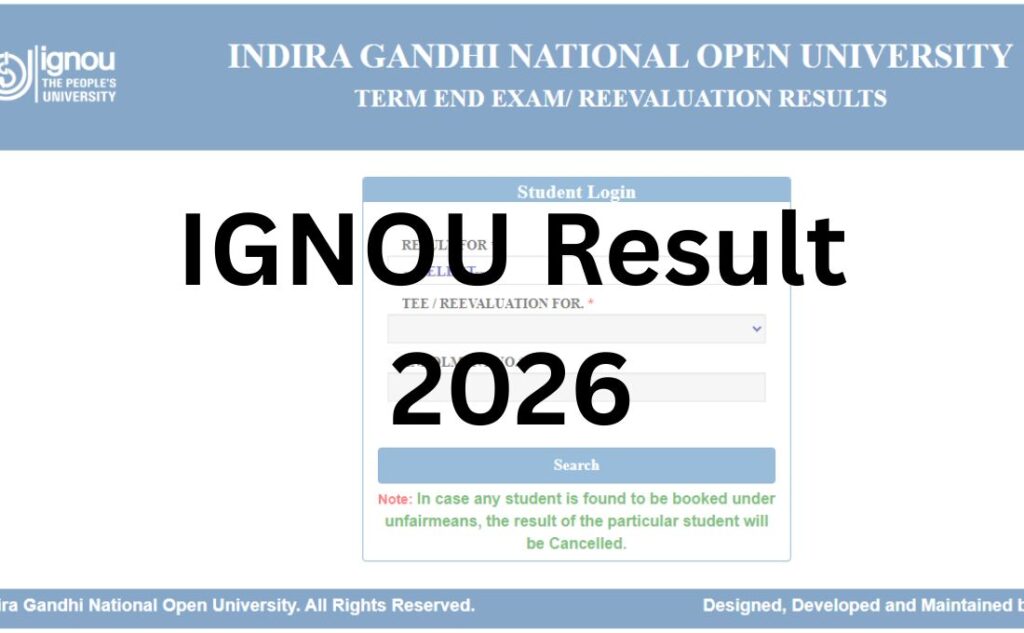

If you’ve just searched “IGNOU result” and landed here confused about which website to open, you’re not alone. Unlike most Indian universities, IGNOU doesn’t run one result portal – it runs several, and each one shows you something different. Get the wrong one and you’ll either see nothing, or see something that looks incomplete when it isn’t.
This guide sorts out exactly which portal does what, walks you through checking your Term-End Exam (TEE) result step by step, and covers everything that comes after – grade card, revaluation, marksheet, and the final degree.
Why IGNOU Feels More Confusing Than Other Universities?
Most universities have one result page. IGNOU, being India’s largest open and distance learning university, spreads student records across separate systems because it handles lakhs of students across UG, PG, diploma, and certificate programmes, in both Online and traditional ODL (Open and Distance Learning) modes, twice a year. That scale is exactly why the portals got split up – and exactly why so many students end up on the wrong one.
Here’s the map, so you never have to guess again:
| Portal | What it actually shows | Web address |
|---|---|---|
| Term-End Result Portal | Your latest TEE result AND your re-evaluation result, selected from a dropdown on the same page | www.termendresult.ignou.ac.in |
| Grade Card Portal | Your cumulative academic record – assignment, theory, practical, and project marks for every course you’ve ever taken | www.gradecard.ignou.ac.in |
| Examination Portal | Exam form status, payment confirmation, hall ticket, date sheet | www.exam.ignou.ac.in |
| iGRAM (Grievance Portal) | Where you file a complaint if your result or grade card doesn’t update after a reasonable wait | www.igram.ignou.ac.in |
| DigiLocker | Your final marksheet, provisional certificate, and digital degree – issued only after your programme is fully complete | www.digilocker.gov.in |
Result, Grade Card, Marksheet, Degree – What’s the Actual Difference?
This is worth slowing down for, because almost no other guide explains it clearly.
- Result – a pass/fail and marks snapshot for one specific Term-End Exam session (June or December).
- Grade Card – the running, cumulative record of every course you’ve attempted: assignment marks, theory marks, practical/project marks, and completion status, updated in phases as each course clears.
- Marksheet – the formal, signed document IGNOU issues once you complete a programme (or a particular exam cycle), used for official verification.
- Degree/Diploma Certificate – the final award document, issued after the programme is fully complete and typically distributed physically or digitally around convocation time.
Students often assume that once the “result” shows up, the “marksheet” and “degree” will follow automatically on the same page. They don’t. Each one lives on a different system and is released at a different stage of your academic journey.
How to Check Your IGNOU Result (Step by Step)?
- Go to the official Term-End Result portal at termendresult.ignou.ac.in – don’t search generic terms and click an aggregator link; type the URL directly or reach it via the “Results” link under Student Services on ignou.ac.in.
- Select “Result For” – choose either TERM-END-EXAM (TEE) or RE-EVALUATION from the dropdown, depending on which result you’re checking.
- Choose your TEE/re-evaluation session – the relevant June or December exam cycle.
- Enter your enrolment number carefully – this is typically a 9-digit number found on your ID card, admit card, or hall ticket. A single wrong digit returns no result at all, not an error message.
- Submit and view your result – subject-wise marks and status will display on screen.
- Save it immediately – take a screenshot or print/save as PDF. There’s no dedicated “my results” download vault on this portal, so you’re responsible for keeping your own copy.
Login Credentials You’ll Need
- Enrolment number (9 digits, sometimes reported as up to 10 for newer admissions – check your ID card if the field rejects your entry)
- Programme code, in some cases, depending on which portal you’re on
- No password is typically required on the public result-lookup portal itself, though the Samarth-based exam/admission portals do require account login with enrolment number and date of birth
What Your Result Actually Shows?
- Enrolment number and name
- Programme and course codes
- Subject-wise marks (theory, practical, and/or project where applicable)
- Assignment marks (reflected separately, often only on the Grade Card, not the result page)
- Pass/fail status per course
- Overall division or grade, where applicable
Why Your Result Might Look “Incomplete” – And What to Actually Do?
IGNOU doesn’t release results for every course, every student, on one single day. It updates them course-wise and programme-wise, in batches, over several weeks after the exam. This is normal, not a glitch. Before you panic:
- Wait it out first. Give it a few days and check again – new courses get added to your record continuously during the release window.
- Double-check your enrolment number. A typo returns a blank page, which looks identical to “result not declared yet.”
- Check the Grade Card portal separately. Sometimes a course clears on the Grade Card before it shows on the Result portal, or vice versa.
- Confirm your exam form and hall ticket were valid. If your exam form had an issue, the course won’t generate a result regardless of how you performed.
- Only escalate through iGRAM (igram.ignou.ac.in) if a genuinely unreasonable amount of time has passed and the rest of your cohort’s results for that course have been published.
How to Check Your IGNOU Grade Card?
- Visit gradecard.ignou.ac.in (or reach it via Student Services → Results → Grade Card on the main site).
- Select your programme/grade card category from the list.
- Choose your programme code from the dropdown.
- Enter your enrolment number.
- Submit to view your consolidated course-wise record.
Passing Marks
Passing requirements vary by course and component, so treat any specific number as indicative only and confirm against your own programme guide:
- Commonly cited passing threshold: around 35–40% in theory, checked separately for each component (theory, practical, assignment)
- Assignment and practical components generally need to be cleared independently of the theory paper
- Some professional or specialised courses use different thresholds
Always verify exact passing marks for your specific course against your programme guide or official notification – this varies enough between courses that a single blanket number would be misleading.
Revaluation / Re-Evaluation Process
IGNOU calls this “re-evaluation,” and – usefully – it lives on the same portal as your original result, just under a different dropdown option.
- Eligibility: Applies to Term-End Exam theory answer scripts only. Assignments, projects, practicals, and seminars are generally not eligible for re-evaluation.
- Application window: Commonly reported as needing to be submitted within roughly 30–40 days of result declaration – sources vary on the exact figure, so confirm the current deadline via the official notification before applying, since this window appears to have changed in the past.
- Fee: Widely reported at approximately ₹750 per course, with an additional smaller fee (around ₹100) if you separately request a photocopy of your evaluated answer script. Treat these as indicative and verify the current fee on the official payment page before paying, since fee structures are revised periodically.
- Outcome: The better of your original marks and re-evaluated marks is typically what gets recorded – but this too should be confirmed against the current notification, as re-evaluation rules can be revised.
- Result timeline: Re-evaluation results are generally published on the same Term-End Result portal, under the “RE-EVALUATION” option, once processed.
Note: Re-evaluation is a rechecking of your existing answer script by another examiner – not a re-examination. If you’re looking to attempt the paper again after failing, that’s a separate process (reappearing in the next TEE cycle as an ATKT/backlog course), not re-evaluation.
Supplementary / Backlog Courses
IGNOU’s open structure means there’s no single “supplementary exam” event the way conventional universities run one. Instead, if you don’t clear a course, you simply reappear for that same course in the next available TEE cycle (June or December) after re-registering for it and submitting the exam form again. There’s no separate “backlog result” portal – your reattempt result appears through the same Term-End Result portal under the relevant future session.
Downloading Your Marksheet and Degree
The final marksheet and degree/diploma certificate are separate from both the online result and the grade card, and are typically accessed through:
- DigiLocker (digilocker.gov.in or the DigiLocker app) – IGNOU has issued digital marksheets and degree/diploma certificates through DigiLocker for a range of past convocation years, searchable directly by enrolment number once linked.
- Physical dispatch – original documents are also traditionally mailed to the address on your student record after processing.
- Duplicate requests – if a document is lost or never received, IGNOU accepts duplicate marksheet/degree applications through a dedicated form (available via Student Services), usually along with proof of identity and the prescribed fee.
A provisional certificate is not the same as your final degree. It’s a temporary document – commonly valid for a limited period – issued to help you apply for jobs or further study while your final degree is still in process.
Common Problems and Fixes
| Problem | Likely Cause | What to Do |
|---|---|---|
| Result page loads but shows nothing | Wrong enrolment number, or result not yet released for that course | Re-check the number digit by digit; wait and retry |
| Site slow or timing out | Heavy traffic right after declaration | Try during off-peak hours (late night/early morning) |
| Grade card and result don’t match | Different update cycles for each system | This is expected – check both separately, don’t assume one reflects the other instantly |
| “Invalid enrolment number” error | Typo, or account under a different/older enrolment format | Confirm the number from your ID card or admit card, not from memory |
| Result shows, but grade card doesn’t update | Grade card updates run on a delayed batch cycle | Wait a few days; escalate through iGRAM only if the delay is unusually long |
| Exam form was submitted, but no result appears | Exam form or fee payment issue | Check exam form status on exam.ignou.ac.in before assuming a result problem |
What to Do After Your Result?
- If you’ve passed: Track your grade card until the course shows “complete,” then plan re-registration for your next semester/year if applicable.
- If you’ve failed a course: Re-register for that course and reappear in the next TEE cycle – no separate application needed beyond the standard exam form.
- If you want your marks rechecked: Apply for re-evaluation within the current window, using the official portal only.
- If you’re graduating: Watch for the provisional certificate process, then track DigiLocker/physical dispatch for your final degree.
- If you need documents for a job or further study: The grade card and/or provisional certificate are usually accepted as interim proof – check with the receiving institution on what they’ll accept before your final degree arrives.
Important Official Links
| Purpose | Link |
|---|---|
| Main university website | www.ignou.ac.in |
| Term-End Result & Re-evaluation Result | www.termendresult.ignou.ac.in |
| Grade Card status | www.gradecard.ignou.ac.in |
| Examination portal (exam form, hall ticket, date sheet) | www.exam.ignou.ac.in |
| Student grievances | www.igram.ignou.ac.in |
| DigiLocker (marksheet/degree) | www.digilocker.gov.in |
IGNOU Result 2026 – FAQ Section
Q1. Where do I check my IGNOU result?
Ans. Your Term-End Exam result is available at termendresult.ignou.ac.in, reachable through the “Results” link under Student Services on the main IGNOU website. Select TEE or Re-evaluation, choose your session, and enter your enrolment number.
Q2. What’s the difference between IGNOU result and grade card?
Ans. Your result is a snapshot of one specific Term-End Exam session. Your grade card is your ongoing, cumulative record across all courses – assignment, theory, practical, and project marks – updated in phases as each course clears.
Q3. Why is my IGNOU result showing as incomplete?
Ans. IGNOU releases results course-wise and programme-wise in batches rather than all at once. An incomplete-looking result usually just means some of your courses haven’t been processed yet – wait a few days and recheck before assuming there’s an error.
Q4. How many digits is the IGNOU enrolment number?
Ans. It’s typically a 9-digit number found on your ID card or hall ticket, though some newer admission formats are reported with up to 10 digits. If the portal rejects your entry, double-check the exact number printed on your official documents.
Q5. Is IGNOU result and grade card updated on the same day?
Ans. Not necessarily. They run on separate systems with separate update cycles, so it’s normal for one to reflect a change before the other. Check both portals independently rather than assuming they’re synced.
Q6. How do I apply for IGNOU revaluation?
Ans. Revaluation (called re-evaluation) is applied for through the same Term-End Result portal, selecting the “Re-evaluation” option instead of TEE. It applies only to theory answer scripts, generally within a window of about 30–40 days after result declaration – confirm the exact deadline on the official notification before applying.
Q7. What is the IGNOU revaluation fee?
Ans. Commonly reported at around ₹750 per course, with an additional smaller fee if you request a photocopy of your answer script. Fees change periodically, so verify the current amount on the official payment page before submitting.
Q8. Can I get revaluation for assignments or practicals?
Ans. No. Re-evaluation at IGNOU generally applies only to Term-End Exam theory papers – not assignments, practicals, projects, or seminars.
Q9. What are the passing marks in IGNOU exams?
Ans. Passing marks vary by course and component, though a commonly cited threshold is roughly 35–40% in theory, checked separately from assignment and practical marks. Always confirm the exact requirement for your specific course in your programme guide.
Q10. How do I download my IGNOU marksheet?
Ans. Final marksheets are typically accessible through DigiLocker once issued, in addition to being mailed physically. They are separate from the online result and grade card, and are generally released after your course or programme is officially complete.
Q11. How is the IGNOU degree different from the marksheet?
Ans. The marksheet shows your marks and pass/fail status for specific courses. The degree/diploma certificate is the final award document confirming successful completion of your entire programme, usually issued later and distributed around convocation.
Q12. What if my IGNOU result doesn’t appear even after weeks?
Ans. First confirm your enrolment number is entered correctly and that your exam form for that session was successfully submitted and paid for. If the delay is unusually long compared to your peers, raise it through the iGRAM student grievance portal.
Q13. Does IGNOU have a supplementary exam for failed courses?
Ans. Not in the traditional sense. If you don’t clear a course, you re-register for it and reappear in the next available Term-End Exam cycle (June or December); your result then appears through the regular result portal.
Q14. Can I check IGNOU results without an enrolment number?
Ans. No. The enrolment number is the only credential used to retrieve results on the official portal – there’s no name-based lookup available.
Q15. What should I do if the IGNOU result website is slow or not loading?
Ans. This usually happens right after a result is declared, due to heavy traffic. Try again during off-peak hours, clear your browser cache, or try a different browser before assuming there’s a deeper issue.
Q16. How long does IGNOU take to declare Term-End results?
Ans. Reported timelines vary widely across sources – anywhere from roughly 30 to 60 days after the exam session ends – and results are released in phases rather than all at once. Treat any specific timeline as approximate and check the official website for the latest update on your session.
Q17. Is the provisional certificate the same as the final degree?
Ans. No. The provisional certificate is a temporary document, typically valid for a limited period, issued to help with immediate needs like job applications while your final degree is still being processed.
Q18. Where do I complain if my IGNOU result or grade card has an error?
Ans. Use the official iGRAM student grievance portal (igram.ignou.ac.in) to raise a formal complaint if you believe there’s a genuine error in your result or grade card, rather than relying on third-party forums.