
If you’ve typed “DBRAU result” into Google and ended up on three different websites that all look slightly official, you’re not alone. Dr. Bhimrao Ambedkar University, Agra – formerly Agra University – runs its digital services across several different domains, and it’s easy to land on an outdated or unofficial one by accident. This guide walks you through exactly where your result actually lives, how to search for it correctly, and what to do next, whether you’ve passed, failed, or want your paper rechecked.
Quick Highlights
| Detail | Information |
|---|---|
| University Name | Dr. Bhimrao Ambedkar University, Agra (DBRAU) – formerly Agra University |
| Location | Agra, Uttar Pradesh |
| Established | 1927 |
| Result Status | Declared in phases across UG, PG, and professional courses through the academic year – check the result portal for your specific course |
| Academic Structure | Mix of semester and annual patterns depending on course and faculty |
| Courses Covered | UG, PG, Diploma, Certificate, Professional (Medicine, Law, Pharmacy, Engineering, etc.), Ph.D. |
| Official Main Website | dbrau.ac.in |
| Result Portal | result.agrauniv.online |
| Category | University Result |
| Required Credentials | Course name, exam type, roll number + date of birth (or father’s name) |
| Marksheet Availability | Provisional statement viewable and printable online; original collected from college |
| Scrutiny/Revaluation | Requires an RTI Registration Number, applied for separately before submitting the scrutiny request |
| Affiliated Colleges | Roughly 200 colleges across Agra, Aligarh, Mainpuri, Hathras, Firozabad, Etah, and Mathura (verify current count on the official site) |
Direct Result Link
- Official main website: https://dbrau.ac.in → Academics → Result
- Result search portal: result.agrauniv.online (linked directly from the DBRAU homepage)
DBRAU Result 2026 (Out) – Click to Check
Why DBRAU’s Online Setup Feels Scattered – And How to Navigate It?
Most universities keep admissions, results, and student portals under one domain. DBRAU spreads these across several:
| Function | Where It Lives |
|---|---|
| Main university website (news, notices, admissions info) | www.dbrau.ac.in |
| Result checking | www.result.agrauniv.online |
| Examination / college login | www.exams.agrauniv.online |
| Student Services / One View | www.ssv.agrauniv.online |
| Admission portal | www.dbrauadm.samarth.edu.in (Samarth) |
| Online helpdesk | www.helpdesk.agrauniv.online |
| Research portal | www.dbrauresearch.com |
| Central library | www.dbraulibrary.org.in |
About Dr. Bhimrao Ambedkar University, Agra
Founded in 1927 as Agra University, the institution was renamed Dr. Bhimrao Ambedkar University in 1996 and remains one of Uttar Pradesh’s oldest state universities. Its jurisdiction covers the Agra division, including Agra, Aligarh, Mainpuri, Hathras, Firozabad, Etah, and Mathura, with roughly 200 affiliated colleges. DBRAU offers programmes across faculties including Arts, Science, Commerce, Law, Medicine, Agriculture, Home Science, Fine Arts, Management, and Engineering, along with several residential institutes spread across four campuses – Paliwal Park, Vivekanand Campus (Khandari), Bag Farzana Campus (Civil Lines), and Chhalesar Campus. The university is NAAC-accredited and UGC-recognised.
Latest Result Update
DBRAU releases results course-by-course and session-by-session rather than all at once. Recent notifications on dbrau.ac.in have covered date sheets, admission cancellations, and examination schemes for the current academic session, alongside a steady stream of result-related notices published under “Recent Notices” and “CoE Notice Board.”
To confirm your specific result status:
- Check the “CoE Notice Board” and “Recent Notices” sections on dbrau.ac.in.
- Go directly to the result portal and search your course – if it’s not declared, the system will indicate so rather than showing incomplete data.
Avoid relying on result-date predictions shared on WhatsApp groups or unofficial forums; these are frequently inaccurate.
Courses Covered Under DBRAU Results
| Course Level | Examples |
|---|---|
| Undergraduate (UG) | B.A., B.Sc., B.Com, B.C.A., B.B.A., B.Ed., LL.B., B.Pharm, B.A. LL.B. |
| Postgraduate (PG) | M.A., M.Sc., M.Com, M.Ed., LL.M., M.S.W., MBA |
| Professional | M.B.B.S., B.D.S., B.A.M.S., B.U.M.S., B.H.M.S., B.P.T., Pharm.D |
| Engineering | B.E. (Civil, Computer Science, Electrical, Electronics & Communication, Mechanical) |
| Diploma & Certificate | Various diploma, certificate, and proficiency courses |
| Research | Ph.D. across faculties |
How to Check Your DBRAU Result – Step by Step?
- Go to the official website: Visit dbrau.ac.in.
- Navigate to Academics → Result, which takes you to result.agrauniv.online.
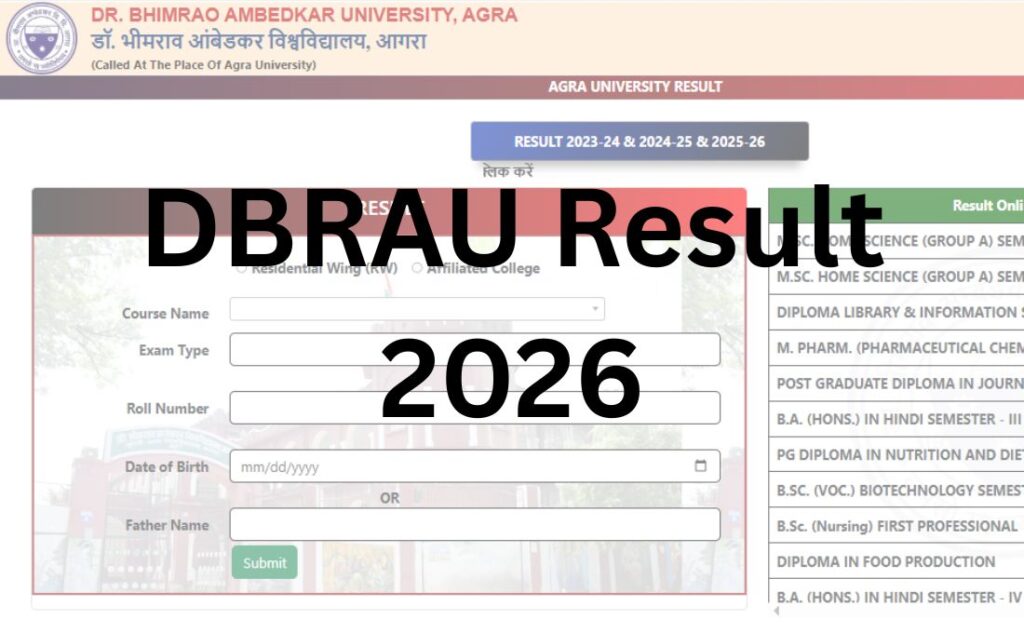
- Choose “Residential Wing (RW)” or “Affiliated College” – this is the first decision point on the form, and picking the wrong one will show no results even if your data is correct. If you study at a college affiliated with DBRAU (not living/studying directly under a university institute), select Affiliated College.
- Select your Course Name from the dropdown.
- Select your Exam Type (regular/annual/semester, as applicable to your course).
- Enter your Roll Number.
- Enter your Date of Birth, OR your Father’s Name – the portal accepts either for verification.
- Submit to view your result.
- Download or print the result page before navigating away.
Residential Wing vs Affiliated College – What’s the Difference
This single dropdown choice trips up a lot of students, so here’s the plain explanation:
- Residential Wing (RW): Refers to students enrolled directly in university-run institutes/departments on DBRAU’s own campuses (Paliwal Park, Khandari, Civil Lines, Chhalesar).
- Affiliated College: Refers to students enrolled in one of DBRAU’s ~200 affiliated colleges spread across the Agra division, which follow DBRAU’s syllabus and examinations but are separately managed institutions.
If you’re unsure which applies to you, check your admission letter or ID card – it will specify your college/institute name. Most students across the Agra division fall under Affiliated College.
Login Credentials Required
| Credential | Where to Find It |
|---|---|
| Roll Number | Admit card, previous marksheet |
| Date of Birth | As per your 10th/12th marksheet |
| Father’s Name (alternate to DOB) | As per your admission form/ID |
| Course Name & Exam Type | Admit card or college examination cell |
Details Mentioned on the DBRAU Result
- Candidate’s Name
- Roll Number
- Father’s/Mother’s Name
- Course, Semester/Year, and Session
- Subject-wise Marks (Theory + Practical/Internal, where applicable)
- Total Marks
- Result Status (Pass/Fail/ATKT)
- Percentage/CGPA
- Division
How to Download Your DBRAU Marksheet?
- Complete the result search as described above.
- Once the result displays, use the browser’s print/save option to generate a PDF.
- Check that your name, roll number, and marks are legible before closing the page.
- Print at least two copies for your records and future submissions.
Passing Marks
Passing criteria vary by faculty, course, and paper type (theory, practical, internal assessment). General patterns across Uttar Pradesh state universities include:
- A minimum percentage required in theory papers individually.
- A separate minimum in practical/internal components where applicable.
- Grace marks, where the university’s regulations permit them, applied automatically for borderline cases.
Exact passing percentages are course- and faculty-specific. Confirm applicable criteria for your programme through your college or DBRAU’s official ordinances, rather than assuming a single university-wide number.
Scrutiny, Revaluation & Rechecking – The DBRAU-Specific Process
DBRAU calls its answer-sheet review process “scrutiny,” and it works a little differently from the straightforward pay-and-apply model used at many other universities:
- Get an RTI Registration Number first. Before applying for scrutiny, students typically need to register on the “Viewing Answer Book under RTI Act, 2005” portal to obtain an RTI Registration Number. This step exists because viewing/rechecking your evaluated answer book falls under Right to Information provisions at DBRAU.
- Apply for Scrutiny. Using that RTI Registration Number, go to the “Apply for Scrutiny” section (linked from the university site) and fill in your details along with the paper(s) you want reviewed.
- Pay the applicable fee. Fees are typically charged per answer book/subject – historically in a modest range, but this changes periodically, so confirm the current fee through the official scrutiny/RTI portal before paying.
- Submit before the deadline, generally within a defined window (commonly around 40 days) after result declaration – verify the exact cutoff in the circular issued with your result, since this can vary by session.
- Wait for the outcome. The university compares original and rechecked marks and updates your record; processing can take several weeks.
Supplementary / Back Paper (ATKT) Result
Students who don’t clear one or more papers are typically marked ATKT (Allowed to Keep Terms) rather than an outright fail in many DBRAU courses, allowing them to proceed to the next semester/year while clearing the backlog subject(s) later. To clear an ATKT:
- Watch for the back-paper/supplementary exam notification on dbrau.ac.in.
- Submit the exam form and fee before the deadline.
- Appear for the specific paper(s).
- Check the result through the same result.agrauniv.online portal once declared.
Name-wise Result
DBRAU’s result portal is built around roll number-based search (with DOB or father’s name as the second identifier), not open name-based lookup. If you don’t have your roll number, contact your college’s examination section, which maintains your enrollment records.
Previous Year Results / Result Archive
Older session results are generally retained on the result portal and can be accessed by selecting the relevant course and session. For results not available online, your college’s examination department can issue duplicate marksheets or provide historical records on request, typically for a fee.
Common Problems While Checking DBRAU Results (and Fixes)
| Problem | Likely Cause | What to Do |
|---|---|---|
| “No record found” | Wrong RW/Affiliated College selection, incorrect course name, or result not yet declared | Re-check your college type; try switching between RW and Affiliated College; confirm declaration status |
| Website slow or unresponsive | High traffic right after declaration | Try during off-peak hours |
| Marks look wrong | Genuine calculation or entry error | Apply for scrutiny through the official RTI-based process, don’t assume it’s a portal glitch |
| Can’t find the scrutiny link | Confusing site navigation across dbrau.ac.in and its sub-portals | Start from dbrau.ac.in → Academics → Result/Examination, and look for “Apply for Scrutiny” or “Viewing A/B under RTI Act” |
| DOB login not working | Mismatch between DOB on record and DOB entered | Try the “Father’s Name” alternate login option instead |
| PDF/print not working | Pop-up blocker | Allow pop-ups for the result portal domain |
What To Do After Your DBRAU Result?
- If you passed: Save and print your marksheet; begin preparing for next-semester admission or, if graduating, for provisional certificate/degree formalities through your college.
- If you have an ATKT/backlog: Track the back-paper exam notification and apply within the window.
- If you believe there’s a marking error: Get your RTI Registration Number and apply for scrutiny within the notified deadline.
- If you’re transferring institutions: Contact your college’s examination cell about migration certificate procedures.
- If you need documents for a job or further study: Most institutions accept the provisional online marksheet initially; keep originals ready for later verification.
Important Links
| Purpose | Link |
|---|---|
| Official University Website | dbrau.ac.in |
| Result Portal | result.agrauniv.online |
| Examination / College Login | exams.agrauniv.online |
| Student Services / One View | ssv.agrauniv.online |
| Admission Portal | dbrauadm.samarth.edu.in |
| Online Helpdesk | helpdesk.agrauniv.online |
| Contact | dbrau.ac.in/contact-us |
DBRAU Result 2026 – FAQs
Q1. What is DBRAU’s full form?
Ans. DBRAU stands for Dr. Bhimrao Ambedkar University, Agra, formerly known as Agra University, established in 1927.
Q2. Where do I check my DBRAU result?
Ans. On result.agrauniv.online, accessed via dbrau.ac.in → Academics → Result. Avoid unofficial or outdated third-party sites.
Q3. Why does the DBRAU result portal have a different domain from dbrau.ac.in?
Ans. DBRAU runs its result, examination, and student services systems on separate domains (agrauniv.online, samarth.edu.in) rather than hosting everything under dbrau.ac.in itself. All of these are linked from the official homepage.
Q4. What is “Residential Wing” vs “Affiliated College” on the result form?
Ans. Residential Wing refers to students enrolled directly in university-run institutes on DBRAU’s own campuses. Affiliated College refers to students at one of DBRAU’s ~200 affiliated colleges across the Agra division. Selecting the wrong one will show no result even with correct details.
Q5. What details do I need to check my DBRAU result?
Ans. Your course name, exam type, roll number, and either your date of birth or father’s name.
Q6. Is DBRAU the same as Agra University?
Ans. Yes – DBRAU was formerly known as Agra University and was renamed Dr. Bhimrao Ambedkar University in 1996.
Q7. How do I apply for DBRAU scrutiny/revaluation?
Ans. You typically need an RTI Registration Number first, obtained through the “Viewing Answer Book under RTI Act” portal, before submitting your scrutiny application and paying the fee.
Q8. Why does DBRAU’s scrutiny process involve the RTI Act?
Ans. Viewing your evaluated answer book at DBRAU is processed through Right to Information provisions, which is why an RTI Registration Number is a prerequisite for scrutiny, unlike a simple direct-application process at some other universities.
Q9. What’s the difference between scrutiny and revaluation at DBRAU?
Ans. DBRAU generally refers to its answer-sheet review process as “scrutiny,” covering checks for calculation, totaling, or transcription errors – it is not intended as a general re-evaluation to improve a score.
Q10. How much does DBRAU scrutiny cost?
Ans. Fees are charged per subject/answer book and have historically been modest, but the exact amount changes periodically – confirm the current fee on the official scrutiny/RTI portal before applying.
Q11. What is ATKT at DBRAU?
Ans. ATKT stands for “Allowed to Keep Terms” – it lets students proceed to the next semester/year while clearing backlog subjects in a later supplementary exam.
Q12. How do I clear a backlog/back paper at DBRAU?
Ans. Watch for the back-paper exam notification on dbrau.ac.in, submit the form and fee before the deadline, appear for the paper, and check your result on the same result portal afterwards.
Q13. Can I check my DBRAU result by name?
Ans. No, the portal requires roll number plus date of birth or father’s name. Contact your college’s examination cell if you’ve lost your roll number.
Q14. What if my DBRAU result shows “no record found”?
Ans. Double-check your Residential Wing/Affiliated College selection and course name first, since a mismatch here is a common cause, before assuming the result isn’t declared.
Q15. How do I download my DBRAU marksheet?
Ans. After your result appears on the portal, use your browser’s print/save-as-PDF option, and confirm your details are legible before closing the tab.
Q16. Are previous year DBRAU results available online?
Ans. Yes, generally accessible on the same result portal by selecting the relevant session; for older records not shown online, your college can issue duplicates.
Q17. What should I do if I fail to clear the deadline for scrutiny?
Ans. Applications submitted after the notified deadline are typically not accepted, so apply as soon as the result and scrutiny circular are published, since windows are usually time-limited.
Q18. Who do I contact if I face technical issues with the DBRAU result portal?
Ans. Use the Online Helpdesk linked from dbrau.ac.in, or contact your college’s examination cell directly for portal-related or data-entry issues.